

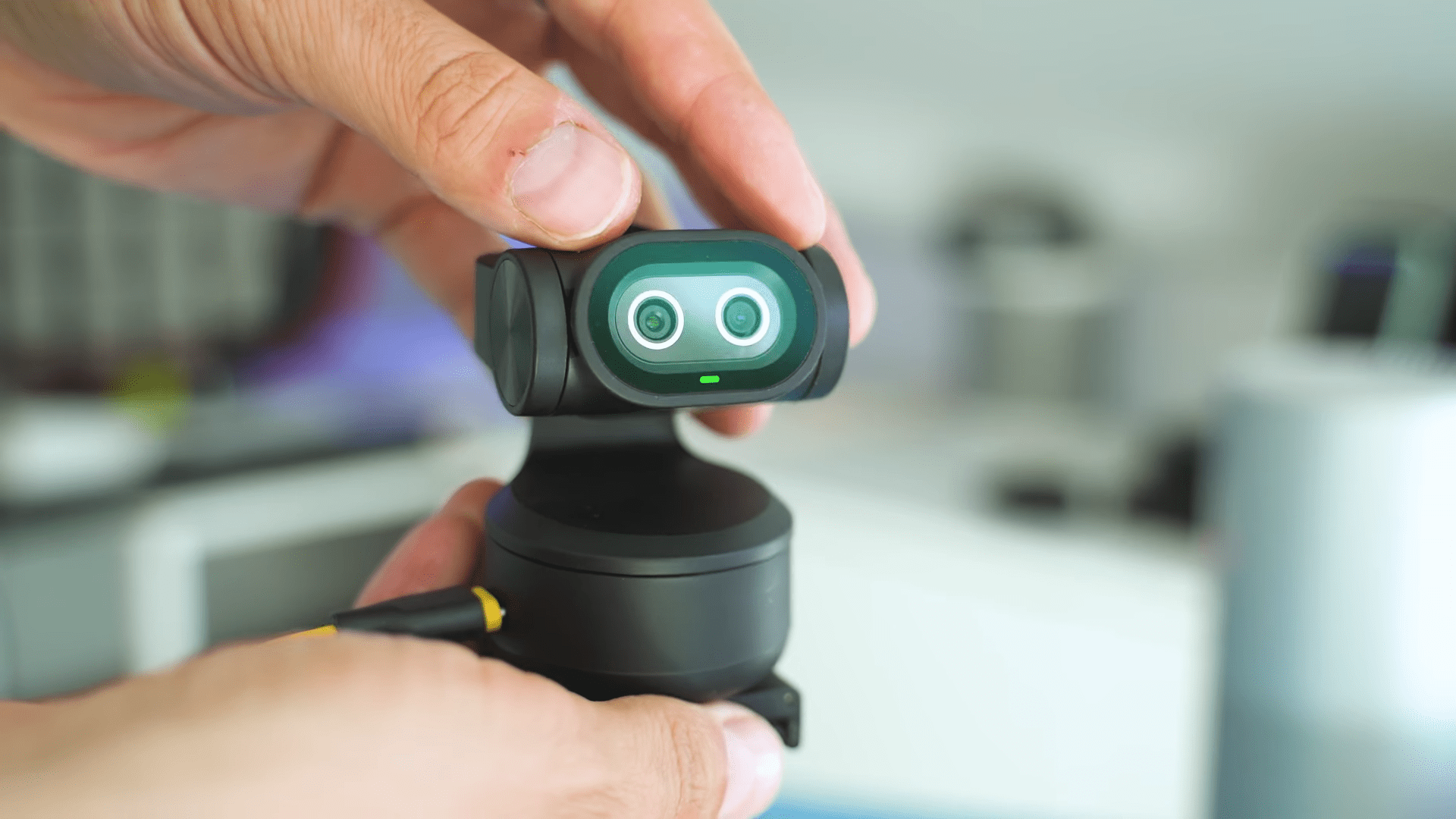
The Emit Pixie enters the market as the world’s first dual-lens AI PTZ web camera aimed squarely at boosting content creation and live streaming setups. This device combines sharp visuals with a unique gimbal-like setup that allows for automatic tracking without the need for bulky equipment. It promises a meaningful upgrade to standard setups by offering a mix of 4K resolution recording and intelligent features designed to keep the subject perfectly framed.
I found that this camera balances premium features with what is described as a very tempting price point for the technology provided. It sits in a competitive space but distinguishes itself through its specific combination of hardware and software capabilities. The following analysis breaks down the real-life footage, autofocusing systems, and audio quality to determine if this “camera with benefits” truly delivers on its promises.

Compact Design, Physical Connectivity
The Pixie immediately impresses with a premium vibe and a compact form factor right out of the box. Its elegant finish and dual-lens front give it a distinct appearance that resembles a friendly robot. The device feels feather-light, making it easy to mount, and it hides significant power beneath its small shell.
Practicality remains a core focus of the physical design. You will find a USB-C port located on the back for connectivity and a standard tripod thread on the bottom for versatile mounting options. Three noise-canceling microphones sit on the top to capture audio directly from the source.

Privacy is handled through a simple physical adjustment rather than a software toggle. You simply tilt the camera lens down to disable the video feed entirely.
Dual Lens Video Performance and Low Light Sensor Capabilities
Video quality is the primary metric for any webcam, and the Pixie shoots at 4K at 30 frames per second and 1080p at 60 frames per second. This performance puts it well ahead of many competitors in this segment, especially those with PTZ functions. The main camera utilizes a 1/2.55-inch Sony image sensor that delivers solid detail and natural colors.
Dynamic range proves excellent even when facing strong backlighting conditions. An AI-assisted secondary camera works in tandem with the main sensor to recognize facial contours and optimize exposure specifically for your face. This ensures you do not look like a glowing ghost or a shadowy figure regardless of the lighting environment.

Low light performance is surprisingly clean because the model does not rely solely on brute sensor size. The AI manages shadows and reduces noise to keep details in check. While it may not challenge a full-frame mirrorless camera, it ranks among the best-performing webcams I have seen for a webcam in this category.
Autofocus Speed, AI Tracking, and Gesture Control Responsiveness
The dual-lens system unlocks a feature called “Imm Blink Focus,” which is an incredibly fast 0.2-second autofocus system. I found this system pleasantly good at maintaining clarity even when I moved quickly or when lighting conditions shifted. It provides a distinct advantage for creators who are active during their streams or presentations.
Intelligent auto-tracking serves as the most entertaining aspect of this device. The Pixie follows you as you move around during a call or live show, keeping you center-framed with high precision. The movement is smooth, avoiding the jerky jumps or focus hunting often seen in lesser PTZ cameras.
Control over this tracking feature requires no remotes or physical buttons. You simply raise your palm to toggle the tracking on or off.
Microphone Array Quality and Specialized AI Audio Modes
Audio capture is handled by a three-microphone array designed for clean pickup and echo reduction. The Emit Studio app enhances this hardware with three distinct AI-powered audio modes. I tested these modes alongside the video feed to understand their practical applications.

The “Original” sound mode delivers raw, unfiltered audio which works best in small, soundproof rooms. For noisier environments like cafes, the “Noise Cancelling” mode effectively removes background disturbers, though it does impact voice quality slightly. This trade-off is often necessary when streaming from crowded locations.
A third option called “Live” mode offers a balance between gain and isolation. It successfully filters out light background noises such as air conditioners or fans.
Software Customization and Unique AI Productivity Features
The Emit Studio software acts as the central control hub for the device. Users can adjust image settings, tweak exposure, and even set three PTZ presets for different camera angles. This functionality is essential for streamers who need to switch between scenes quickly.
A surprising inclusion is the built-in access to AI script-writing tools like ChatGPT and Gemini directly within the webcam software. This means the software can actually assist you in writing your next video script. Additional modes include a whiteboard mode for educators and a portrait mode for vertical content creation.

Compatibility is super universal across major platforms. The device is plug-and-play for Windows and macOS without requiring drivers unless you want the extra software controls. It works seamlessly with Zoom, Teams, OBS, and Twitch.
Identified Hardware Limitations and Connectivity Shortcomings
Despite the strong feature set, there are areas where the device could be better. The absence of a physical mute button is a notable omission for a device focused on conferencing and streaming. Additionally, the camera lacks support for external microphones, forcing users to rely on the internal array or a separate computer interface.
Some users might find the connectivity protocol slightly dated. The connection is USB 2.0 rather than USB 3.0, which is a technical detail worth noting for bandwidth enthusiasts. Furthermore, some advanced features are only accessible through the proprietary software.
Another limitation is the lack of zoom capabilities when shooting in full 4K resolution. While understandable given the sensor constraints, it limits framing options at the highest quality setting. These issues are relatively minor but important to consider before purchasing.
Final Thoughts — Price & Value
The Emit Pixie stands out as one of the most capable and stable web cameras I have tested to date. It delivers excellent 4K video quality in both daytime and low-light environments, ensuring your content looks professional regardless of the time of day. The super-responsive AI tracking and the autofocus system operate with a level of precision that enhances the user experience significantly.

Value is a key factor here, as the device is offered at a very tempting price point considering the technology packed inside. The combination of dual-lens hardware and smart software features makes it a robust package for creators. It successfully bridges the gap between standard webcams and more expensive camera setups.
Upgrading to this device is definitely a good idea for those seeking better performance and automation. The features provided offer a tangible improvement over standard webcams, particularly for users who move around while recording. It represents a solid investment for anyone serious about improving their video presence.
