

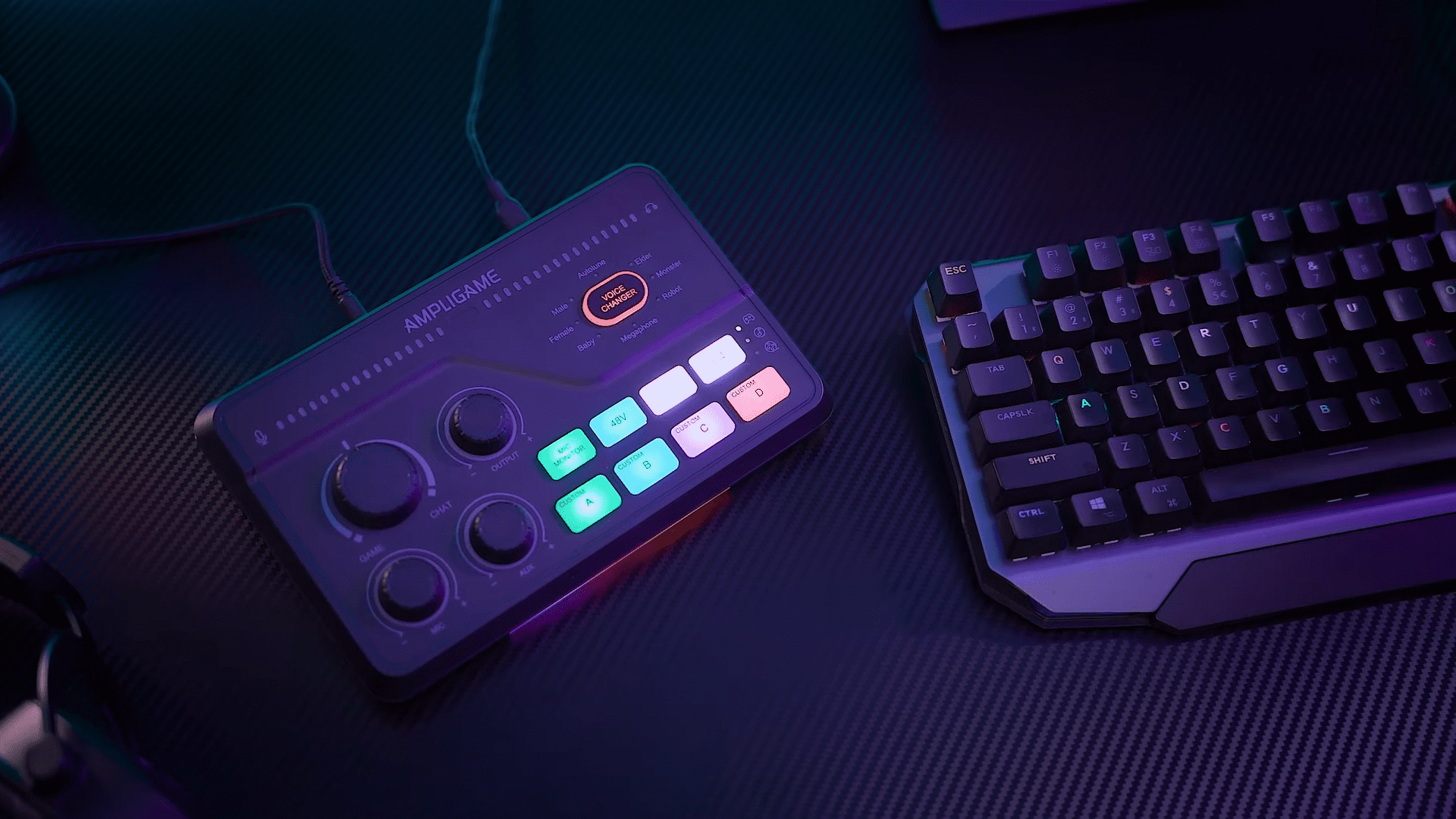
Unlocking professional-grade audio for your setup doesn’t always require a massive investment, but finding the right balance between price and performance remains a challenge for many creators. The Fifine SC8 USB audio mixer arrives as a potential solution designed to bridge the gap between entry-level gear and high-end studio equipment.
Driving power-hungry dynamic microphones is usually the downfall of budget interfaces, so I decided to test the SC8 using the legendary Shure SM7B. This microphone is notorious for requiring significant gain, often necessitating expensive inline preamps. Throughout my time with this mixer, I analyzed its ability to handle such demanding hardware, explored its unique physical design, and tested its suite of onboard effects.
Design Ergonomics and Build Aesthetics
A mixer’s physical design dictates how comfortably it fits into your daily workflow, and the Fifine SC8 immediately distinguishes itself with a thoughtful form factor. Rather than sitting flat against the desk surface like many standard audio interfaces, this unit features a pronounced, slanted profile. This inclined elevation ensures that every knob, fader, and button faces directly toward the user, making adjustments effortless during intense gaming sessions or live recordings.

The unit features lighting along the bottom base, creating an under-glow effect that adds depth to its presence on a desk. Additionally, the front panel controls are illuminated, allowing for customization. You can cycle through various effects, such as a breathing mode or solid colors, or simply turn them off if you prefer a more understated look.
The layout of the top panel is equally logical, separating input monitoring from output control. You have clear visual indicators for microphone activity and headset levels. The spacing between the knobs and buttons is sufficient to prevent accidental presses, which is a critical detail when managing audio live.
Connectivity Options for Multi-Platform Streaming
Versatility is the core strength of the SC8, evidenced by the extensive array of ports located on the back panel. For PC users, the connection is straightforward via the OTG/PC USB cable, which handles both power and data transmission.

Console gamers, specifically those on PlayStation 4 and PlayStation 5, benefit from dedicated integration. A physical switch on the rear allows you to toggle between PC and PS4 modes. Furthermore, the inclusion of an optical input is a significant advantage for console setups. By routing the optical cable from your console directly into the mixer, you can capture pristine digital audio, ensuring that your game sound is processed with the same fidelity as your voice.
Xbox users face a different scenario due to the console’s USB restrictions, but the SC8 provides a functional workaround. While you cannot connect via USB, you can utilize the 3.5mm aux cable to connect the mixer directly to the Xbox controller. This method enables the use of an XLR microphone on Xbox, granting access to the mixer’s physical controls and audio quality improvements. Beyond gaming, the “Aux In” port allows for the connection of smartphones or tablets, enabling you to pipe in external audio sources like music or soundboards directly into your stream mix.

Preamp Performance and Microphone Compatibility
The most critical test for any audio interface is its ability to provide clean, sufficient gain, particularly for dynamic microphones. I paired the SC8 with a Shure SM7B, a microphone famous for its low output and high gain requirements. Many interfaces in the budget to mid-range category struggle to lift the SM7B’s signal to a usable level without introducing excessive hiss or requiring a separate “Cloudlifter” device. To my surprise, the SC8 powered the SM7B effectively, providing ample volume without maxing out the gain knob.
I found that the preamp offers approximately +60 dB of gain, which is a substantial amount of headroom for a device in this class. During my recording sessions, I did not even need to turn the mic gain to 100% to achieve a broadcast-ready level. This performance puts the SC8 on par with audio interfaces that cost significantly more—often in the $600 to $1,000 range. Having room to spare on the gain dial means you can speak quietly or back away from the mic slightly without losing signal clarity.

Noise performance is equally impressive. High gain often introduces a high noise floor or static hiss, but the SC8 remained remarkably quiet during operation. The clean signal path ensures that your voice remains the focal point, rather than the electronic hum of the equipment. For users with condenser microphones, the rear panel includes a switch to toggle between dynamic and condenser modes, engaging the necessary +48V phantom power to drive studio condensers.
Game and Chat Audio Balancing Features
Managing the balance between game audio and voice chat is a frequent headache for streamers, often requiring complex software routing. The SC8 simplifies this hardware-side by presenting itself as two distinct audio devices within Windows: a “Game” input and a “Chat” input. This separation allows for granular control over your audio sources directly from the mixer’s top panel using the dedicated Game/Chat balance knob.

In a practical scenario, you would set your main game, such as Fortnite, to output to the “Game” channel in your audio settings. Simultaneously, you would configure your communication software, whether it be Discord or the Xbox app, to output to the “Chat” channel. Once configured, rotating the knob allows you to physically fade between the two sources. Turning it one way prioritizes the game audio while lowering your teammates, and vice versa. This feature provides instant control without needing to Alt-Tab out of your game to adjust software sliders.
Real-Time Audio Processing and Voice Effects
Content creation often involves entertainment value beyond just high-quality voiceover, and the SC8 includes a suite of real-time voice changing effects. Navigating through these options, I tested the “Monster,” “Baby,” “Female,” and “Male” presets, alongside an “Autotune” function. The “Megaphone” effect stood out as my personal favorite, providing a distinct, radio-like distortion that works well for comedic effect or specific streaming segments. The “Baby” filter was a close second in terms of usability.

Not all effects are created equal, however. The “Female” voice changer felt the least convincing during my tests, failing to produce a natural-sounding result. The Autotune feature functions, though it may struggle to keep up depending on the complexity of the vocal input. You can engage an effect for a quick joke and immediately return to your natural voice by holding down the button to reset to default.
Beyond voice transformation, the unit includes four custom pad buttons designed for audio sampling. These pads allow you to record and save short audio clips, such as sound effects, catchphrases (“Who’s your daddy now?”), or even intro music. Once recorded, these clips can be triggered instantly during a broadcast. This sampler functionality eliminates the need for external stream deck software for basic audio drops, keeping your production capability contained within a single hardware unit.
Sound and Virtual Surround Capabilities
For gamers who rely on positional audio, the SC8 includes a dedicated button for 7.1 Virtual Surround Sound. Enabling this feature significantly alters the audio profile, widening the soundstage to create a more immersive listening experience. During gameplay, this expanded field can help in pinpointing the direction of footsteps or environmental cues. I also tested this with music, and the effect successfully “opens up” the track, giving it a more spacious feel compared to the standard stereo output.
EQ customization is available through three preset modes: Gaming, Music, and Movie. Toggling through these options changes the frequency response to suit the content you are consuming. In my listening tests, I found the “Movie” EQ setting to be the most enjoyable, providing a richness that complemented both video content and general listening. These presets allow you to tailor the output to your headphones without needing to dive into complex software equalizers.

A crucial tip for Windows users is to ensure that “Audio Enhancements” are turned off in your Windows sound settings for this device. Leaving this setting on can negatively color the audio and interfere with the mixer’s raw performance. Disabling it immediately improved the clarity of the microphone input and the fidelity of the audio coming from the PC.
Final Thoughts — Price & Value
The Fifine SC8 stands out as a competent and surprisingly powerful audio mixer, particularly for creators who need to drive professional-grade gear on a budget. Its ability to power the Shure SM7B without a cloudlifter or maxed-out gain is a testament to its preamp quality, a feat that many competitors in this price bracket fail to achieve. It delivers a clean, quiet signal while providing a physical interface that is intuitive and accessible, avoiding the confusion that often plagues overly complex gaming mixers.

Certain compromises are present, which is expected given the accessible nature of the device. The absence of a loopback feature means you cannot easily route your PC audio back into your recording for specific podcasting workflows, and the lack of audio ducking means the music won’t automatically lower when you speak. Additionally, the preference for knobs over faders is a subjective matter; coming from a voiceover background, I generally prefer sliders for volume control, but the dials here are functional and smooth.
The SC8 offers exceptional value for streamers and gamers looking for a centralized audio hub. It successfully combines essential features like XLR support, phantom power, and game/chat balancing into a compact, aesthetically pleasing package. For anyone looking to upgrade from a USB microphone to an XLR setup without spending a fortune on an interface and a preamp, this mixer provides a robust foundation for high-quality audio production.
