

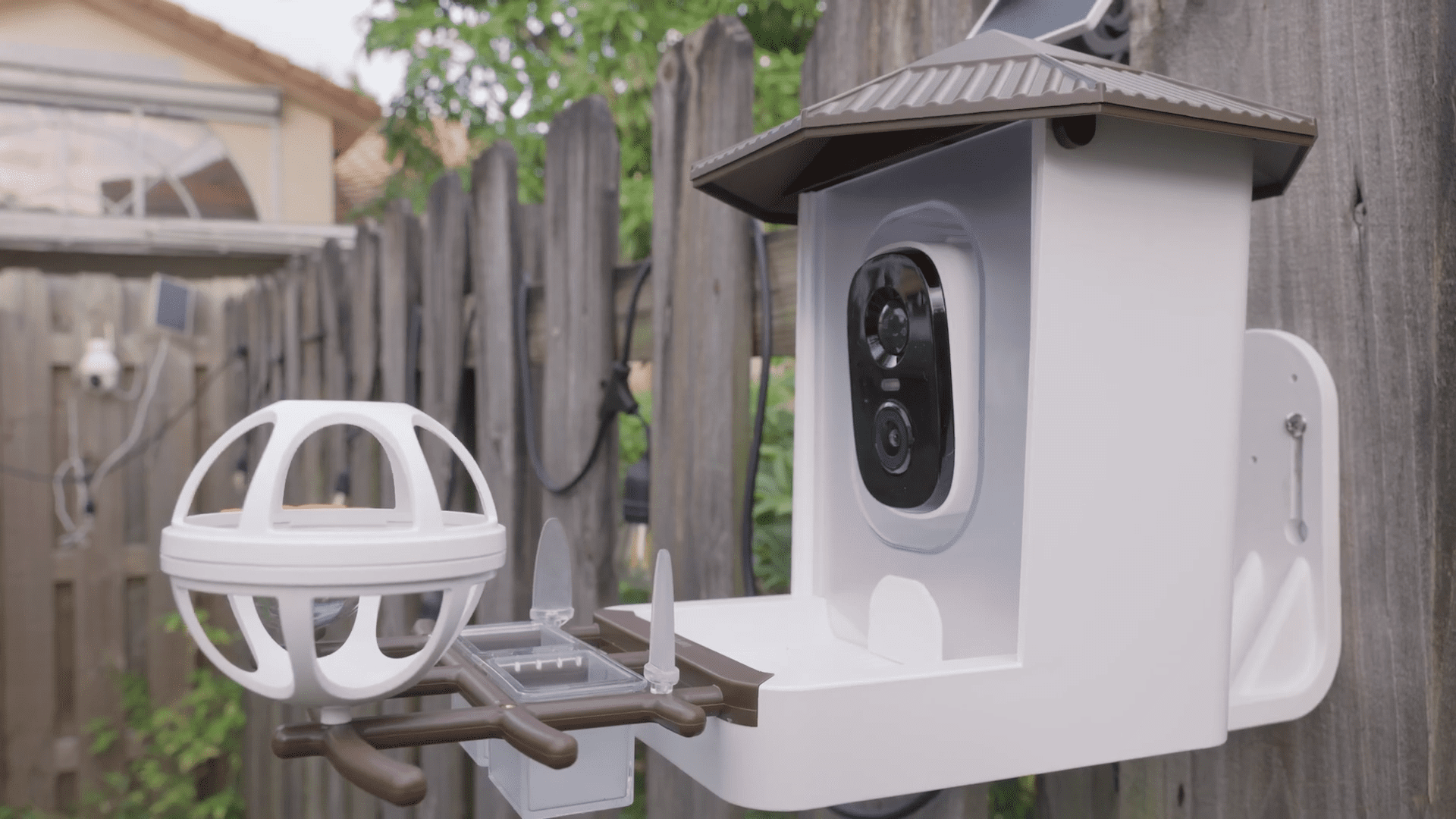
Backyard birdwatching has officially entered the smart home era. I recently had the chance to test out the Wansview F1, a device that promises to turn your garden into a 24/7 nature documentary. It isn’t just a plastic container for seeds; it is a fully equipped smart device powered by a solar panel and artificial intelligence designed to identify the specific species visiting your yard.
Here is a deep dive into my experience with the F1, from unboxing to catching my first Cardinal on camera.

What’s in the Box?
Wansview packs a lot into this kit. Cracking open the box reveals that this is a modular system. You get the main bird feeder unit with the camera embedded, a roof to protect the feed (and the lens), and a mounting bracket.
The accessories are where it gets interesting. It comes with specialized attachments to attract different types of birds: a suet ball holder, a honey/nectar feeder, a jelly box, and spikes for fruit. They also include a solar panel with a long cable, which is essential for keeping this thing running wireless.

Assembly and Setup
Putting the physical unit together is straightforward. The bird perch screws directly onto the base with the provided short screws. You can then attach the various feeding accessories—like the fruit forks or the suet ball cage—depending on what kind of birds you are trying to attract in your area.

Before taking everything outside, I highly recommend handling the digital setup indoors. The device offers three connection methods: QR code scanning, Soft AP, or Bluetooth. Bluetooth is easily the most convenient route.
One critical technical note here: the Wansview F1 only connects to 2.4GHz Wi-Fi networks. This is standard for outdoor smart home gear because 2.4GHz offers better range and penetration through exterior walls than 5GHz. Once you power it on and pair it via the Wansview app, you should see a live feed immediately.

Installation and Power
Mounting the unit requires a drill and a bit of patience. You screw the bracket into a fence or wall, then slide the feeder body onto it. The solar panel is the real hero of this setup. You mount it separately, ideally in a spot that gets maximum sunlight, and plug it into the USB-C port on the back of the feeder.
This solar capability means you don’t have to worry about taking the unit down to charge it. It stays topped up automatically. Just fill the hopper with bird seed, open the little dispensing door at the bottom, and you are in business.

Video Quality and Performance
The camera boasts 2K video resolution with a 3-megapixel sensor. In my testing, the image quality was crisp. Because the birds are quite literally inches away from the lens, the level of detail is fantastic. You can see the texture of the feathers and the glint in their eyes.
In the app, you can toggle between “2K” and “Standard Definition” (SD). Unless your Wi-Fi signal is extremely weak at the installation site, keep it on 2K. The bandwidth usage is manageable, and the visual difference is significant.

The “Smart” Features
This device does more than just record video; it listens and interacts.
Two-Way Audio: The built-in microphone picks up ambient sounds surprisingly well. You can hear the birds chirping clearly. There is also a speaker, which allows you to talk through the camera. I tested this by saying “Testing 1, 2, 3” into my phone, and it broadcasted loudly from the feeder. This is a fun feature, but it also serves a practical purpose: scaring off squirrels.
The Siren: Speaking of unwanted guests, the app includes a siren function. You can set it to trigger automatically upon motion detection or fire it manually if you see a squirrel stealing the goods.
Night Vision: As the sun goes down, the F1 has you covered. It features infrared LEDs for black-and-white night vision, but it also has a built-in spotlight. If the light triggers, you get full-color night vision, ensuring you don’t miss any nocturnal visitors.

AI and Cloud Storage
The big selling point here is the AI bird recognition. The camera captures “events” when motion is detected. If you subscribe to the AI plan, the software analyzes the footage and identifies the bird species.
In my “Bird Album” within the app, it successfully identified a Northern Mockingbird, a Blue Jay, and a Northern Cardinal. It gives you a nice catalog of everything that has visited your yard.
Regarding storage, you have two choices. You can insert a TF (microSD) card into the slot on the device for local recording. This is great if you want to avoid monthly fees. Alternatively, Wansview offers cloud storage plans. They usually have a few tiers, including a specific “Bird Plan” for the AI features and a “General Plan” for standard security recording.
Smart Home Integration
For those of us with smart displays, the F1 plays nice with the ecosystem. I connected it to Alexa, and by simply saying, “Alexa, open backyard camera,” the live feed popped up on my smart screen. It’s a great way to keep an eye on the feeder while you are working or cooking without needing to open your phone.

Final Thoughts
The Wansview F1 takes a traditional hobby and injects it with modern convenience. The image quality is solid, the solar power removes the battery anxiety, and the AI identification adds an educational layer that makes checking your notifications actually exciting. If you want to see exactly who is visiting your backyard, this tech delivers.
