

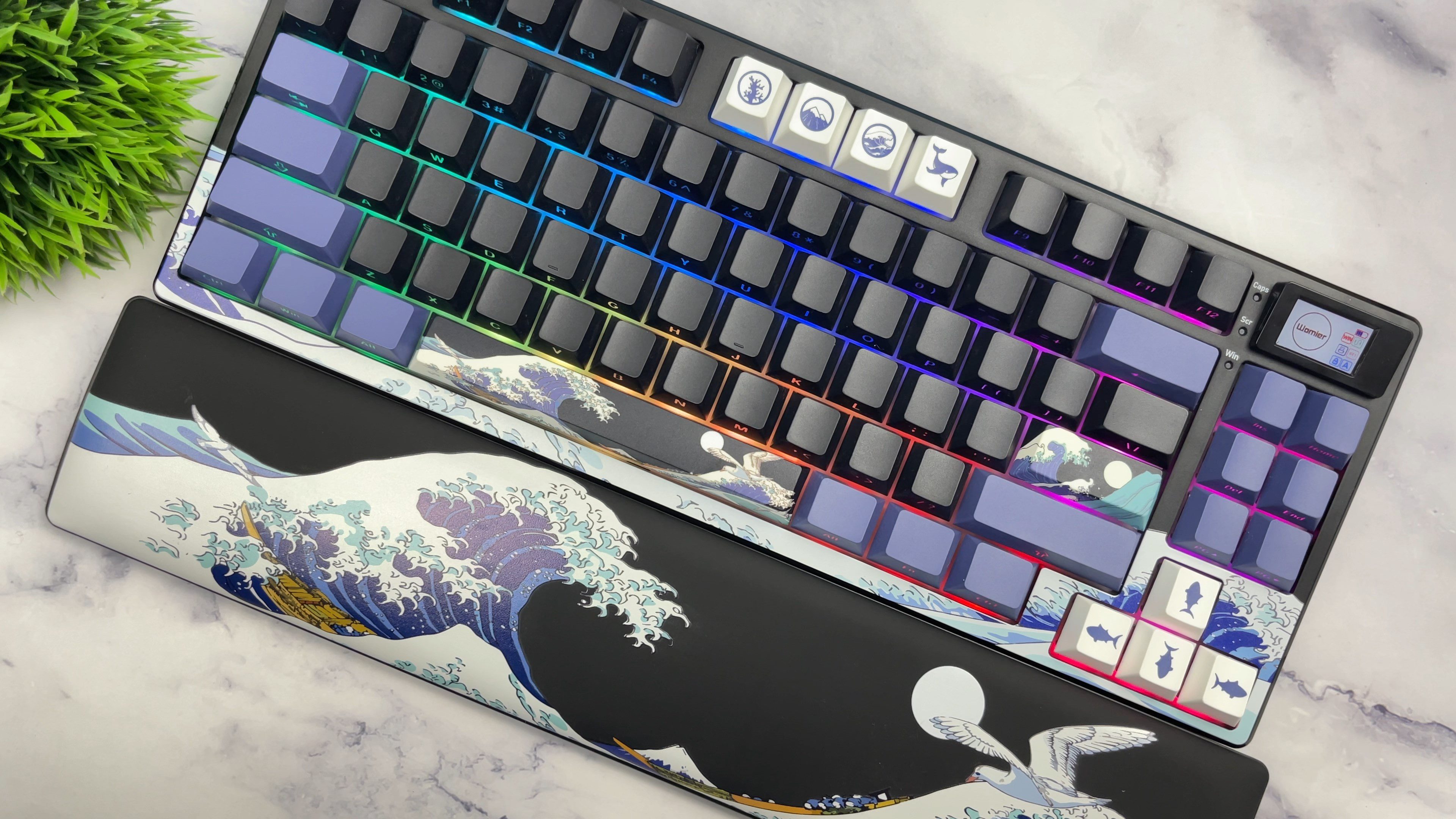
The mechanical keyboard market is incredibly saturated right now, making it difficult for any single board to truly stand out. I recently spent some time testing the Womier SK80 Pro, a compact 75% keyboard that attempts to differentiate itself through a bold visual design and a comprehensive feature set. This board moves away from the standard minimalist look, offering a heavily themed aesthetic right out of the box.
Most keyboards in the budget segment require you to purchase additional accessories to complete your setup. Womier has taken a different approach here, as the SK80 Pro arrives as a complete bundle. It includes matching accessories that fit the specific theme of the board. You can typically find it for around $70 to $80 on Amazon, positioning it aggressively against other budget-friendly options.
Build Quality and Design
The Kanagawa theme heavily dictates the look of this specific SK80 Pro model, paying homage to the famous Great Wave artwork. The chassis uses ABS plastic, but it avoids feeling cheap due to the internal weight and the gasket-mounted structure. Womier incorporated the theme deeply into the physical build. The bottom of the case features a textured, 3D-molded wave design rather than a simple flat plastic plate.

The keycaps utilize a double-shot process with front-facing shine-through characters, ensuring the legends will not fade over time. The novelty keys are dye-sublimated, replacing the standard arrow keys with sharks and highlighting the escape and enter keys with traditional Japanese art elements like Mount Fuji and ocean waves. The typing angle is comfortable directly out of the box, though Womier included adjustable flip stands on the back for users who prefer a steeper incline.
Display and Lighting
The top right corner houses a dedicated TFT display. Womier designed this screen with a slight angle, pointing directly toward the user for better visibility compared to flat screens mounted flush with the case. The display shows standard system information like battery life and connection mode, and you can upload custom GIFs and images using their proprietary software. The screen module is also easily removable. Right next to the screen sit three dedicated LED indicators for caps lock, scroll lock, and the Windows key lock.

The board utilizes south-facing LEDs. This orientation prevents interference with Cherry-profile keycaps and provides a bright, uniform underglow. Womier paired this with LED diffusers built directly into the switches, which helps distribute the light evenly across the polycarbonate plate instead of creating harsh hot spots.
Switch Mechanics and Acoustic Profile
Typing relies on Womier’s custom POM linear switches. These feature an actuation force of 42 grams, a total travel distance of 3.8 millimeters, and a 20-millimeter stainless steel spring. The factory lubrication on both the switches and the stabilizers is highly consistent, effectively eliminating the harsh pinging and wire rattle common in budget plastic boards.

The gasket mount implementation absorbs the impact of bottoming out, creating a soft and muted acoustic profile. The PCB supports full hot-swapping for 3-pin and 5-pin switches. You can easily pull the stock POM linears and drop in your preferred tactiles or heavy linears down the line without any soldering.
Connectivity and Battery
Tri-mode connectivity gives you options for wired USB-C, Bluetooth, and the 2.4GHz wireless dongle. Womier placed the USB-C port deep underneath the chassis. You have to flip the keyboard over to plug it in, routing the cable through dedicated channels out the left, right, or center. This design keeps the desk perfectly clean, but plugging the board in is undeniably a hassle compared to a standard rear-facing port.

Powering the wireless operation is a 4,000 milliamp-hour battery. During my testing, the board lasted exactly three days while running the LCD screen and the south-facing RGB lights at maximum brightness. Turning off the screen and lowering the RGB intensity will significantly extend that battery life for standard office use.
Final Thoughts — Price & Value
The Womier SK80 Pro retails for around $70 to $80 on Amazon. The value is highly dependent on how much you appreciate the included accessories and the heavily themed design.
You get a gasket-mounted, hot-swappable keyboard with a functional TFT screen, pre-lubed POM switches, and tri-mode connectivity. Including a matching wrist rest and mouse pad pushes the value higher than a standalone barebones kit at the same price point.
