

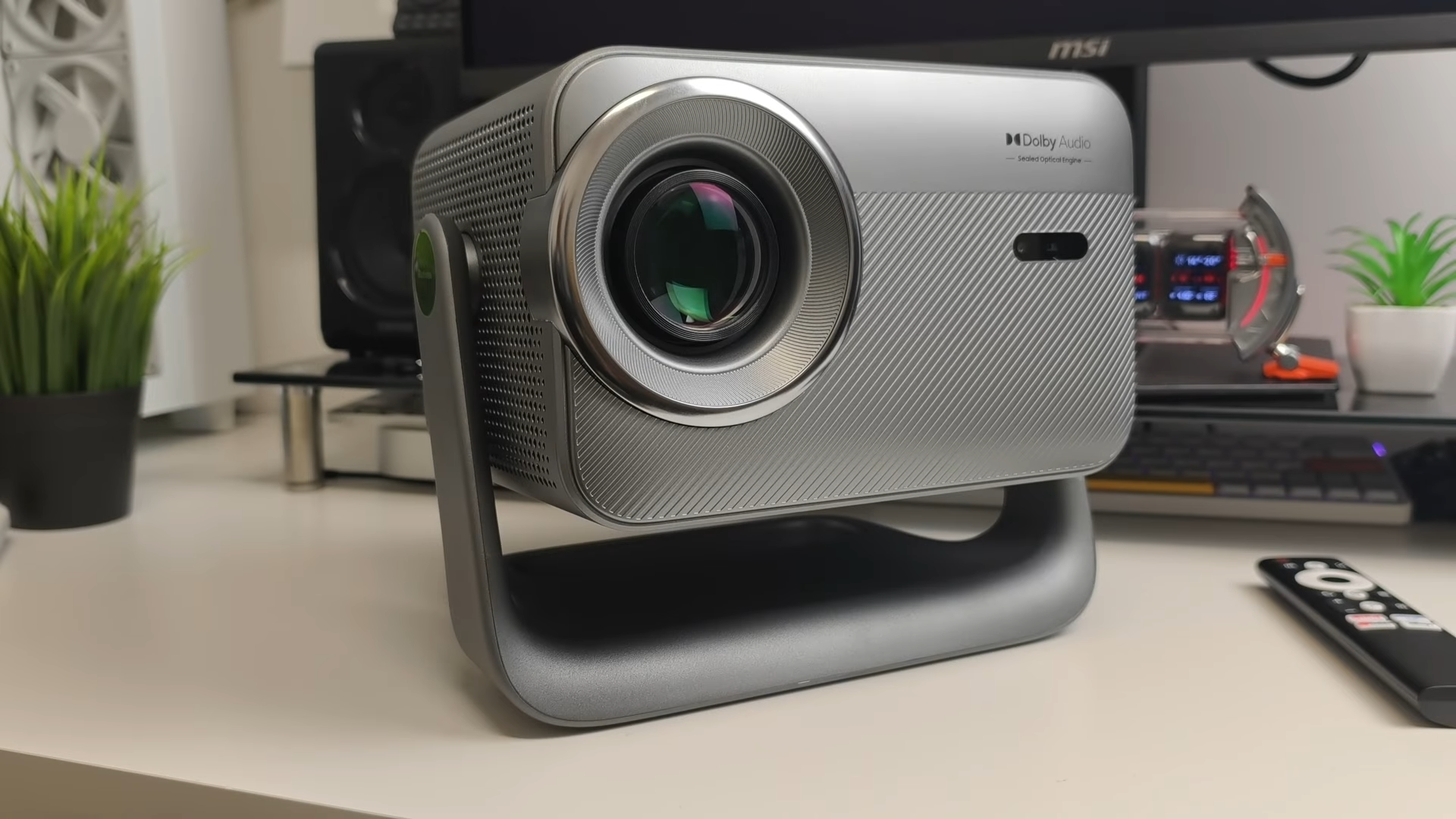
Evaluating home entertainment gear often leads me to search for the perfect balance between ease of use and performance. The Blackview PV1000 Max enters the market as a highly versatile option, aiming to transform standard rooms into functional home cinemas without complex mounting setups. This device offers an entry-level pathway to large-scale projection.
My testing process focuses on how well these specifications translate to everyday living environments. Having put this projector through its paces, I am ready to share my thorough, experienced analysis of what this unit delivers.

Design and the 360-Degree Gimbal
The physical build of this projector feels robust, carrying a weight of 3.5 kilograms that provides stability without sacrificing portability. A standout element of the design is the integrated 360-degree rotating gimbal, which allows for instant adjustments from traditional wall projection to ceiling viewing. This mechanical design eliminates the need for bulky ceiling mounts, allowing me to easily angle the lens upward while lying comfortably in bed.

Looking closer at the hardware, the front houses the projector lens alongside an audio-sealed optical engine. Directly below these optics sit the advanced Time-of-Flight sensors that drive the automatic correction features. The bottom of the gimbal stand houses the power socket, keeping cables tidy, while the rear panel accommodates a physical power button, an HDMI input, two USB ports, and a 3.5 mm audio jack.
Wireless connectivity is equally comprehensive on this unit, ensuring seamless integration with modern home setups. Users can easily connect external media devices or mobile screens via built-in Wi-Fi, Bluetooth, AirPlay 2, DLNA, and Miracast. The package includes a user manual, power cable, and a dedicated Bluetooth remote control that features integrated quick-access buttons for popular streaming services alongside a built-in microphone for voice commands.

The Six-in-One Intelligent Setup System
Setting up a projector usually requires tedious manual adjustments, but the intelligent setup system here manages most of the heavy lifting. The built-in Time-of-Flight sensors execute a six-in-one routine consisting of autofocus, automatic keystone correction, screen alignment, obstacle avoidance, wall color adaptation, and eye protection. During my physical tests, moving the projector prompted an immediate automatic recalibration that successfully refocused the image in seconds.

To test the obstacle avoidance capability, I positioned a photo frame in the path of the projection. The system detected the obstruction within seconds and automatically shifted the screen image to the right to maintain a clear view. Accurate projection from awkward angles is highly achievable because the automatic keystone correction aligns the edges with minimal user intervention.
Wall color adaptation ensures that color accuracy remains stable even when projecting onto surfaces that are not perfectly white. The built-in eye protection dimming feature adds an important layer of safety, especially when pets or children cross in front of the active lens source. This combination of automated tools makes the initial setup process incredibly straightforward for any user.

Display and Image Quality Performance
This model delivers a native 1080p Full HD experience while fully supporting 4K video decoding. Images appear sharp, and the color representation feels vibrant when casting a screen size within the recommended range. I found the sweet spot to be between 100 and 120 inches, though the projector is capable of scaling from 40 inches all the way up to a massive 150 inches.

Brightness plays a critical role in projection, and this LED-driven light source outputs a rated 1,000 ANSI lumens. Under darkened room conditions, movies and sports look crisp, showcasing great contrast and immersive detailing. Ambient light degrades the contrast significantly, meaning a dim or pitch-black room remains necessary to get the best visual performance.
Testing sports content demonstrated how the massive screen scale changes the viewing experience compared to a standard television screen. Fast-moving football matches retain their clarity, and the bright output keeps the green turf looking natural and engaging. This performance highlights the projector’s capability as a dedicated solution for group sports viewing in a darkened environment.

Vidaa OS Integration and Streaming Experience
Software usability can make or break a modern smart projector, and this unit benefits greatly from running official Vidaa OS. This licensed platform provides immediate, native access to top-tier applications like Netflix, YouTube, Prime Video, and Disney Plus. Users do not need to deal with sideloading applications or plug in external media sticks to access their favorite libraries.

Navigating the user interface feels incredibly fluid, with applications launching quickly and menus transitioning smoothly. Because the applications are officially licensed, you can stream content in high definition, including Netflix, which is often restricted to standard definition on unlicensed projectors. The system responds to commands with minimal lag, creating an experience closely matching that of a high-end smart television.
The pre-installed ecosystem functions directly out of the box with zero complex workarounds required. The physical remote control further enhances usability by including physical hotkeys for quick app launches. Finding content is straightforward, making the software interface one of the strongest selling points of this package.

Audio Performance and Dolby Certification
Sound quality is frequently an afterthought in portable projection design, but the inclusion of Dolby Audio certification changes the dynamic here. The built-in speakers deliver surprisingly clear movie dialogues and balanced music playback. Sporting events benefit from a wider soundstage, helping to recreate some of the stadium atmosphere inside a standard room.
Medium-sized spaces like bedrooms, offices, or small living rooms are well-served by the volume output of these internal speakers. Heavy bass is predictably limited due to the physical size of the chassis, but the entire sound profile avoids the tinny distortion common in budget models. Connecting a soundbar or external speakers via the physical 3.5 mm jack or Bluetooth remains an easy option for those wanting a deeper cinema experience.

Gaming with Game Consoles and PS5
Connecting a PlayStation 5 to the HDMI input allows me to analyze the projector’s gaming capabilities. The system successfully decodes a 4K resolution signal at 60 Hz with high dynamic range (HDR) active. Testing at native 1080p similarly caps the output at 60 Hz, which is the maximum refresh rate this hardware supports.
Variable Refresh Rate (VRR) is not supported, meaning competitive gamers might miss some high-end features. Casual gaming, however, feels highly responsive with low input latency during active play. Football matches and action games look incredibly immersive on a massive wall space, making it a fun alternative to a standard gaming monitor.

Final Thoughts — Price & Value
Analyzing the price-to-performance ratio reveals that this projector represents solid value at its £277 price point. The inclusion of an official operating system, licensed streaming applications, and robust automatic alignment tools justifies the investment. Buyers get a streamlined, plug-and-play experience that bypasses the typical headaches of budget projection systems.
Users must remember to manage their expectations regarding ambient light performance and the non-native 4K display. Placing the unit in a dedicated dark room unlocks its full potential, turning any wall or ceiling into an immersive media hub. This device presents a highly compelling option for casual viewers, sports fans, and gamers looking for hassle-free home cinema.
