

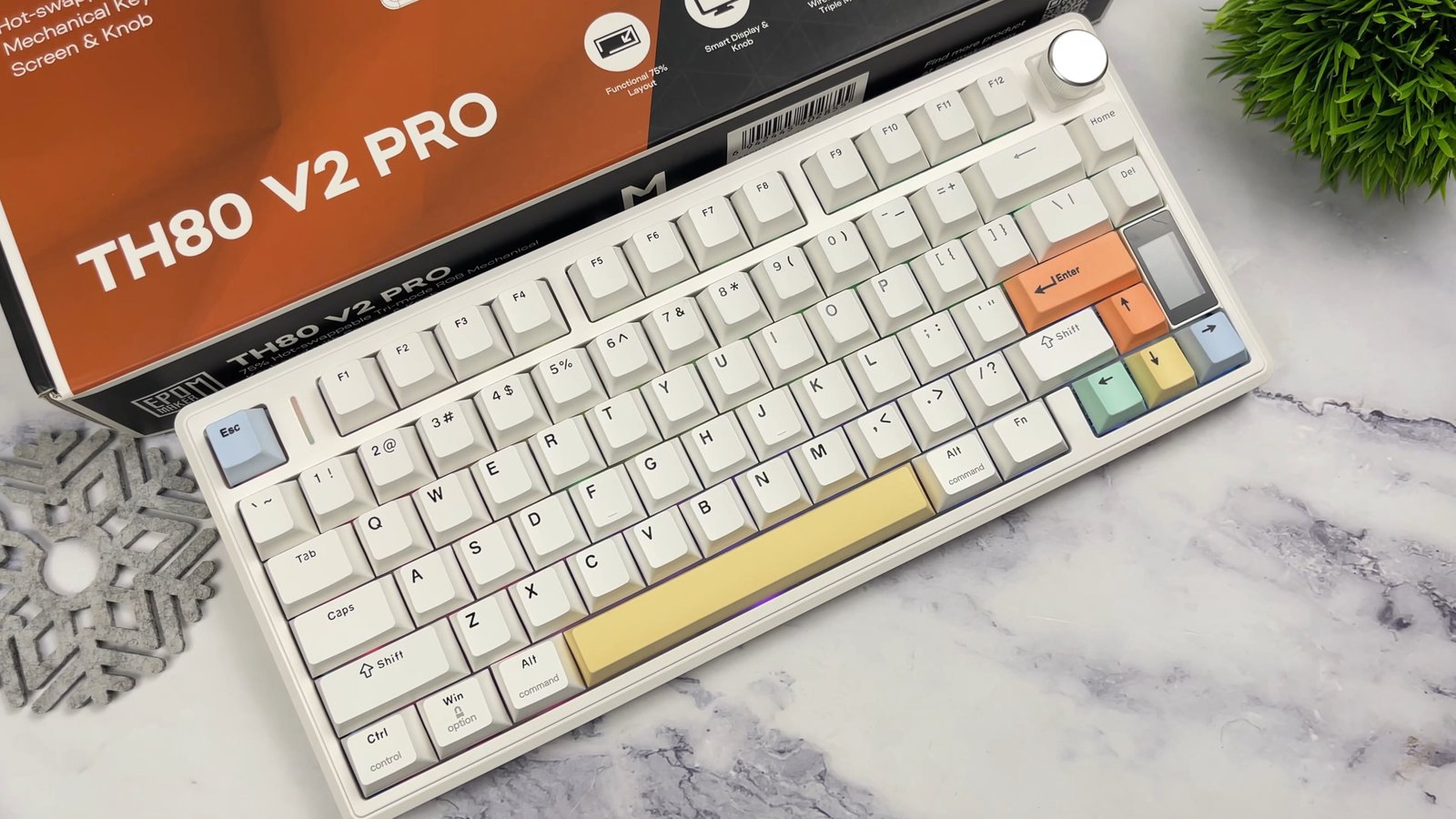
Finding a pre-built mechanical keyboard that packs enthusiast-grade hardware into a sub-$80 price bracket has become rare in today’s crowded peripherals market. The Epomaker TH80 V2 Pro sells between $78 and $80 across major retailers like AliExpress and Amazon, bringing custom keyboard features directly to budget-conscious buyers.
I spent several weeks testing this board across daily typing, office tasks, and late-night gaming sessions to verify if the hardware lives up to its ambitious spec sheet. Epomaker updated its popular 75% platform with a built-in display, acoustic foam layering, and a battery capacity that dwarfs competing wireless boards.
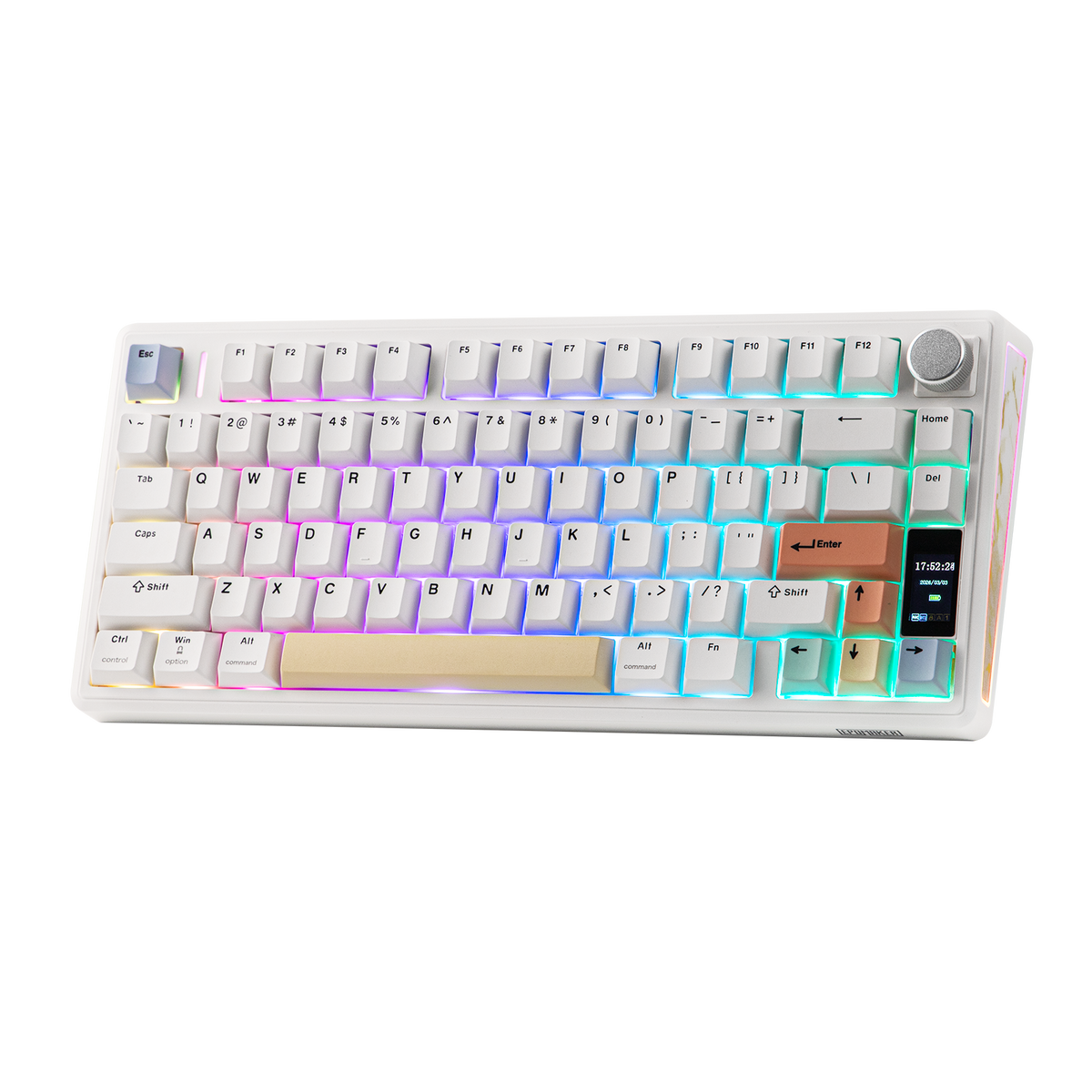
Epomaker TH80 V2 Pro
- Compact 75% 78-key layout
- Gasket-mounted engineering
- Customizable 1.06-inch glass screen & metal knob
- Massive 10000mAh battery.
Quick Navigation (Table of Contents)
- Design, Layout, and Build Quality
- Keycaps and Typing Ergonomics
- Gasket Mount and Five-Layer Dampening
- Sea Salt Silent vs Creamy Jade Switches
- The Multifunction LCD Screen and Removable Knob
- Tri-Mode Connectivity and 10,000 mAh Battery Life
- RGB Illumination and Web-Based Software
- Final Thoughts — Price & Value
Design, Layout, and Build Quality
The keyboard adopts a compact 75% form factor with 78 physical keys, retaining the essential arrow cluster and dedicated function row while eliminating the numeric keypad. This footprint frees up valuable desk territory for broad mouse sweeps while preserving direct shortcuts for productivity workflows. Despite using an ABS plastic chassis rather than CNC aluminum, the board carries a reassuring weight of roughly two pounds, or one kilogram.

Thick rubberized feet line the underbelly, keeping the frame firmly anchored to the desk even during aggressive, fast typing sessions. Epomaker also incorporated dual-stage kickstands on the back, allowing you to choose between flat, medium, or high typing elevations. The chassis finish features a clean matte texture available in white, black, or pink colorways, complemented by decorative side accent plates.

A subtle cutout beneath the rear kickstand securely houses the 2.4 GHz wireless USB dongle so it never gets misplaced during transit. The rear edge features a centered USB-C port, plus hardware toggles for power, connection protocol, and operating system layouts.
Keycaps and Typing Ergonomics
Epomaker equipped this model with thick double-shot PBT keycaps molded in a standard Cherry profile. The legends are crisp, legible, and resistant to fading, while the textured surface naturally repels oily finger residue and dust. Unlike inexpensive ABS caps that develop an unsightly shine after weeks of friction, these keycaps maintain a consistent matte appearance.

The default color configurations combine balanced two-tone alphas with bright accent novelty keys for the escape and enter positions. Because the keys use a standard Cherry profile, the angled rows provide natural hand placement and reduce finger fatigue across extended typing sessions. The switches and stems mate snugly without undesirable keycap wobble or misaligned rows.
One mechanical consideration is the elevated front lip of the casing, which sits relatively tall against the desk surface. I found that pairing the keyboard with a separate wrist rest provided the best ergonomic support, especially when utilizing the extended rear kickstands.

Gasket Mount and Five-Layer Dampening
Beneath the switches, the internal engineering relies on a true gasket-mounted design rather than a stiff tray-mount system. This architecture cushions each bottom-out impact, providing a noticeably soft, flexible sensation that absorbs harsh typing vibrations. Typing for hours on this board feels remarkably smooth on the fingertips thanks to that sustained mechanical rebound.
Acoustic tuning inside the chassis is handled by five distinct sound-dampening layers, including Poron plate foam, silicone pads, and an IXPE switch sheet. This dense internal stack eliminates hollow case ping, echoing, and rattle without requiring any manual aftermarket modifications. The resulting auditory profile delivers a clean, muted thud straight out of the factory box.

The stabilizers around the spacebar, enter key, and backspace come pre-lubricated to prevent wire rattle and inconsistent travel. Every wide stabilizer key depresses cleanly with balanced resistance across the entire cap surface.
Sea Salt Silent vs Creamy Jade Switches
My review unit arrived configured with Epomaker Sea Salt Silent V2 linear switches, though buyers can also choose the Creamy Jade switches. The Sea Salt Silent switches feature internal silicone silencing pads that mute the upward and downward impact noises. They produce a discreet, muffled sound profile that makes this keyboard ideal for shared offices, late-night typing, and live microphone environments.

The keystroke travel feels buttery smooth with minimal friction, delivering consistent actuation through the entire stroke. While silent switches naturally exhibit a slightly dampened, cushioned bottom-out feeling, the tactile feedback remains distinct and communicative. You get all the mechanical responsiveness you need without generating sharp clatter that disturbs nearby colleagues or family members.

If you prioritize an audible, deep acoustic thock, the Creamy Jade switch variant serves that preference much better. The PCB features universal 3-pin and 5-pin hot-swappable sockets, allowing you to exchange switches effortlessly using the included dual-purpose metal puller tool. Swapping in different mechanical switches requires no soldering, giving the board immense long-term versatility.
The Multifunction LCD Screen and Removable Knob
Positioned at the upper right corner sits a bright mini LCD screen that provides immediate hardware feedback at a quick glance. By default, the display conveys essential status metrics, including remaining battery life, current connection protocol, date, and local time. You can also upload custom static images or animated GIFs through the companion driver to personalize your desk aesthetic.

Adjacent to the screen is a metal rotary knob that offers tactile, ratcheted scrolling for instant system volume adjustments. Holding down the function key and pressing the knob toggles its operation into screen navigation mode, enabling on-the-fly backlight and menu modifications. Epomaker engineered this knob with a textured metal finish that feels dense and satisfying during rotation.

A clever hidden feature of this rotary assembly is its hot-swappable socket design. Epomaker includes an extra mechanical switch and a matching Insert keycap inside the packaging, allowing you to pull out the rotary knob entirely. You can convert that physical corner into a regular functional key within seconds if you prefer a traditional key cluster over a dial.

Tri-Mode Connectivity and 10,000 mAh Battery Life
The keyboard supports tri-mode versatility, letting you switch between low-latency 2.4 GHz wireless, multi-device Bluetooth, and standard USB-C wired connections. The 2.4 GHz wireless connection delivers seamless, imperceptible input latency that feels identical to a wired cable during daily office workflows and fast typing drills. Bluetooth mode pairs with up to three distinct devices, though it adds minor latency best reserved for spreadsheets or browsing rather than high-stakes gaming.

A massive 10,000 mAh internal rechargeable battery powers the wireless hardware. This capacity represents roughly double or triple what standard wireless mechanical keyboards provide in this price category. Epomaker rates the operational endurance up to 200 hours, and my testing confirmed that the battery percentage dropped by only a fraction after weeks of daily operation.
Leaving the per-key backlighting running does not drain the cell within a single afternoon, solving the primary drawback of budget wireless RGB keyboards. Fast charging over the central USB-C port brought my unit from thirty percent back to full capacity in under twenty minutes.

RGB Illumination and Web-Based Software
Backlighting is powered by south-facing LEDs that illuminate the keycap legends and plate area without interfering with Cherry profile keycaps. Epomaker also installed dual diffused RGB light strips along the side profiles of the chassis, casting an ambient glow onto your desk mat. You can cycle through built-in lighting patterns, speeds, and static colors using direct hardware key combinations on the function row.
Configuration settings are managed through Epomaker’s online web driver rather than bloated local desktop software. You simply launch the driver interface directly inside a Chromium browser to adjust key assignments, record macros, and tweak lighting zones. Uploading custom animated GIFs to the small LCD screen requires connecting the keyboard via the provided braided USB-C cable.

Finding the correct web link and firmware updates on Epomaker’s support pages can feel slightly disjointed due to brief documentation. Once established in the browser, the interface executes adjustments cleanly and writes your custom keymaps directly to internal onboard memory.
Final Thoughts — Price & Value
The Epomaker TH80 V2 Pro establishes a formidable benchmark for what manufacturers can package into a sub-$80 wireless keyboard. Delivering a 10,000 mAh battery, a hot-swappable rotary knob, a customizable TFT screen, and five layers of acoustic dampening creates undeniable value. The out-of-the-box acoustic performance rivals custom-built enthusiast boards that require hours of hand modifications.

Certain hardware trade-offs remain apparent, such as the lightweight ABS plastic case and the high front lip profile. Gamers demanding elite esports latency should also rely on the wired or 2.4 GHz modes rather than Bluetooth. These practical concessions remain entirely reasonable given the budget-friendly pricing structure.
I consider this keyboard an outstanding investment for students, programmers, and office professionals seeking an effortless typing upgrade. The Sea Salt Silent switch option provides exceptional stealth performance without sacrificing tactile satisfaction. Epomaker delivered a remarkably complete package that justifies every cent of its retail price tag.
Related Mechanical & Gaming Keyboard Reviews
If you are exploring other switches, layouts, or magnetic rapid-trigger options, check out our hands-on tests of the Epomaker TH65 65% mechanical keyboard and the Akko AIR 01 low-profile metal keyboard. You can also view our full collection of tested typing gear in the Mechanical Keyboards Hub.
