

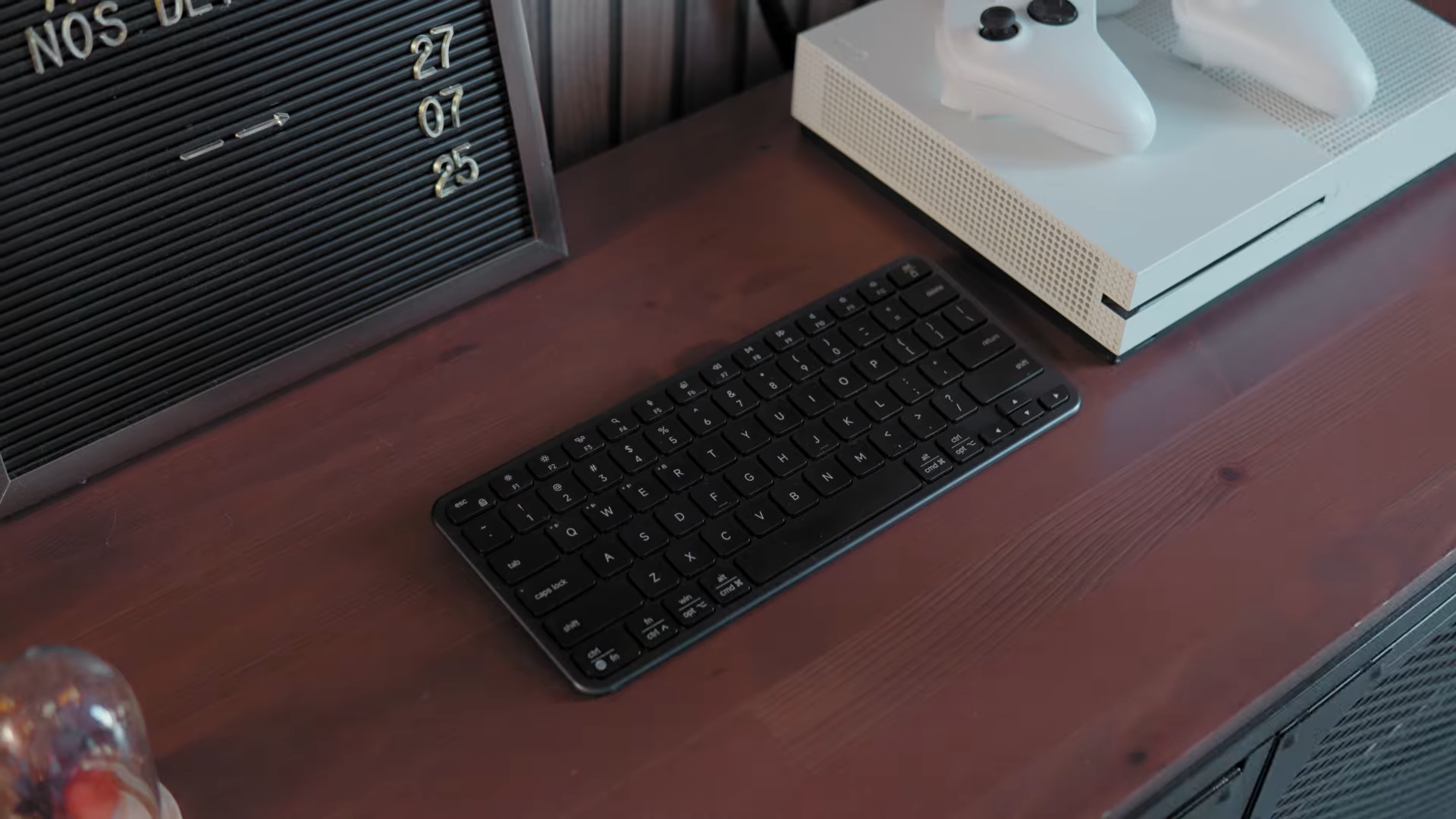
Satechi has expanded its compact input device lineup with the introduction of the Satechi Slim EX1, a tenkeyless keyboard designed to meet the demands of modern multi-device workflows. Having extensively tested this unit on my desk to the point of leaving noticeable fingerprints, I am ready to share my seasoned perspective on how it handles daily production tasks.
Shooters looking to source this sleek accessory will find it listed across major retail hubs like Amazon, positioned as a premium solution for clutter-free workspaces.

Premium Construction and Low-Profile Ergonomics
The physical design of the Slim EX1 immediately stands out due to its robust electrostatic painted metal base finished with a high-grade aluminum top plate. This intentional weighting provides enough desk friction to prevent the keyboard from slipping during rapid typing sessions, offering a high-quality physical presence. Its compact layout lacks a traditional numeric pad, making it an exceptional option for narrow workstations or mobile professionals who require a highly portable typing tool.
Low-profile ergonomics define the typing posture, allowing your wrists to rest in a natural position close to the desk surface. This design choice minimizes fatigue during extended writing sessions, eliminating the immediate need for an external wrist rest. Merging structural rigidity with a thin silhouette makes this keyboard both a highly durable desk centerpiece and a dependable travel companion.

Scissor-Switch Performance and Tactile Feedback
Typing on this keyboard relies on premium low-profile scissor switches that deliver a quiet, controlled, and tactile response. The acoustic profile is whisper-quiet, ensuring that your typing does not disturb colleagues nearby or register as intrusive background noise during online video calls. Side-by-side comparisons with high-end laptop keyboards, such as the built-in keyboard on a MacBook Pro, reveal a highly comparable yet slightly more cushioned tactile feedback.
Transitioning to these keys feels immediate, as the keycap spacing preserves the traditional layout standards of standard desktop inputs. Maintaining a silent workflow while preserving typing speed is one of the strongest attributes of this scissor-switch mechanism. Writers, programmers, and general office workers will appreciate the low acoustic profile that seamlessly fades into the background of any shared office space.

Multi-Device Connectivity
Power users managing complex setups will benefit from the extensive wireless connectivity suite designed into this unit. Satechi enables simultaneous connection to four separate devices, utilizing three dedicated Bluetooth channels alongside a 2.4 GHz wireless receiver. The inclusion of a USB-C dongle represents a meaningful upgrade over older USB-A standards, allowing direct connection to modern laptops without requiring additional adapters.
Switching between a primary computer, a smartphone, a tablet, and a television occurs seamlessly at the press of a button. Keeping up with fast-paced cross-platform workflows becomes significantly easier when a single keyboard coordinates all active screens. Reliable wireless performance ensures that input lag remains unnoticeable, making this device a highly capable hub for multi-device productivity.

Sustainable Battery Design
Battery longevity is rated for up to five weeks on a single charge under standard usage conditions. Satechi implemented a highly sustainable engineering choice by making the internal rechargeable battery completely removable and replaceable. This design decision dramatically extends the product lifespan, because a degraded cell can simply be replaced without discarding an otherwise perfectly functional keyboard.
Users facing a swelling or failing battery can simply swap the power cell or run the device permanently in a wired configuration via a USB-C cable. Charging warnings are delivered via a physical LED indicator located on the rear chassis, which activates when the power drops below fifteen percent. Placing this warning light on the back of the case is not the most intuitive ergonomic decision, but it serves its purpose of alerting the user before a complete shutdown.

Platform Compatibility and Dual Layout Nuances
Swapping operating systems is managed by a physical toggle switch that instantly reconfigures the keyboard layout for either macOS or Windows. This hardware-level switch eliminates the need for background software, natively remapping shortcut keys and modifiers to match the selected platform. Despite this convenience, the dual-printed keycaps can look visually crowded because they must display legends for both operating systems simultaneously.
Muscle memory might experience slight adjustments, especially for users who frequently alternate between different keyboard layouts. Moving from Satechi’s mechanical SM1 keyboard to this model highlights minor physical layout differences that require a brief adaptation period. Despite the initial visual clutter of the dual-printed keys, the native Mac and Windows configurations remain anatomically accurate and easy to navigate once mastered.

Addressing the macOS Bluetooth Battery Reporting Issue
Users running this keyboard on macOS might observe the operating system reporting a flat sixty percent battery level even when the keyboard is completely charged. This anomaly is a well-documented operating system issue rather than a mechanical defect on Satechi’s part. Similar battery reporting glitches affect prominent competitor products from brands like Keychron, Razer, and even Apple’s proprietary Magic Keyboard.
Troubleshooting forums have debated this specific macOS Bluetooth reporting bug for years without a definitive software fix from Apple. Monitoring the exact battery percentage becomes a non-issue over time because the physical hardware easily runs for weeks. Relying on the physical LED indicator on the keyboard provides a much more accurate representation of actual power levels than the macOS Bluetooth menu.

Real-World Durability and Long-Term Reliability
Testing over half a dozen Satechi keyboards has provided me with a clear picture of the build quality. An older Satechi model passed to a colleague has operated flawlessly for over a year of daily production work without showing signs of wear. While temporary connectivity hiccups occurred during my past testing of the mechanical SM1 model, those issues resolved themselves completely, highlighting the unpredictable nature of Bluetooth environments.
Reading community feedback on retail sites remains an important step before purchasing any tech accessory. Unhappy customers will occasionally report issues, which is why utilizing the manufacturer warranty period for immediate exchanges is always recommended for defective units. Satechi generally maintains a stellar reputation for durability, and this modern compact addition aligns perfectly with their track record of reliable hardware.

Final Thoughts — Price & Value
Satechi has successfully refined their established design formula, offering modern upgrades like a USB-C wireless receiver and a highly sustainable removable battery. The premium price point on platforms like Amazon reflects the high-quality aluminum chassis and the reliable multi-device connectivity options. Buyers seeking a low-profile, silent typing instrument will find excellent value in a keyboard built to last for years of continuous office work.

Long-term financial value is further secured by the user-replaceable battery design, shielding your investment from premature obsolescence. Minor layout differences and operating system reporting quirks do not overshadow the superb physical execution of this compact accessory. Purchasing this model provides a highly competent, durable, and elegant typing tool that easily justifies its place in a professional desktop setup.
