

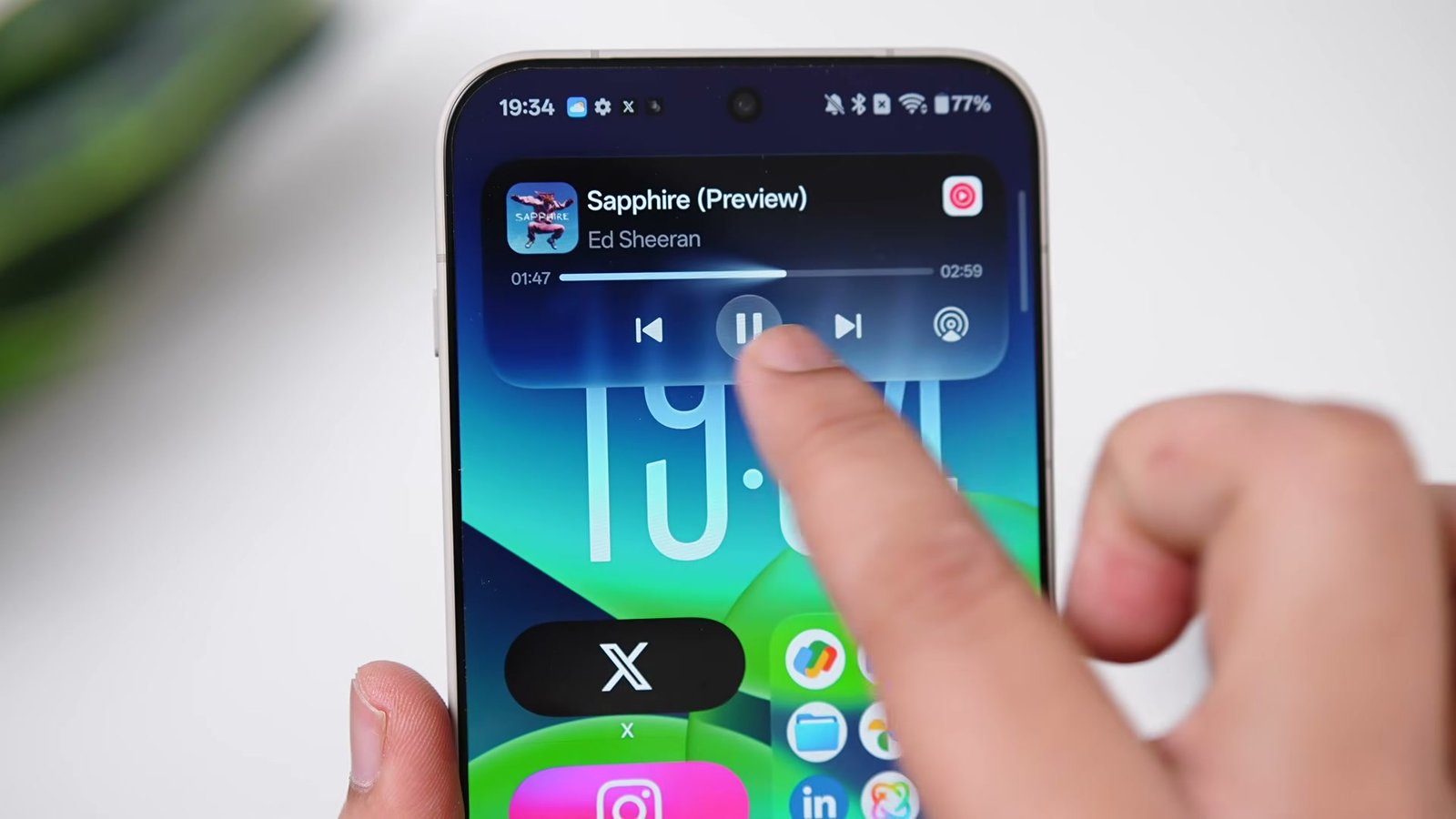
ColorOS 17 and MagicOS 11 represent the closest software battle Android has seen in years, with both skins embracing translucent Liquid Glass aesthetics, physics-driven animations, and system-wide AI agents. OPPO powers ColorOS 17 with its Luminous Rendering Engine, while Honor builds MagicOS 11 around Shimmer Architecture and Hummingbird 2.0 across flagship phones starting around $799 on Amazon. Both interfaces share a similar visual direction on the surface, yet daily interaction reveals clear philosophical differences.
I tested ColorOS 17 and MagicOS 11 side by side across lock screen Liquid Glass effects, home screen customization, Quick Settings ergonomics, hardware shortcut buttons, AI assistants, and animation fluidity. Putting both phones next to each other makes it obvious where Honor pushes visual flair harder and where OPPO delivers tighter polish. Here is how ColorOS 17 and MagicOS 11 compare in real-world daily use.
ColorOS 17 vs MagicOS 11
The Good (Pros)
- Luminous Rendering Engine cuts rendering load by 30%
- Cohesive progressive blur keeps text crisp over wallpapers
- Elastic touch animations feel snappy and consistent
- Trinity Engine retains 25% more background apps
- AI Mind Space organizes daily schedules cleanly
The Bad (Cons)
- Less aggressive Liquid Glass refraction than MagicOS 11
- Fewer clarity-slider toggles for icon glass effects
- Flagship AI features roll out gradually by region
Quick Navigation (Table of Contents)
- ColorOS 17 vs MagicOS 11 Key Differences
- Liquid Glass UI & Translucent Layering
- Home Screen, Lock Screen & Customization
- Quick Settings Tweaks & Control Center Ergonomics
- Hardware Shortcut Buttons & Quick Triggers
- AI Features: AI Mind Space vs Yoyo AI
- Animations, Fluidity & Resource Efficiency
- Final Thoughts — Price & Value
- Frequently Asked Questions
ColorOS 17 vs MagicOS 11 Key Differences
| Category | OPPO ColorOS 17 | Honor MagicOS 11 |
|---|---|---|
| Design Language | Living Flow Design (Progressive Blur) | Liquid Glass (Shimmer Architecture) |
| Rendering Engine | Luminous & Laminar Flow Engine | Hummingbird Architecture 2.0 |
| Efficiency Gain | -30% Rendering Load / -25% RAM Usage | +20% Animation Fluidity Under Glass Load |
| AI Ecosystem | AI Mind Space & Mind Pilot | Yoyo AI (1,000+ Automated Scenarios) |
| Customization | Elastic Icons, Depth Wallpapers, Cohesive Cards | Personalized Clarity Sliders & Tilt Reflections |
| Quick Settings | Resizable Translucent Tiles & Live Media Pill | Floating Glass Capsules & Split Control Center |
| Storage & Memory | Trinity Engine (+25% Background App Retention) | Storage Space 2.0 (Up to 60GB Compression) |
Liquid Glass UI & Translucent Layering
Honor leans aggressively into a literal Liquid Glass interpretation on MagicOS 11, wrapping docks, floating widgets, and notification cards in refractive light-bending borders. Tilting the phone subtly shifts specular highlights across glass edges, and Honor gives you Personalized Clarity Sliders to dial between crystal-clear and frosted textures. I found the effect genuinely eye-catching on dark or colorful wallpapers, though third-party app icons occasionally clash with the glass aesthetic.
ColorOS 17 takes a more restrained, battery-conscious route under its Living Flow Design and Progressive Blur layers. Rather than refracting every edge with heavy GPU shaders, OPPO uses soft 3D outlines and graduated blur that keep notification text effortless to read outdoors. In my side-by-side comparison, ColorOS 17 looks slightly more cohesive across third-party apps while still delivering modern translucent depth.

Home Screen, Lock Screen & Customization
Both skins give you deep lock screen typography controls, depth-effect wallpapers that tuck clocks behind subjects, and resizable folder grids. ColorOS 17 stands out with its playful elastic icon physics and unified card geometry that keeps weather, music, and clock widgets visually aligned. I also liked how cleanly ColorOS 17 blends Always-On Display transitions directly into the unlocked home screen wallpaper.
MagicOS 11 counters with more granular glass opacity controls and interactive lock screen capsules that expand with a tap. Users who enjoy spending an evening fine-tuning transparency levels, icon shapes, and depth shadows will have more sliders to play with on Honor's skin. Out of the box, however, ColorOS 17 requires far less tweaking to look balanced and refined.

Quick Settings Tweaks & Control Center Ergonomics
Swiping down into the Control Center immediately highlights how both brands borrow modern modular tile layouts while adding their own usability twists. ColorOS 17 lets you drag handles directly inside the Quick Settings editor to resize connectivity toggles, toggle tile labels on or off, and rearrange brightness sliders with one hand. I appreciated the clean visual hierarchy that keeps Wi-Fi, Bluetooth, and media controls reachable near the thumb zone.
MagicOS 11 organizes Quick Settings into floating glass capsules with smooth blur transitions over whatever app sits underneath. Honor's split notification and control center gesture feels snappy, and its live media player pill integrates neatly at the top of the panel. Both control centers are fast, though ColorOS 17's direct tile-resizing editor feels slightly more intuitive during setup.

Hardware Shortcut Buttons & Quick Triggers
Modern flagships running ColorOS 17 and MagicOS 11 increasingly pair software shortcuts with dedicated physical side buttons. On hardware equipped with customizable action keys, both skins allow single-press, double-press, and long-press mappings for camera launch, flashlight, sound profiles, or instant AI triggers. Holding both devices side by side shows how slim camera-button and action-key ergonomics have become.
ColorOS 17 ties its physical shortcut neatly into Mind Space capture, letting you snapshot and summarize whatever is on screen with a single hold. MagicOS 11 maps its AI key directly to Yoyo AI contextual actions and quick service cards without leaving your current app. Having reliable hardware triggers makes both skins feel noticeably faster when you are walking or commuting.

AI Features: AI Mind Space vs Yoyo AI
Artificial intelligence is front and center in both operating systems, though OPPO and Honor target slightly different daily workflows. ColorOS 17 centers around AI Mind Space and Mind Pilot, acting as an intelligent hub that organizes saved screenshots, calendar events, morning briefings, and visual search queries. I found Mind Space particularly helpful for turning messy notes and saved links into structured summaries.
MagicOS 11 pushes Yoyo AI as an active automation agent capable of chaining multi-step tasks across supported apps and system settings. Honor also pairs Yoyo AI with Storage Space 2.0 lossless compression, which can reclaim significant storage on heavy media libraries. Power users who want automated multi-step routines will lean toward Yoyo AI, while organizers will prefer ColorOS 17's Mind Space.

Animations, Fluidity & Resource Efficiency
Under the hood, ColorOS 17 uses its Luminous Rendering Engine and Laminar Flow Engine to cut rendering load by up to 30 percent and RAM usage by 25 percent. Opening, interrupting, and swiping between heavy apps produces elastic, zero-stutter transitions that never drop frames even during rapid gesture switching. Trinity Engine memory management also keeps roughly 25 percent more background apps alive without reloads.
MagicOS 11 counters with Hummingbird Architecture 2.0, boosting animation fluidity by around 20 percent so heavy Liquid Glass blur layers stay smooth at 120Hz. Honor's physics feel slightly snappier and more linear when flicking through recents, whereas OPPO's curves feel bouncier and more organic. In real-world use, both skins rank at the very top of Android fluidity, with ColorOS 17 holding a slight edge in long-term efficiency.

💡 Recommended Alternatives: Explore flagship hardware running these skins in our Honor X80 Pro Max Review, our Redmi K100 Pro Max Review, and browse the full Smartphones Hub.

OPPO & Honor Flagship Phones (ColorOS 17 / MagicOS 11)
- Liquid Glass & Living Flow UI
- Luminous vs Shimmer Engine
- AI Mind Space vs Yoyo AI
- 120Hz Fluid Animations
- Cross-Device Ecosystem
Final Thoughts — Price & Value
ColorOS 17 and MagicOS 11 are remarkably close in daily polish, proving that Android skins have caught up to iOS in visual fluidity and glass aesthetics. ColorOS 17 wins slightly overall thanks to its 30 percent lighter rendering pipeline, cohesive progressive blur, and clean AI Mind Space organization. MagicOS 11 remains a very close runner-up with deeper Liquid Glass clarity customization and ambitious Yoyo AI automation.
Choose an OPPO or OnePlus flagship with ColorOS 17 on Amazon if you want the most refined animations, strong battery efficiency, and reliable background app retention. Its Luminous Rendering Engine keeps daily multitasking smooth without draining your battery on heavy shaders. Pick an Honor flagship running MagicOS 11 if you love customizable refractive glass UI controls, cross-device Apple file sharing, and automated Yoyo AI workflows.
Frequently Asked Questions
Which has smoother animations: ColorOS 17 or MagicOS 11?
Both skins deliver top-tier 120Hz Android fluidity with interruptible gestures and zero visible stutter. ColorOS 17 feels slightly bouncier and more cohesive thanks to its Luminous Rendering Engine, which also reduces rendering load by 30 percent. MagicOS 11 feels very snappy and linear via Hummingbird Architecture 2.0.
How does Liquid Glass differ between ColorOS 17 and MagicOS 11?
MagicOS 11 adopts a bolder Liquid Glass look with tilt-responsive edge reflections and Personalized Clarity Sliders for transparent docks and capsules. ColorOS 17 uses Progressive Blur and soft 3D outlines under Living Flow Design to preserve text legibility and battery life. Honor offers more visual glass tweaking, while OPPO looks more consistent across third-party apps.
Which AI suite is better: ColorOS 17 AI Mind Space or MagicOS 11 Yoyo AI?
AI Mind Space in ColorOS 17 excels at organizing saved content, daily schedules, and visual search summaries in one clean hub. Yoyo AI in MagicOS 11 focuses more on multi-step task automation across apps and system actions. Your preference depends on whether you value personal organization or hands-free workflow automation.
Does ColorOS 17 or MagicOS 11 manage RAM and battery better?
ColorOS 17 holds a slight efficiency advantage because its Laminar Flow Engine cuts RAM consumption by 25 percent while keeping more background apps active. Dialing back heavy refractive glass shaders also helps OPPO conserve power during long screen-on days. MagicOS 11 counters with Storage Space 2.0 compression to free up extra internal storage.
