

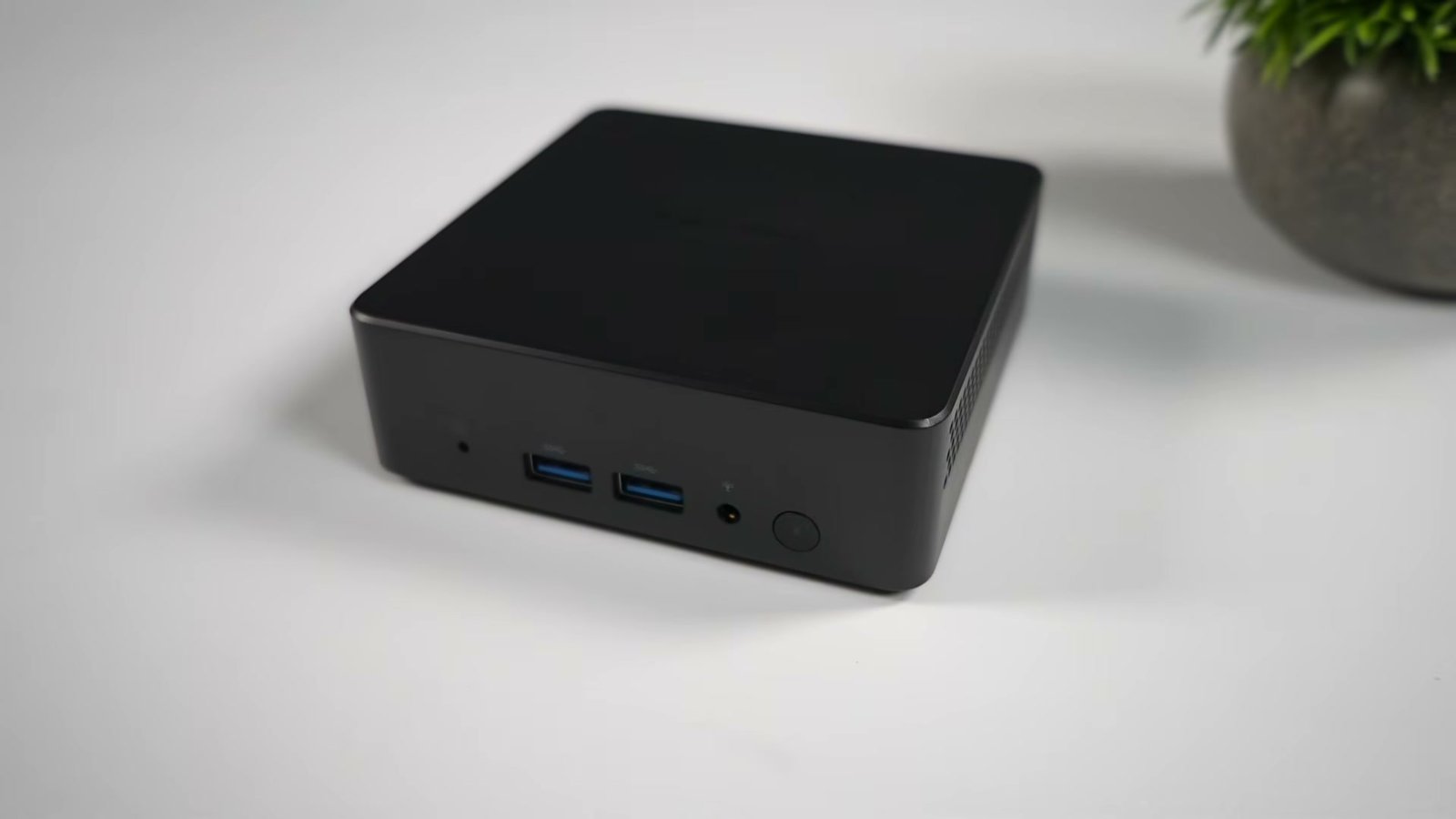
The Minisforum M2 Slim (EliteMini M2 Slim-304) is a palm-sized 0.47-liter all-metal mini PC built around Intel’s Core 3 304 processor for quiet everyday computing, digital signage, and light emulation. Starting around $399 (currently $410.07 on AliExpress and also listed on Amazon), it packs 16GB of LPDDR5X memory, 512GB UFS 3.1 storage, and dual 2.5GbE LAN into a whisper-quiet desktop footprint. That spec sheet positions it well above entry-level Intel N100 and N200 boxes without stepping into expensive workstation territory.
I tested the Minisforum M2 Slim across its 0.47L metal chassis and VESA mounting kit, dual 2.5G LAN and USB4 40Gbps I/O, quad-4K 60fps YouTube stress playback, 3DMark Time Spy against the Core i3-N305 and N200, UFS 3.1 read/write speeds, and real-world 1080p PC gaming and console emulation. Drawing as little as 7W to 12W during upscaled GameCube and PS2 sessions, it balances low power draw with surprisingly capable Xe graphics. Everything below breaks down where this budget-friendly mini PC excels and where soldered memory sets clear boundaries.
Minisforum M2 Slim
The Good (Pros)
- 0.47L all-metal chassis with VESA mount
- 3DMark Time Spy 947 beats N305 and N200
- Dual 2.5GbE LAN plus USB4 40Gbps and 2x HDMI 2.1
- Fast 512GB UFS 3.1 plus M.2 2280 PCIe 4.0 slot
- Runs Dolphin GameCube 1080p 60fps at 7-11W
The Bad (Cons)
- Soldered LPDDR5X RAM is not upgradeable
- Single Xe-core iGPU limits heavy AAA gaming
- 28W TDP ceiling prioritizes efficiency over raw multi-core speed
Quick Navigation (Table of Contents)
- Key Specifications at a Glance
- 1. 0.47L All-Metal Build, Ports & Triple-4K I/O
- 2. Intel Core 3 304, Multitasking & Quad-4K60 Stress Test
- 3. CPU & GPU Benchmarks vs. Intel N305 and N200
- 4. 512GB UFS 3.1 Storage Speed & M.2 PCIe 4.0 Expansion
- 5. Light PC Gaming Performance (1080p & 720p)
- 6. GameCube & PS2 Emulation at 7W–12W
- Recommended Alternatives
- Final Thoughts — Price & Value
- Frequently Asked Questions
Key Specifications at a Glance
| Specification | Measured / Confirmed Detail |
|---|---|
| Model | Minisforum EliteMini M2 Slim (M2 Slim-304) |
| Processor (CPU) | Intel Core 3 304 (5 Cores / 5 Threads: 1 P-Core + 4 LP E-Cores, up to 4.3 GHz) |
| Graphics & NPU | Intel Graphics iGPU (1 Xe-Core up to 2.3 GHz) + 15 TOPS NPU |
| Memory (RAM) | 16 GB LPDDR5X @ 5600 MT/s (Onboard / Soldered) |
| Storage | 512 GB UFS 3.1 (1,677 MB/s Read, 901 MB/s Write) + 1× M.2 2280 PCIe 4.0 ×4 |
| Display Outputs | 2× HDMI 2.1 TMDS + 1× USB4 40Gbps (Triple 4K Support) |
| Networking | Dual 2.5GbE RJ45 LAN + Wi-Fi 6E + Bluetooth 5.4 |
| Chassis & Power | 0.47L All-Metal Body, VESA Mountable, 28W Balanced / 15W Silent TDP |
| Operating System | Windows 11 |
1. 0.47L All-Metal Build, Ports & Triple-4K I/O
Measuring just 0.47 liters in volume, the Minisforum M2 Slim slips easily into the palm of your hand yet wraps its internals in a rigid all-metal enclosure. Included VESA mounting hardware lets you tuck the unit neatly behind a monitor or on a wall, turning any display into a clutter-free workstation. Front-panel access puts USB 3.2 Gen 2 Type-A ports and a 3.5mm audio combo jack within effortless reach.
Around the rear, connectivity punches well above its price class with dual 2.5GbE RJ45 LAN ports, two HDMI 2.1 TMDS outputs, and a full-featured USB4 40Gbps Type-C port supporting data, video, and power delivery. Supporting up to three simultaneous 4K monitors makes it a compelling choice for multi-screen office desks, trading setups, or commercial digital signage. Wireless hardware rounds things out cleanly with Wi-Fi 6E and Bluetooth 5.4.

2. Intel Core 3 304, Multitasking & Quad-4K60 Stress Test
Inside sits Intel's Core 3 304 hybrid processor featuring 5 cores and 5 threads (1 Performance core plus 4 Low-Power Efficiency cores) boosting up to 4.3 GHz within a 28W balanced or 15W silent TDP envelope. Paired with 16GB of onboard LPDDR5X memory running at 5600 MT/s and Windows 11, everyday Chrome browsing, document editing, and video calls feel snappy and responsive. An integrated 15 TOPS NPU also handles light background AI tasks without bogging down CPU threads.
To push media decoding, I ran four simultaneous 4K 60fps YouTube streams side by side in a digital-signage stress test. Hardware video decode handled all four feeds smoothly without dropped frames or intrusive fan roar, keeping desktop acoustics quiet under load. Having soldered LPDDR5X means you cannot upgrade RAM later, so opting for the 16GB configuration over 8GB is essential for long-term multitasking.

3. CPU & GPU Benchmarks vs. Intel N305 and N200
In synthetic 3DMark Time Spy testing, the Minisforum M2 Slim posted an overall score of 947 points, representing a massive 57.3% uplift over the Intel Core i3-N305 at 602 points. Entry-level Intel N200 mini PCs trail even further behind at 437 points, underscoring how much faster Intel's newer Core 3 304 and Xe-core graphics architecture perform. Clocked up to 2.3 GHz, that single Xe-core iGPU delivers far smoother hardware acceleration across modern apps.
Thermal behavior remains equally composed thanks to the 28W balanced power target, avoiding sudden clock throttling during sustained benchmark loops. For buyers comparing low-cost home-server nodes or everyday desktops, dual 2.5GbE networking paired with that 947 Time Spy baseline gives you substantially more headroom than older Alder Lake-N chips. Running Proxmox, Plex, or lightweight Docker containers alongside Windows tasks feels effortless.

4. 512GB UFS 3.1 Storage Speed & M.2 PCIe 4.0 Expansion
Instead of shipping with slow eMMC flash like many budget mini PCs, the Minisforum M2 Slim equips 512GB of onboard UFS 3.1 storage as its primary boot drive. Sequential testing measured 1,677 MB/s read speeds and 901 MB/s write speeds, keeping Windows 11 boots, app launches, and large file transfers crisp. Everyday responsiveness feels indistinguishable from a solid mainstream NVMe drive during office workflows.
When you need more capacity for game libraries or local media caches, an open M.2 2280 PCIe 4.0 ×4 slot sits ready inside for high-speed NVMe expansion. There is also a built-in TF (microSD) card reader on the chassis for quick camera imports or portable emulator ROM storage. Combining fast built-in UFS 3.1 with full-speed PCIe 4.0 expansion solves the storage bottleneck common in sub-$450 mini PCs.

5. Light PC Gaming Performance (1080p & 720p)
While a single Xe-core iGPU is not built for modern ray-traced blockbusters, it handles indie hits and classic PC titles remarkably well at 1080p. Hollow Knight: Silksong ran locked at 60 fps in 1080p while pulling roughly 12.7W TDP at a cool 39°C CPU temperature. Left 4 Dead 2 pushed up to 120 fps at 1080p medium settings, making older Source-engine favorites feel ultra-fluid.
Stepping into heavier 3D open-world games like Skyrim works smoothly at 720p low settings around 50 to 60 fps while drawing ~15W to 16W total package power. Keeping power draw under 17W during active 3D gaming keeps fan noise low and temperatures comfortably in the mid-40°C range. For casual Steam library sessions on a desk monitor or living-room TV, it punches well above typical N100 mini PCs.

6. GameCube & PS2 Emulation at 7W–12W
Retro console emulation is where the Minisforum M2 Slim truly shines as an ultra-efficient living-room box. Using Dolphin DX12 for GameCube titles at 3× internal resolution (1080p), frame rates held a rock-solid 60 fps while the Core 3 304 sipped just 7W to 11W of power. Classic fighting and action games looked razor-sharp on a modern 4K television without any audio crackle or shader stutter.
Moving up to PlayStation 2 emulation via PCSX2 at 2× 1080p resolution maintained smooth 60 fps gameplay around 12W TDP and 42°C. That efficiency means you can mount the M2 Slim behind a bedroom TV, pair a Bluetooth controller, and enjoy upscaled retro libraries in near-total silence. Few sub-$415 mini PCs deliver that blend of emulation polish and 10-watt acoustics.

Recommended Alternatives
Before finalizing your compact desktop purchase, explore more tested compact desktops across our TechXReviews Mini PC Hub to compare Intel Core 3 systems against AMD Ryzen mini workstations. You can also visit the TechXReviews homepage for our latest living-room monitors, keyboards, and storage reviews. Weighing whether you need upgradeable SODIMM RAM or ultra-low 10W emulation power will point you to the right chassis.

Minisforum M2 Slim (M2 Slim-304) — Intel Core 3 304 Mini PC
- Intel Core 3 304 (5-Core up to 4.3GHz) + Xe iGPU
- 16GB LPDDR5X + 512GB UFS 3.1 + M.2 PCIe 4.0 Slot
- Dual 2.5GbE LAN + USB4 40Gbps + 2x HDMI 2.1
- Quad-4K60 Streaming & 1080p Emulation at 7-12W
Final Thoughts — Price & Value
Starting around $399 (or $410.07 live on AliExpress), the Minisforum M2 Slim occupies a sweet spot between sluggish N100 budget boxes and pricier $600+ Ryzen gaming mini PCs. Its combination of a 0.47L all-metal build, dual 2.5GbE networking, USB4 40Gbps, and 57.3% faster 3DMark Time Spy graphics over the Core i3-N305 makes it a genuinely capable everyday machine. Even with soldered memory, the 16GB/512GB tier delivers well-rounded value right out of the box.
Buy the Minisforum M2 Slim if you want a silent, palm-sized Windows 11 mini PC for triple-4K office work, home-lab networking, quad-4K signage, or 1080p GameCube and PS2 emulation. Its built-in 512GB UFS 3.1 drive and open M.2 PCIe 4.0 slot give you plenty of fast storage headroom out of the box. Skip it if you require upgradeable 32GB–64GB RAM or want to run modern AAA 3D PC games at high settings.
Frequently Asked Questions
Can you upgrade the RAM and storage on the Minisforum M2 Slim?
The LPDDR5X memory (8GB or 16GB) is soldered onboard and cannot be upgraded after purchase, so choosing the 16GB model is recommended. Storage, however, is expandable via a free M.2 2280 PCIe 4.0 ×4 NVMe slot alongside the built-in 512GB UFS 3.1 drive. There is also a TF card slot for extra media capacity.
How does the Intel Core 3 304 compare to the Core i3-N305 and N200?
In 3DMark Time Spy testing, the Minisforum M2 Slim with Intel Core 3 304 scored 947 points. That is 57.3% faster than the Core i3-N305 (602 points) and more than double the Intel N200 (437 points). It also runs quad-4K 60fps video streams and 1080p console emulation effortlessly.
How many 4K monitors can the Minisforum M2 Slim drive simultaneously?
It supports up to three 4K displays simultaneously using its two HDMI 2.1 TMDS ports and one USB4 40Gbps Type-C port. The USB4 port also handles high-speed data transfers and power delivery over a single cable. Combined with dual 2.5GbE LAN, it works nicely for multi-monitor desks and digital signage.
