

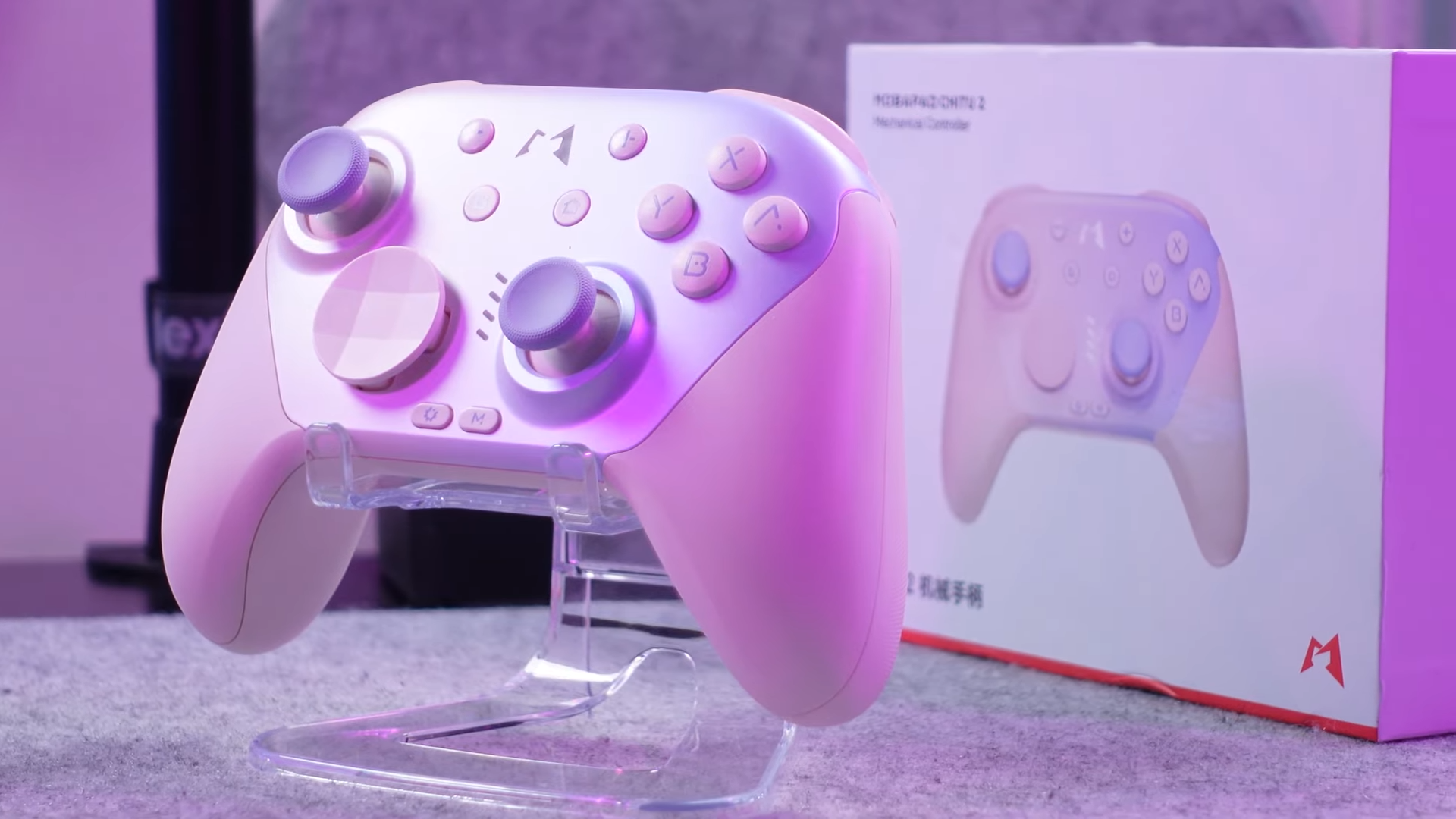
Finding the perfect accessories to complement my Nintendo Switch 2 is a constant pursuit, and this latest controller from Mobapad might just be the best option on the market today. I have spent significant time testing the Mobapad Chitu 2, pitting it head-to-head against the official first-party Nintendo Switch 2 Pro Controller to see which one deserves a spot in your setup. Priced at a highly competitive $49.99 on Amazon and directly from Mobapad, this controller promises premium features without the steep first-party price tag.
My testing focused on real-world usability, technical performance, and design integrity to give you an experienced analysis of this device. This review covers everything from the unboxing experience to technical stick tension measurements, ensuring you have all the facts before making a purchase. I will also share a bonus recommendation for a stellar Switch 2 carrying case that has quickly become a staple in my daily carry.

Quick Navigation (Table of Contents)
- Unboxing and Hardware Specifications
- Design, Ergonomics, and Build Quality
- Comparing Chitu 2 and the Nintendo Switch 2 Pro Controller
- Companion Software and Customization
- Performance Testing, Calibration, and Precision
- In-Game Performance and Gyro Responsiveness
- Bonus Accessory: Coup’s P2 Dockable Protective Case
- Final Thoughts — Price & Value
Unboxing and Hardware Specifications
Unboxing the Chitu 2 reveals a thoughtful package that immediately establishes its value proposition. Aside from the controller itself, which I received in a striking pink variant, the box contains a detailed user manual, a durable USB-A to USB-C charging cable, and an interchangeable D-pad. Choosing between the default dome-shaped eight-way D-pad and the traditional four-way pad is simple, as both are included right out of the box to suit different gaming preferences.
Looking at the spec sheet, Mobapad packed an incredible amount of advanced technology into this $49.99 device. The controller features Glide TMR (Tunnel Magnetoresistance) joysticks equipped with liquid silicone rubber tracks designed to eliminate drift while providing buttery-smooth movement. It also boasts micro switch triggers, tactile switch bumpers, mechanical face buttons, two remappable back buttons, six-axis gyro controls, and NFC support for Amiibo. A robust 1000 mAh battery powers the entire experience, promising long-lasting sessions without frequent recharging.

Design, Ergonomics, and Build Quality
Visually, the Chitu 2 presents a clean, modern aesthetic that stands out in a crowded market. The pink-to-light-blue gradient on the front shell looks absolutely fantastic, complemented beautifully by the color-matched thumb caps. Gripping the controller feels incredibly natural, assisted by a subtle texture on the handles that prevents slippage during intense gaming sessions.
Removing the faceplate and D-pad requires some effort, but this design choice successfully hides all unsightly screws to maintain a sleek external profile. The physical buttons and triggers provide an tactile sensation that resembles ASMR for your hands, turning every press into a highly satisfying interaction. Comparing the shape to the official Switch 2 Pro Controller, this design feels slightly more comfortable in my hands, offering superior ergonomics for extended play.

Comparing Chitu 2 and the Nintendo Switch 2 Pro Controller
Choosing between these two controllers requires looking closely at how Mobapad’s hardware stands up to Nintendo’s first-party engineering. The biggest advantage of the Chitu 2 lies in its drift-resistant TMR joysticks, a massive upgrade over the outdated potentiometer sticks Nintendo still utilizes in their expensive controller. It remains baffling that first-party options continue to use older tech prone to wear and tear when superior magnetic solutions exist.
Nintendo does retain a few exclusive advantages, such as a built-in 3.5mm headphone jack, which the Chitu 2 lacks entirely. This omission is not a dealbreaker because the Switch 2 fully supports wireless Bluetooth headsets for audio. Regarding physical weight, the Chitu 2 registers at just over 9 ounces, whereas the official Nintendo Pro Controller is slightly lighter at 8.35 ounces. Both controllers feel balanced and premium in the hand, ensuring neither feels like cheap plastic.

Companion Software and Customization
Managing your settings is handled via Mobapad’s dedicated mobile application, which connects seamlessly to the controller. I immediately updated the firmware wirelessly upon pairing, ensuring the controller was running the latest software optimization. The app comes pre-loaded with official profiles for various popular games, but creating personalized profiles is highly intuitive.
Adjusting joystick dead zones, remapping physical buttons, configuring turbo functions, and modifying vibration strength are all easily accomplished within the software. The app also allows you to customize the RGB lighting of the logo on the faceplate to match your style. Once your configurations are complete, you can save your custom setups directly to one of the four onboard profile slots for quick switching on the fly.

Performance Testing, Calibration, and Precision
Testing the joysticks with dead zones set to zero percent revealed highly detailed data regarding accuracy. The circularity of the sticks proved to be excellent, though my specific right joystick exhibited slightly more drift than I would prefer out of the box. Finding the calibration setting in the software proved challenging, but I expect this minor drift to smooth out once a proper calibration is completed.
Linearity testing yielded phenomenal results, recording 1,093 data points with a 1,160-point resolution and an impressive 95.8% linearity. Using a digital force gauge, I measured the physical tension of both sticks at approximately 32 grams of force. This tension is on the lighter side compared to other controllers, but the friction-free Glide TMR design still feels outstanding during gameplay.

In-Game Performance and Gyro Responsiveness
Testing the Chitu 2 with Final Fantasy VII Remake highlighted just how responsive and fun this controller is to use. The clicky mechanical face buttons and micro switch triggers make combat sequences feel incredibly tactile and snappy. The smooth joystick travel allows for precise character movement and camera control without any noticeable lag or stutter.
Gyro controls perform admirably, allowing for quick, accurate aiming adjustments without encountering frustrating dead zones. The official Switch 2 Pro Controller does possess slightly better gyro responsiveness and a noticeably wider range of vibration feedback. You can feel a touch of first-party magic in Nintendo’s rumble and gyro integration, but the Chitu 2 remains highly competitive.

Bonus Accessory: Coup’s P2 Dockable Protective Case
Protecting your console on the go is vital, and the Coup’s P2 dockable protective case is my favorite recommendation so far. Available for $40 on their website, this case provides outstanding utility by combining comfort with robust protection. The ergonomic grips make holding the thin Joy-Cons much more comfortable during handheld play sessions.
Traveling is made easier by a clever front shell that pops on securely to shield the screen and joysticks. A built-in kickstand adds great convenience when playing in tabletop mode. Much like the Chitu 2 controller, this case offers premium quality at an affordable price point that makes it an easy recommendation.
Final Thoughts — Price & Value
Evaluating the market landscape reveals that the Chitu 2 offers an extraordinary price-to-performance ratio. At $49.99, it provides premium mechanical buttons, drift-resistant TMR joysticks, and great ergonomics for almost half the price of Nintendo’s official option. Selecting the Chitu 2 is a smart financial decision for gamers who want advanced hardware features without overpaying.

The decision ultimately rests on your personal budget and specific feature preferences. Having used both extensively, I find myself reaching for the Chitu 2 due to its incredibly satisfying tactile feel and superior joysticks. Gamers looking for a high-quality, long-lasting alternative to first-party controllers will find immense value in this Mobapad offering.
