

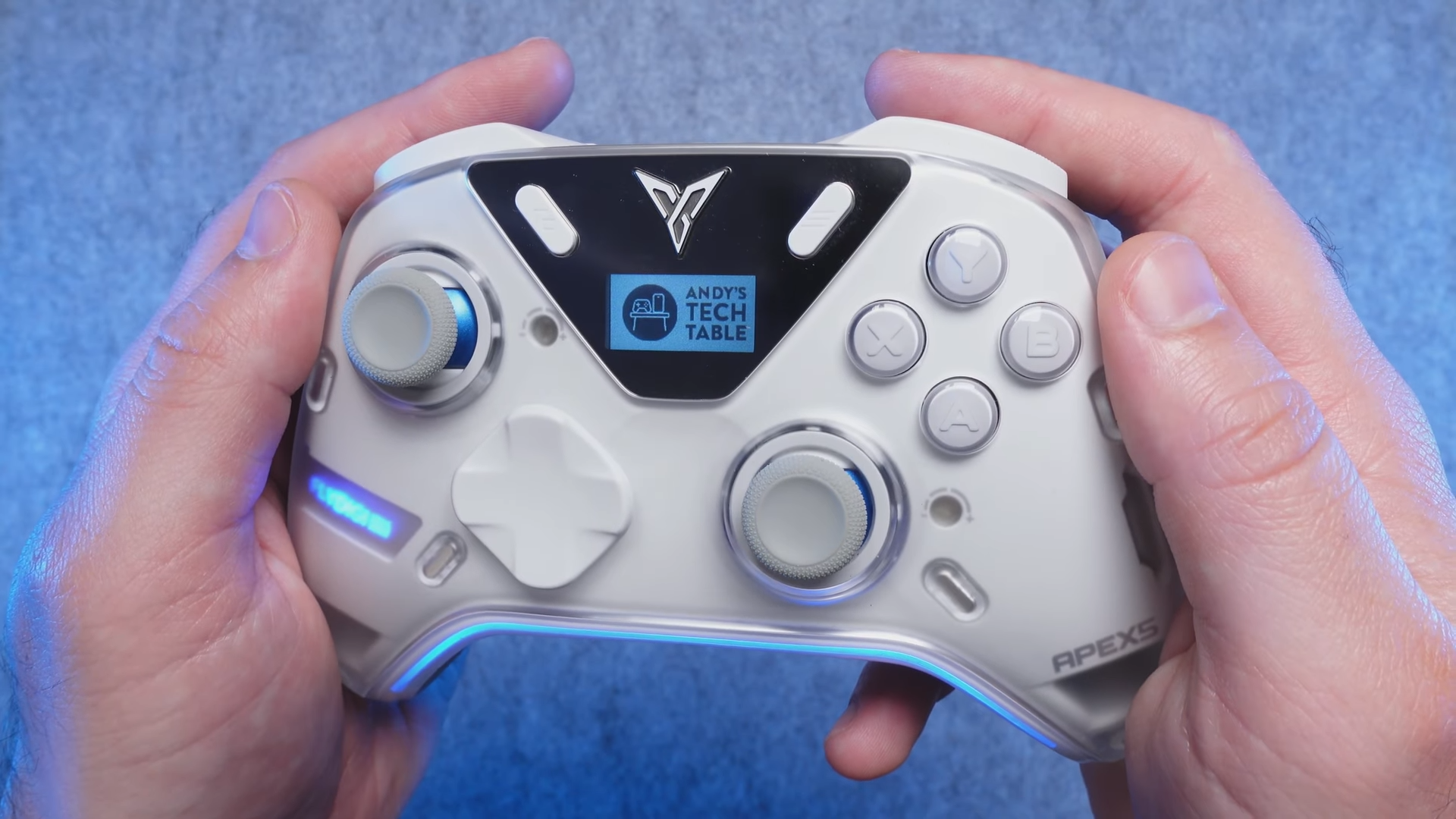
The premium controller market has seen a surge of high-tech entries lately, and the FlyDigi Apex 5 represents the latest attempt to capture the enthusiast crowd. Having spent three full weeks thoroughly testing a domestic Chinese beta unit, I am ready to break down how this controller holds up under intense gaming conditions. Priced near the $100 mark, this device enters a highly competitive space where expectations for build quality and performance are exceptionally high.
My evaluation focuses on real-world performance, usability, and design choices rather than initial impressions. Throughout this analysis, I will examine the unique hardware features, the companion software, and the ergonomic trade-offs that define this controller.

Unboxing Experience
Inside the packaging, you receive the controller itself, a braided USB A to C cable, a 2.4 GHz wireless dongle, product paperwork, and the new removable back paddles. The box itself feels relatively flimsy, failing to match the premium price point of the Apex 5. Buyers seeking a complete high-end package will notice the lack of an included charging dock, which must be purchased separately.
Including a charging dock has become standard even for controllers costing half as much as this model. This omission is a missed opportunity for a flagship device, especially given the premium target audience. The domestic packaging tested here features Chinese text, though the upcoming international release will feature English documentation and potentially refined quality control.

Hardware Architecture and Performance
The technical sheet of this controller is packed with high-end features designed for competitive gamers. It boasts adjustable Hall effect sticks, clicky micro switch face buttons, a customizable 150 Hz display, and customizable RGB lighting. Additionally, the device offers Hall effect triggers with adaptive trigger support, six remappable buttons, texturized rubber back grips, and six-axis motion controls powered by a large 1500 mAh battery.
Connectivity options are robust, spanning Windows, Android, Nintendo Switch, and iOS, with Xbox and PlayStation 5 compatibility available via third-party adapters. Testing on PC reveals that the controller only supports Xinput natively, while Dinput is reserved solely for games that support adaptive triggers. Performance measurements indicate exceptional wireless and wired latency, combined with fantastic stick linearity and a high 847-point stick resolution.

The Space Station 4.0 Software Suite
Customizing the controller requires using the proprietary Space Station 4.0 software. This application acts as the central hub for adjusting RGB lighting, vibration intensity, button mapping, joystick circularity, and dead zones. Users can also configure the gyro controls, set specific trigger modes, and manage firmware updates directly through the interface.
Navigating the software is straightforward, and the app serves its purpose well for deep customization. Fortunately, many of these settings can also be adjusted directly on the controller’s onboard display, bypassing the software entirely for quick tweaks. The manufacturer seems committed to pushing Space Station 4.0 as their primary hub, making it a mandatory tool for owners of their modern hardware line.

Ergonomics and Button Feel
Holding this controller immediately conveys a sense of premium construction due to its solid, weighty build. The matte plastic face plate resists fingerprints and sweat, remaining comfortable during long gaming sessions. The textured rubber back grips are precisely placed to prevent slipping, complementing the modern look created by the RGB lighting and the customizable screen.
The clicky micro switch face buttons deliver highly satisfying tactile feedback during gameplay. However, the D-pad feels like a slight step down from the metal version found on the Apex 4 Blacksmith Wukong Edition. Despite this change, the D-pad remains responsive and performs reliably across various genres.

Design Trade-offs and Mechanical Issues
Several design choices on this controller represent a step backward from previous models. The trigger stops feel awkward during play; even at the minimum dampening setting, the triggers can still be pulled down significantly. This mechanical behavior is distracting, and testing revealed that the right trigger activates with noticeably less resistance than the left trigger.

The redesigned back button and paddle layout also presents usability issues. The placement of the paddles makes accidental activations common, occasionally causing users to pinch their fingers underneath the mechanism during intense play. Removing the paddles is a viable solution due to the presence of two extra top bumpers, but the layout remains inferior to older designs.
Adjusting the stick tension requires removing the face plate entirely, unlike the Apex 4 Wukong Edition which allowed direct adjustment. Additionally, a potential flaw in the joystick module’s pin structure can cause unwanted noise when pressure is applied firmly. While this mechanical noise only occurs under heavy force, buyers spending this much money may expect a more polished product.

Final Thoughts — Price & Value
Evaluating this controller reveals a complex balance of premium features and questionable design choices. The high price tag of nearly $100 makes it a tough recommendation for casual gamers, particularly given the lack of native Steam and Dinput support. Quality control concerns from early domestic units suggest that waiting for the international release might be the wisest path for prospective buyers.
Gamers seeking the best value should consider the cheaper Vader 4 Pro instead of this model. The Vader 4 Pro costs less than half the price while offering a superior back button layout, excellent micro switch triggers, and a highly praised tension ring joystick design. This controller remains a high-quality, experimental piece of hardware, but its current flaws prevent it from achieving absolute dominance in the premium market.
