

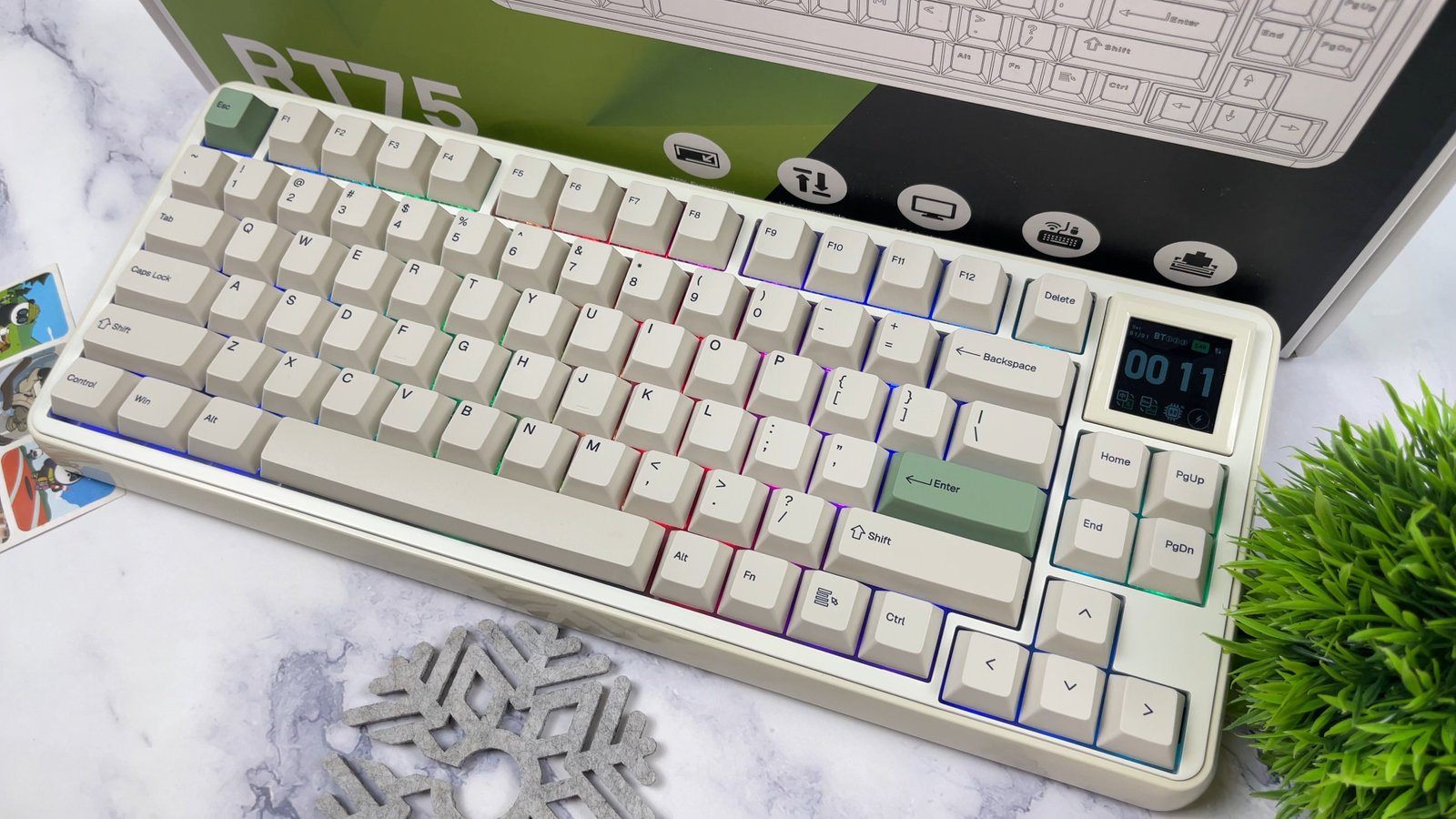
The mechanical keyboard market is flooded with repetitive rectangular chassis, but Epomaker is attempting a different aesthetic direction with the Epomaker RT75. Rather than chasing ultra-aggressive gaming frames, this board leans into a retro cream-toned style reminiscent of vintage office computers from the 1980s. Retailing around $92 to $110 depending on platform promotions, it enters a very competitive price bracket with a rare hardware gimmick on top.
Beneath the vintage exterior, the board pairs wireless functionality with a gasket-mounted assembly and an interchangeable 1.54-inch screen. I spent substantial time typing and testing the unit across diverse setups to evaluate whether its retro charm and modular screen offer genuine utility.
Retro Aesthetics and Chassis Architecture
Epomaker crafted the RT75 around a distinct vintage identity that moves away from generic, razor-thin minimalist frames. The keyboard measures 352 x 142 x 45 mm and weighs 1,165 grams, keeping it firmly anchored to the desk during aggressive typing. The housing pairs a warm cream-colored ABS plastic base with green accent details, subtle clamshell side cutaways, and a polished finish that provides depth to the retro frame.

The bottom of the board maintains a clean, practical layout without adjustable flip-out feet, settling into an ergonomic fixed typing angle of 5.8 degrees. Epomaker also integrated a magnetic compartment door underneath to house the 2.4 GHz wireless receiver safely during transport. You access the dongle instantly by pressing down on one edge of the cover, which raises the opposite end for clean, tool-free removal.

The keycaps complete the vintage presentation using a classic Cherry profile molded from thick dye-sublimated PBT plastic. The textured surface resists finger oils and gloss buildup, ensuring the cream and green colorway retains its matte look over extended daily use.
The 1.54-Inch Hot-Swappable TFT Display
The defining highlight of the RT75 is its 1.54-inch TFT color screen positioned directly in the upper-right corner. The screen functions as an informative dashboard displaying active connection modes, battery percentage, date, and local system time. Using the dedicated Epomaker desktop software over a wired USB cable connection, you can import static custom images or animated GIF files directly to the board’s internal flash storage.

What differentiates this screen from typical built-in mini displays is its hot-swappable modular design. The display connects via two 4-pin headers and pulls straight out of the top plate with minimal effort. Epomaker includes extra switches and matching keycaps, allowing you to convert the default 83-key plus screen layout into a standard 87-key array. This design ensures users who require direct access to navigation keys like Print Screen are not permanently locked out of physical switches.
Removing the display leaves two standard switch sockets exposed, allowing you to drop in switches and keycaps within seconds. This flexibility gives the RT75 a clear functional advantage over fixed-screen alternatives that force you to sacrifice navigation keys permanently.

Companion Software and Key Configuration
Configuring the RT75 requires Epomaker’s dedicated desktop software utility connected over a wired USB interface. The application features independent tabs for custom key remapping, full macro recording that captures both mouse clicks and keystrokes, and function layer modifications. The lighting menu allows you to tweak individual south-facing LED patterns, cycle animations, and regulate backlighting brightness or cycle speeds.
The software also hosts the display customization tool used to transfer visual media directly to the 1.54-inch TFT panel. Uploading static pictures or custom multi-frame animated GIFs is straightforward: you load the image file, save it to the queue, and write the animation to the onboard memory. While loading complex high-frame-count animations requires a bit of transfer time, once completed, your settings stay saved on the board across operating systems.

The utility also provides dedicated profile storage, meaning remaps and lighting configurations remain active when alternating between Windows, macOS, and mobile devices. Key reassignment remains responsive across layers, allowing you to establish secondary hotkeys without driver dependency.
Typing Feel and Acoustic Performance
Keystrokes on the RT75 feel cushioned and controlled rather than bouncy or loose. The combination of a polycarbonate positioning plate and a six-layer sound-dampening stack effectively isolates case resonance. Inside the chassis, plate foam, an IXPE switch pad, PET sound film, PCB socket foam, and thick bottom acoustic layers eliminate hollow echoes and metallic ping.

The pre-lubricated Epomaker Creamy Jade linear and Crystal Silent Tactile switch options deliver a smooth, quiet bottom-out with tight stem tolerances. Factory-tuned plate stabilizers keep larger keys like the spacebar, enter, and backspace sounding clean, muted, and free of annoying plastic rattle. Instead of generating a sharp, clacky clatter like older office hardware, the RT75 produces a deep, refined sound profile suited for quiet working environments.
Typing on the Crystal Silent Tactile switches yields a consistent, low-pitched bottom-out that feels substantial under finger pressure. The gasket suspension isolates keystroke impacts without introducing distracting plate wobble, striking an ideal middle ground between typing comfort and key stability.

Connectivity, Battery Life, and Latency
Connectivity on the RT75 covers three modes: wired USB Type-C, Bluetooth, and low-latency 2.4 GHz wireless via the bundled USB receiver. Over wired USB and 2.4 GHz wireless modes, the board operates at a standard 1,000 Hz polling rate with anti-ghosting support. Manufacturer specifications list input latency at 4 ms over wired connections, 8 ms on 2.4 GHz wireless, and approximately 16 ms over Bluetooth at 125 Hz.
Powering wireless operations is a built-in 5,000 mAh rechargeable battery, which sits above the typical 4,000 mAh capacities found in comparable 75% wireless boards. Battery longevity varies depending on the brightness of the south-facing LEDs and whether the 1.54-inch TFT screen remains continuously active. Device pairing shortcuts mapped to the Fn row switch smoothly between three Bluetooth device profiles: Windows, macOS, and Android systems.

Wireless reliability over the 2.4 GHz dongle proved rock-solid during high-speed typing and casual gaming sessions, showing zero dropped inputs. Charging occurs through the rear USB-C port, allowing continuous operation in wired mode while replenishing the high-capacity cell.
Final Thoughts — Price & Value
The Epomaker RT75 stands out primarily because its retro styling is matched by competent internal engineering. Entering the market around the $92 to $100 price point, the combination of a 5,000 mAh battery, a six-layer dampening gasket structure, and factory-lubricated switches delivers great baseline performance. It looks unique on a desk without demanding manual stabilizer tuning or immediate component mods.
The hot-swappable 1.54-inch screen serves as a fun visual addition, but its true utility lies in Epomaker providing the extra switches and keycaps needed to turn it back into a standard four-key navigation cluster. Some buyers may be disappointed by the fixed 5.8-degree typing angle and non-shine-through legends, yet neither compromise prevents the keyboard from delivering a solid acoustic and tactile experience.
