

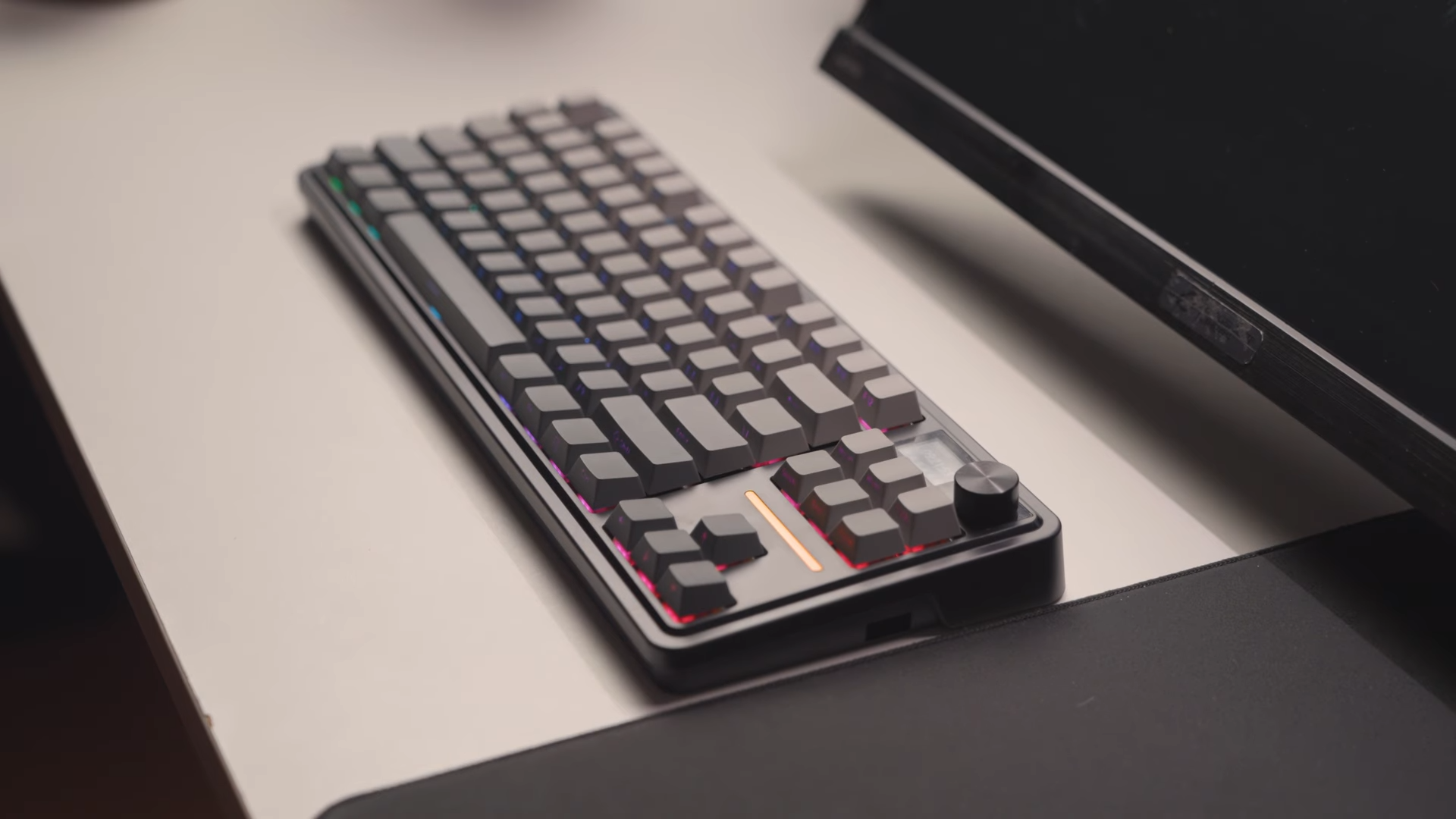
Redragon sent me their latest Antonium Pro mechanical keyboard to put through its paces in the studio. I have spent significant time testing their recent releases, and this new model highlights a refined design shift that makes the brand feel more polished than before. This evolution shows a clear effort to move away from generic budget builds toward highly deliberate, user-focused designs.
This mechanical keyboard takes direct inspiration from its sibling, the Starblade Pro, while introducing highly requested physical upgrades. Finding a balanced layout with productive shortcuts remains a priority for many users searching online storefronts like Amazon. My extensive hands-on testing provides a clear picture of how this device performs under daily workloads.

Layout and Structural Build
The Antonium Pro adopts a highly functional 80% layout, effectively presenting a classic tenkeyless (TKL) footprint. RedDragon opted to replace the standard print screen and pause keys with a control knob and an LCD screen, maximizing the physical real estate.
The chassis itself utilizes an ABS plastic construction, which delivers a lightweight but slightly flexible body. Bending is noticeable under pressure, particularly in the middle section of the frame, though it remains well within acceptable limits for a daily driver. The classic RedDragon side profile returns here, neatly housing the power switch, USB port, and dedicated wireless dongle holder on the side. This layout keeps your cables tidy and provides convenient storage for wireless accessories.

LCD Screen and Volume Knob Functionality
Integrating a dedicated LCD screen and a rotary control knob elevates the utility of this keyboard beyond basic layouts. The aluminum knob offers heavy tactile steps alongside a physical click, although it does suffer from a slight wobble when manipulated. This display screen communicates essential system metrics, allowing you to monitor battery levels, connectivity status, and basic configurations instantly. It reduces the need to check desktop software widgets while working.

Customization options extend to visual flair through the physical display menu. Pressing the rotary dial allows you to select and run a pre-installed GIF directly on the screen. Operating these system functions requires navigating the built-in software, giving users a quick way to personalize their desktop aesthetic. You can easily switch between custom animations and functional metrics depending on your mood.

Customizable RGB Lighting and Manual Bugs
A thick, distinct RGB light strip wraps around the keyboard to create a prominent underglow effect on your desk. Users can modify this lighting by holding down the function key paired with the page down button to cycle colors, or the home key to change effects. The brightness of this underglow matches the moderate output seen on the previous Starblade Pro model. It provides a clean, subtle mood light rather than an overpowering desk illumination.

Keycap Profiles and Switch Performance
Typing comfort relies heavily on the double-shot Cherry profile PBT keycaps included with this model. These keycaps feature clean, side-printed characters that allow light to pass through with a soft, readable glow. They avoid looking overly bright, ensuring the legends remain perfectly legible during late-night typing sessions. The matte texture feels great under the fingers and resists finger oil buildup over time.

Underneath the keycaps sit the linear Mint Mambo switches, which are identical to those featured in the Starblade Pro. These switches lack LED diffusers, explaining the slightly dimmer illumination profile of the keyboard backlighting.
The internal hot-swappable sockets support both three-pin and five-pin hardware, allowing enthusiasts to swap switches easily without soldering. Testing different switches is a great option if you prefer a heavier tactile typing feel.

Acoustic Profile and Typing Performance
The acoustic signature of the Antonium Pro is defined by its internal plate structure and the Mint Mambo linear switches. Typing on this board produces a deep, consistent sound that avoids high-pitched clicking. Because the materials mirror the Starblade Pro, the sound profile remains entirely uniform across both models. Users who enjoy a solid, low-frequency clack will be pleased with the default acoustics.
Audiophiles seeking a quiet office keyboard will find the dampening adequate for daily tasks. The switches glide smoothly without heavy spring ping or scratchiness during rapid actuation. Swapping the stock linear switches for silent alternatives is incredibly straightforward due to the universal hot-swap sockets. It gives modders an excellent starting point for further sound optimization.

Comparing the Antonium Pro and Starblade Pro
These two keyboards share a striking physical resemblance that goes beyond simple brand styling. They utilize the same internal switches, keycaps, overall colorways, and structural materials, resulting in an identical typing feel. The sound signature produced during rapid typing is virtually indistinguishable between the two units. Both keyboards share the exact same internal structural design.
Choosing between these options comes down to your personal aesthetic preferences and utility requirements. The Starblade Pro caters to those seeking a minimal, clean, and sleek design. Selecting the Antonium Pro provides the physical volume knob and functional LCD screen for a slight compromise in minimalist aesthetics. Both options deliver an identical baseline performance for your daily setup.

Final Thoughts — Price & Value
Evaluating this keyboard highlights how RedDragon has successfully refined its hardware approach to target budget-conscious consumers on Amazon. The addition of highly requested premium features like the rotary knob and LCD display adds clear value to this setup. It stands as a reliable, highly functional tool for both intensive gaming and daily workflow tasks.
Users seeking a rugged, premium aluminum frame might find the ABS plastic construction lacking in structural stiffness. However, the hot-swappable switch sockets and standard Cherry profile PBT keycaps make it an incredibly versatile platform for future upgrades. I recommend this model to anyone wanting a feature-rich, customizable keyboard without paying a premium price.
