

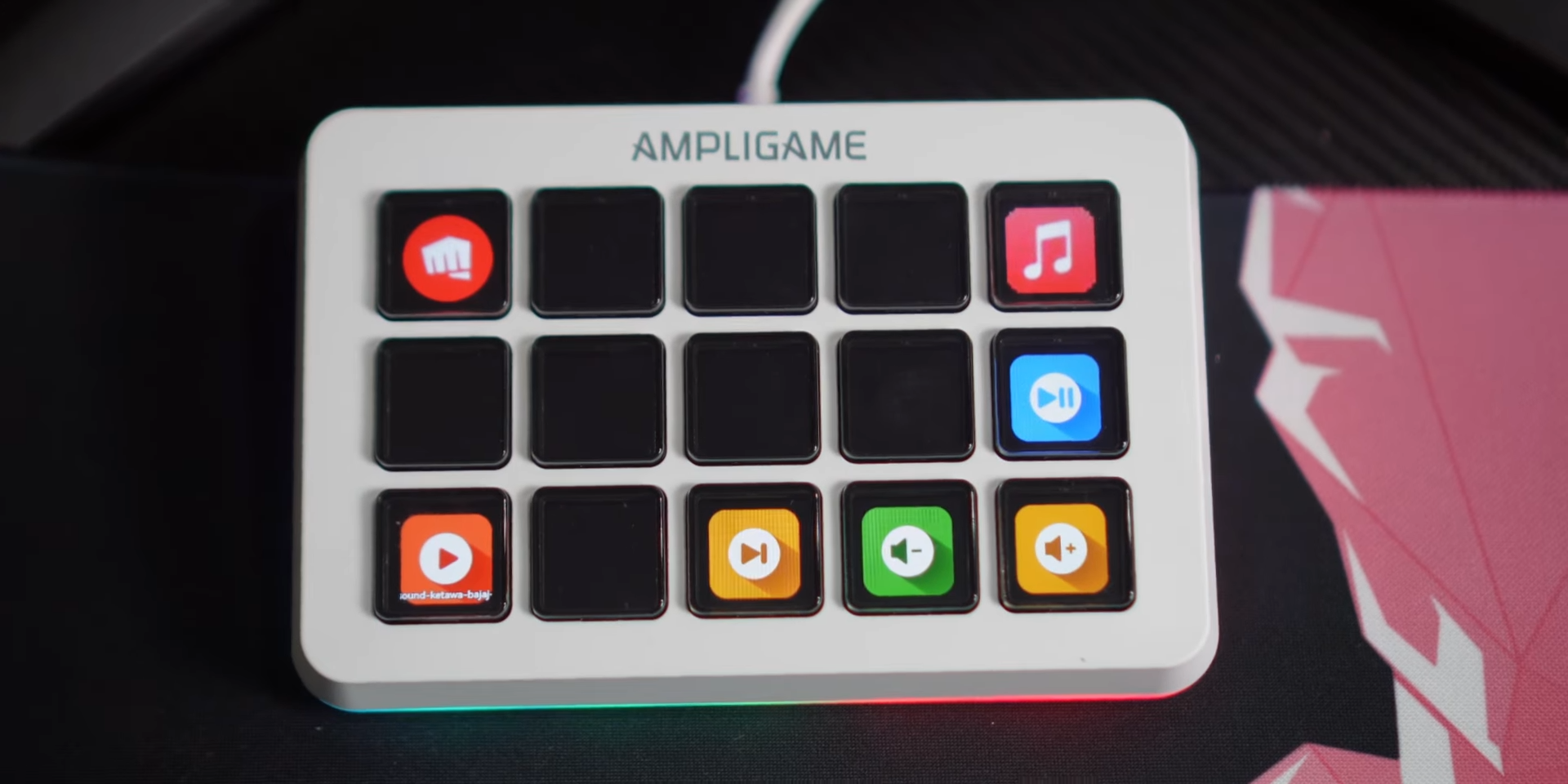
Content creators seeking to optimize their workflow often find themselves looking at stream controllers to execute quick shortcuts, though dominant brand options carry incredibly high price tags. To solve this problem, Fifine has introduced a highly competitive alternative known as the AmpliGame D6, priced at a much more accessible point. Known primarily for their high-quality, budget-friendly microphones, the brand is now leveraging its popularity in the streaming space to deliver a versatile, 15-key macro pad.
I spent extensive time putting this device through its paces to see how it holds up against more expensive industry standards. My evaluation relies strictly on hands-on analysis of the features, hardware response, and custom software mapping to help you determine if this budget-friendly hardware belongs on your desk.
Design and RGB Aesthetics
The physical styling of this controller departs from the plain, utilitarian appearance common among traditional stream decks. Fifine offers the device in two neutral color options, including a classic black and a clean white variant. Selecting the white variant highlights an elegant and clean aesthetic contrast that stands out on any modern desktop setup, unlike premium competitors that typically only offer single-color black chassis options.

A prominent visual highlight of this device is the integrated RGB lighting system, which adds a lively pop of color to any desktop setup. A dedicated physical hardware button on the chassis allows you to easily cycle through various lighting modes. You can configure the illumination to cycle through full RGB spectrums, lock onto a single static LED color, or turn off completely depending on your personal workspace preferences.

The inclusion of these customizable light elements ensures that the device matches modern gaming and streaming setups. Having a physical button to cycle through these visual modes removes the need to open secondary software just to change the lighting look. It represents a thoughtful design touch that prioritizes immediate visual customization for the user.
Build Quality and Button Tactility
Examining the physical construction reveals a full plastic housing paired with glossy buttons. Cheaply made stream controllers often cut corners to meet low price targets, and this device shows some compromises in its material density. The plastic chassis feels lightweight, and the keys themselves exhibit a slight wobble when you rest your fingers on them.
Pressing the keys provides a tactile experience that feels somewhat inconsistent, as the physical click feedback is noticeable during some presses but feels slightly mushy on others. Despite this minor lack of structural solidity, the actual input responsiveness remains flawless. Commands execute immediately upon pressing a key, showing zero lag or missed inputs during intense operational sessions.

Visually, the icons and graphics displayed on the key screens appear remarkably clear and sharp. The screen colors are vibrant and easily legible under different desk lighting conditions. This high level of visual clarity compensates nicely for the slightly loose physical feel of the keys, ensuring you always know exactly what button you are pressing.
Software Customization and UI Layout
Setting up the controller requires downloading the official software utility, which is fully compatible with both macOS and Windows operating systems. The application features a clean user interface that avoids unnecessary complexity, making macro mapping accessible. The configuration window places your available tool menus on the right, the interactive 15-button grid layout in the middle, and advanced settings at the bottom.
Mapping functions is as simple as utilizing a direct drag-and-drop action to assign shortcuts to your desired key locations. You can effortlessly link fast-access shortcuts to specific software applications or target complex website URLs. To expand your control potential, the utility supports creating up to 10 distinct profile pages, giving you a massive library of customized shortcuts.

Navigating through these multiple pages is highly intuitive, allowing users to cycle through layouts on the fly. The software avoids the clunky nesting of menus that plagues other budget hardware utilities on the market. This streamlined approach allows you to build a highly personalized control deck in just a few minutes of configuration.
Direct OBS and Streamlabs Integration
Streamers will find that this controller connects directly to primary broadcasting applications without demanding tedious workarounds. The native software features direct integration modules for both OBS Studio and Streamlabs. There is absolutely no requirement to source, install, or configure third-party plugins to establish a stable connection with your broadcasting setup.
Changing live scenes, toggling sources, or muting audio feeds is handled entirely via direct drag-and-drop actions in the configuration menu. You simply select your desired OBS actions from the list and place them onto the virtual key grid. The native integration ensures that commands execute instantly, allowing you to manage complex broadcasts without interrupting your flow.

Targeting active content creators is clearly the core goal of this design, as evidenced by how seamlessly the device handles standard streaming tasks. The software registers the active streaming software immediately upon launch. It removes the technical barriers that often discourage entry-level broadcasters from integrating a dedicated macro controller.
Workflow Versatility for Video Editors
The practical application of this device extends far beyond live video broadcasting. Video editors, digital artists, and office professionals can utilize the customizable key binds to accelerate their daily production workflows. By assigning complex hotkey combinations to a single physical key press, you can bypass repetitive keyboard shortcuts.
Working within editing applications like Adobe Premiere Pro becomes much faster when mapping essential tools to the device. For instance, you can map the cut tool shortcut to a specific button, allowing you to make quick edits with a single press. This flexibility transforms the controller into a highly customizable productivity pad for non-streamers.
The ability to customize profiles specifically for different creative suites makes the hardware highly adaptable. You can configure one page for streaming, another page for video timeline editing, and a third page for general system navigation. This cross-functional capability adds massive everyday utility to the device.
Final Thoughts — Price & Value
Priced at approximately 1.3 million IDR, this device sits in a highly competitive spot compared to premium alternatives. The savings are substantial, making it an incredibly appealing entry point for creators who cannot justify the premium price tag of dominant market brands. The inclusion of dynamic RGB aesthetics, robust dual-OS software compatibility, and direct OBS integration delivers an impressive feature set that justifies the investment.

Minor compromises in the physical build materials and key wobble do exist, but they do not detract from the stellar responsiveness and ease of use. The intuitive drag-and-drop software combined with the 10-page layout capacity provides all the flexibility required for both live broadcasting and professional editing workflows. Choosing this device represents a highly cost-effective path to optimizing your desktop productivity without breaking your budget.
