

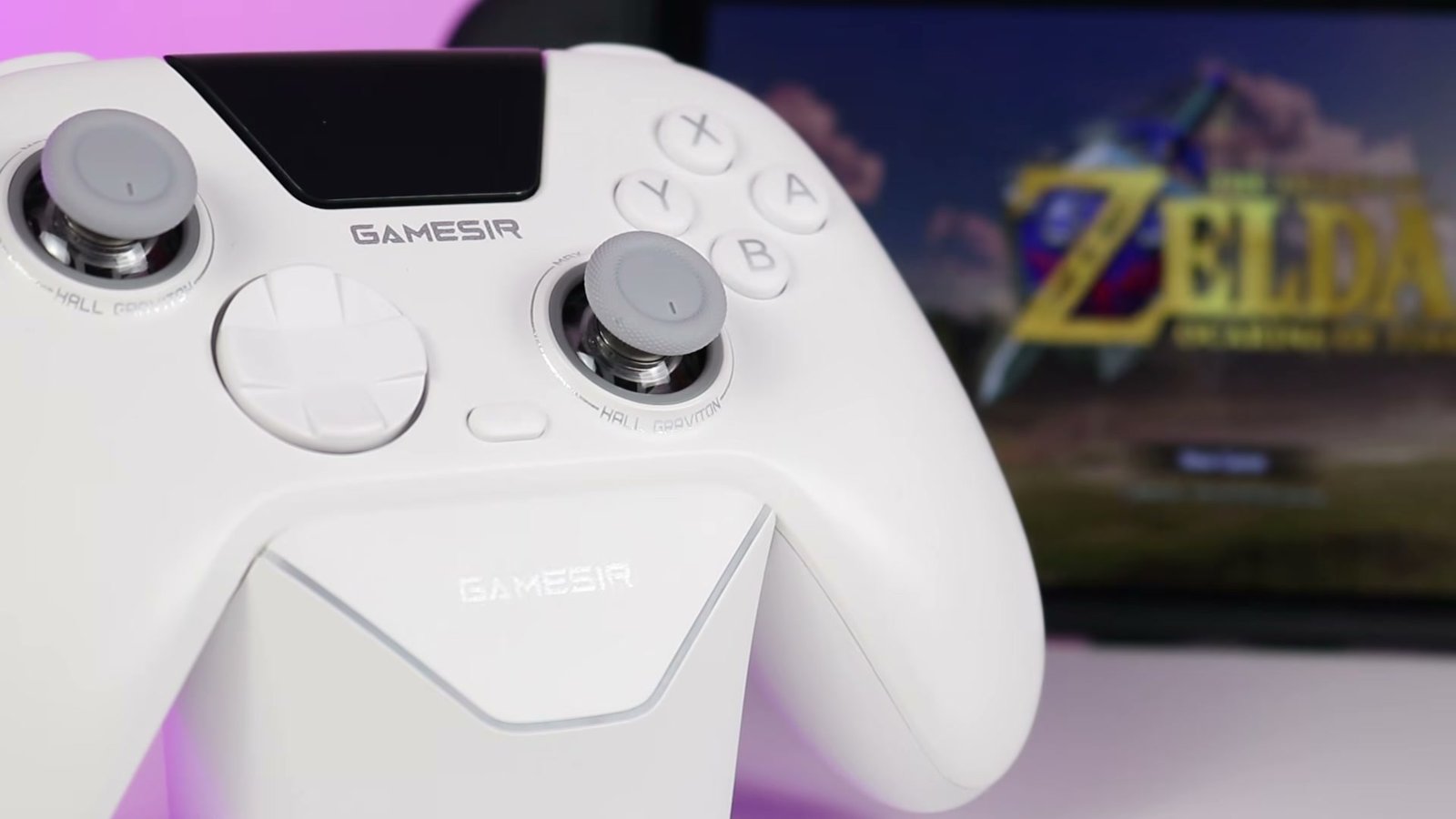
The GameSir Nova Vision is a $54.99 wireless controller built for Nintendo Switch 2, Switch, PC, and mobile that embeds a 0.96-inch LCD screen directly into the faceplate. Running GameSir’s Vision OS, that compact display lets you swap profiles, remap back buttons, tune stick dead zones, and switch connection modes without opening a companion app on Amazon. Budget controllers rarely pack both on-device telemetry and adjustable-tension Hall-effect sticks at this price.
I tested the GameSir Nova Vision across Switch 2 handheld and docked sessions, PC 2.4 GHz wireless play, and Vision OS menu navigation. Putting its 30–80 gf stick tension rings, dual-mode trigger locks, and built-in display through real gameplay quickly shows whether the screen is a gimmick or a practical upgrade. Here is how the Nova Vision performs in daily use.
GameSir Nova Vision
The Good (Pros)
- Built-in 0.96-inch LCD with Vision OS for instant profile and dead-zone tweaks
- Adjustable-tension Hall-effect thumbsticks (30 to 80 gf)
- Dual-mode triggers switching between Hall-effect analog and micro switches
- Tri-mode wired, 2.4 GHz, and Bluetooth up to 1,000 Hz polling
- Includes two back buttons and 6-axis gyro at $54.99
The Bad (Cons)
- Small 0.96-inch screen cannot configure macros or custom wallpapers without the app
- 1,000 Hz max polling trails pricier esports PC pads
- Two rear buttons instead of four paddles
Quick Navigation (Table of Contents)
- GameSir Nova Vision Specifications
- Design, Charging Dock & Faceplate Ergonomics
- 0.96-Inch Vision OS Display & On-Controller Controls
- Adjustable-Tension Hall-Effect Thumbsticks (30–80 gf)
- Dual-Mode Triggers & Rear Back Buttons
- Top USB-C Port, Pogo Pins & Multi-Platform Pairing
- Real-World Switch 2 & PC Gameplay Performance
- Final Thoughts — Price & Value
- Frequently Asked Questions
GameSir Nova Vision Specifications
| Specification | GameSir Nova Vision |
|---|---|
| Built-In Display | 0.96-Inch LCD Running Vision OS |
| Thumbsticks | Hall-Effect Sticks with Adjustable Tension (30–80 gf) |
| Triggers | Dual-Mode (Hall-Effect Analog / Micro Switch Stops) |
| Connectivity & Polling | Wired USB-C, 2.4 GHz Wireless, Bluetooth (Up to 1,000 Hz) |
| Extra Inputs & Motion | 2 Remappable Back Buttons + 6-Axis Gyro |
| Platform Compatibility | Nintendo Switch 2, Switch, PC, Mobile (iOS / Android) |
| App Features | Macros, Turbo, Firmware Updates, Custom Wallpapers |
| Retail Price | $54.99 |
Design, Charging Dock & Faceplate Ergonomics
Out of the box, the GameSir Nova Vision sports a clean matte-white shell with subtle gray thumbstick rings and a glossy dark bezel housing its center display. Comfortably contoured grips sit naturally in medium and large hands, avoiding the cramped feel of some compact Switch-oriented pads. Resting the controller on its matching white charging dock keeps your desk tidy while topping up the battery between sessions via rear pogo pins.
Face buttons offer crisp, tactile actuation without excessive wobble, and the circular-dish D-pad handles fighting games and retro platformers cleanly. Even with the LCD module integrated above the guide area, weight feels balanced and never top-heavy during long play. At $54.99, the overall fit and finish punches noticeably above typical budget third-party Switch controllers.

0.96-Inch Vision OS Display & On-Controller Controls
Powering on the 0.96-inch LCD reveals Vision OS, a crisp menu system navigated right from the controller's own D-pad and face buttons. I could switch between saved game profiles, remap standard or rear buttons, adjust stick sensitivity and dead zones, pick wired/2.4 GHz/Bluetooth modes, and check exact battery percentage in seconds. Having dead-zone and profile controls built straight into the hardware is genuinely liberating when playing on Switch 2 without a PC nearby.
Advanced extras like multi-step macros, turbo fire, firmware updates, and custom screen wallpapers still require opening the GameSir companion app. For everyday adjustments mid-game, however, Vision OS eliminates 90 percent of the menu hassle that plagues multi-platform controllers. The screen stays bright and sharp indoors and dims automatically when idle to save battery.

Adjustable-Tension Hall-Effect Thumbsticks (30–80 gf)
Instead of standard drift-prone potentiometers, GameSir equips the Nova Vision with Hall-effect magnetic thumbsticks featuring mechanical tension adjustment rings. Turning the collar around each stick lets you dial resistance smoothly between a feather-light 30 gf and a firm 80 gf. I loved tightening the right aiming stick for shooters while keeping the left movement stick looser for fast strafing.
Zero-drift magnetic sensing combined with on-screen dead-zone tuning in Vision OS gives you remarkable control over stick responsiveness. Centering accuracy felt rock-solid in testing, with smooth radial output and no sticky cardinal snapping. Finding adjustable-tension Hall-effect sticks on a $54.99 controller is still rare and makes this a standout feature.

Dual-Mode Triggers & Rear Back Buttons
Sliding the physical switches on the underside flips both triggers instantly between full-travel Hall-effect analog pulls and hair-trigger micro switches. In racing games, the smooth analog sweep gives precise throttle modulation out of corners. Flipping to micro-switch mode turns the triggers into crisp, short-throw mouse clicks ideal for rapid semi-auto firing in shooters.
Two ergonomic back buttons sit naturally under your middle fingers and can be remapped on the fly through Vision OS. While hardcore PC competitors sometimes prefer four paddles, two well-placed rear buttons cover jump and reload binds cleanly on Switch 2 and PC. Top USB-C connectivity and shoulder bumpers feel sturdy with zero mushiness.

Top USB-C Port, Pogo Pins & Multi-Platform Pairing
GameSir includes tri-mode connectivity across wired USB-C, low-latency 2.4 GHz wireless, and Bluetooth, reaching up to 1,000 Hz polling on PC. Switching between Switch 2, a Windows laptop, and an Android phone takes seconds directly from the Vision OS connection menu. Underneath, four gold pogo pins mate cleanly with the charging dock so the controller is always topped up.
Built-in 6-axis gyro support works out of the box for Switch 2 and Switch motion aiming, adding crisp micro-corrections in Zelda and Splatoon titles. Latency over the 2.4 GHz receiver felt snappy and consistent at 1,000 Hz, easily keeping pace with casual and ranked PC play. Only Xbox consoles are left off the compatibility list.

Real-World Switch 2 & PC Gameplay Performance
Playing directly on Switch 2, the GameSir Nova Vision pairs reliably and wakes smoothly without finicky button combos. Motion aiming, responsive micro-switch triggers, and tuned stick tension combine to make handheld and tabletop play feel far more precise than stock Joy-Con grips. Vibration motors provide clean, balanced rumble feedback without rattling the plastic shell.
Moving over to PC titles at 1,000 Hz polling confirms that the Nova Vision is no one-trick Switch accessory. Swapping between analog racing profiles and micro-trigger FPS profiles takes two seconds on the controller screen alone. At $54.99, very few multi-platform pads offer this much hardware versatility without compromises.

💡 Recommended Alternatives: Compare this $54.99 pad against higher-end wireless options in our Flydigi APEX 6 Pro Review, our Telesin MasterGrip Neo Review, and browse the full Controllers Hub.

GameSir Nova Vision Wireless Controller
- 0.96-Inch Vision OS LCD
- 30–80 gf Hall-Effect Sticks
- Dual-Mode Analog & Micro Triggers
- 1,000 Hz Tri-Mode Wireless
- 6-Axis Gyro & 2 Back Buttons
Final Thoughts — Price & Value
Priced at $54.99, the GameSir Nova Vision packs an absurd amount of hardware innovation into a budget-friendly Switch 2 and PC controller. Its 0.96-inch Vision OS display solves real-world profile and dead-zone headaches without forcing you into a phone app. Add adjustable-tension Hall-effect sticks, dual-mode triggers, and 1,000 Hz tri-mode wireless, and the value proposition is tough to beat.
Buy the GameSir Nova Vision on Amazon if you game on Switch 2, Switch, or PC and want on-device customization with drift-free sticks under $60. Its charging dock, 6-axis gyro, and dual-mode triggers round out a remarkably complete package. Skip it only if you need native Xbox console support or demand 4,000–8,000 Hz competitive PC polling with four rear paddles.
Frequently Asked Questions
What can the built-in screen on the GameSir Nova Vision do?
The 0.96-inch LCD runs Vision OS, letting you switch profiles, remap standard and back buttons, adjust stick sensitivity and dead zones, choose connection modes, and view battery levels directly on the pad. You do not need a PC or smartphone nearby for everyday adjustments. Macros, turbo, firmware updates, and custom wallpapers are configured through the GameSir app.
Does the GameSir Nova Vision work with Nintendo Switch 2?
Yes, the GameSir Nova Vision is built for Nintendo Switch 2 alongside original Switch, PC, and mobile devices. It includes full 6-axis gyro motion controls for Switch games and switches platforms effortlessly via Vision OS. It supports wired USB-C, 2.4 GHz wireless, and Bluetooth connections.
Are the thumbsticks on the GameSir Nova Vision Hall-effect?
Yes, both thumbsticks use drift-resistant Hall-effect magnetic sensors rather than traditional potentiometer modules. Each stick also features a mechanical tension ring allowing you to adjust resistance between 30 gf and 80 gf. That lets you tailor stick stiffness separately for movement and aiming.
What is the polling rate of the GameSir Nova Vision?
The GameSir Nova Vision supports up to a 1,000 Hz polling rate in wired USB-C and 2.4 GHz wireless modes on PC. That delivers responsive 1ms input intervals suited for fast-paced shooters and fighting games. Bluetooth mode operates at standard console and mobile polling speeds to conserve battery.
