

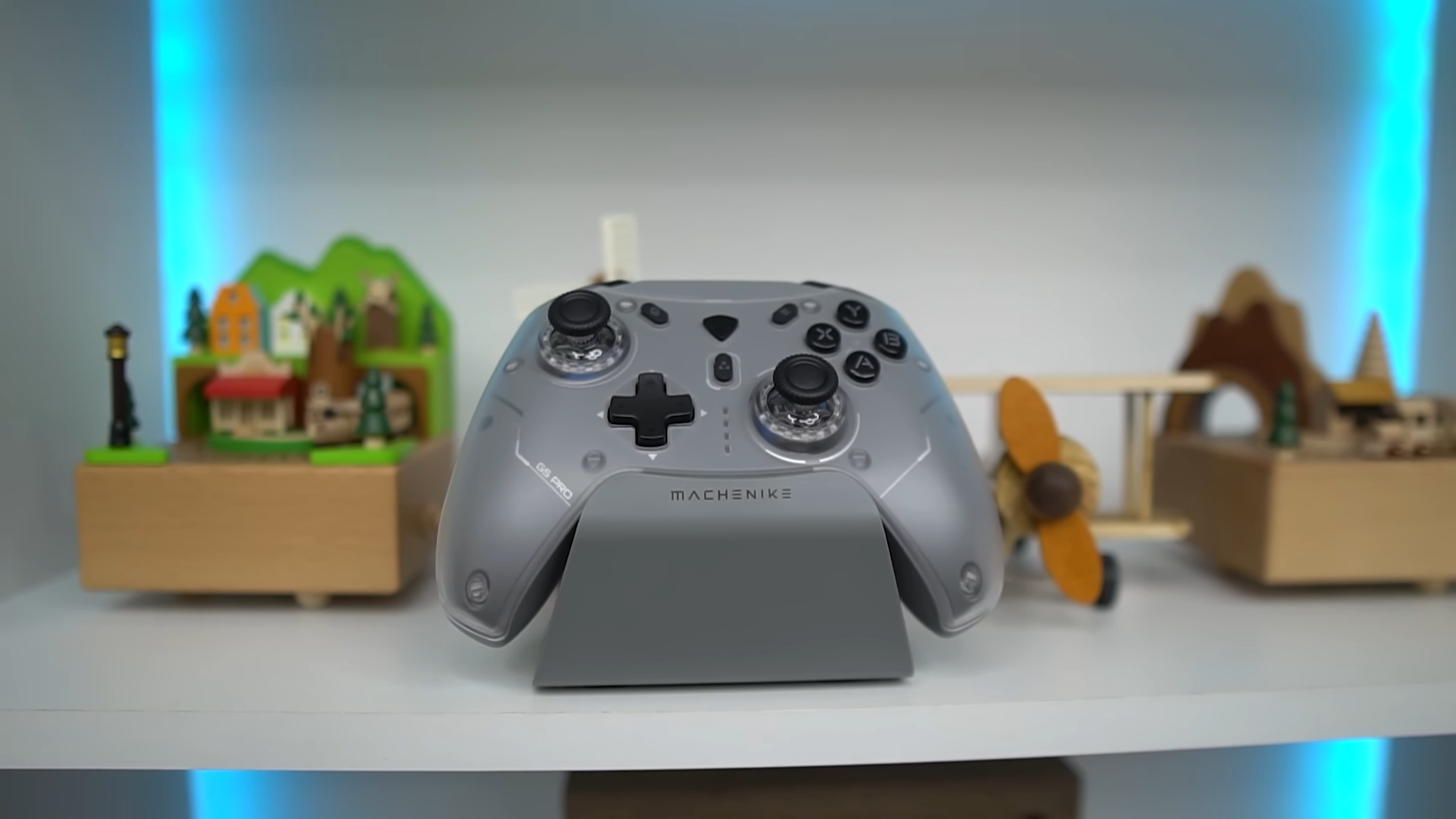
During my extensive career reviewing gaming peripherals at TechXReviews, I have observed how easily marketing promises can fall apart during intense, competitive gaming sessions. The Machenike G5 Pro Max SE enters a highly competitive marketplace, promising drift-free analog performance, multi-platform adaptability, and premium charging accessories in a single package. I took this controller through its paces to see if it stands up to heavy daily use.
My rigorous testing protocol reveals how well this controller delivers on its ambitious claims rather than simply mimicking the aesthetics of its high-end rivals.

Quick Navigation (Table of Contents)
Unboxing Experience and Ergonomic Design
Opening the packaging immediately signals that the manufacturer focused heavily on providing a premium presentation for the consumer. Inside the retail box, I uncovered the controller itself, a dedicated magnetic charging dock, a durable USB-C cable, custom stickers, and a compact 2.4G wireless dongle. It is rare to see such a complete suite of accessories included without requiring an additional purchase.

Holding the controller reveals a highly balanced weight distribution that feels incredibly substantial without causing physical fatigue during extended gaming sessions. The back shell features a fine, slip-resistant texture that enhances overall grip, while the familiar physical layout ensures a seamless transition from first-party controllers. I immediately noticed how natural the curves feel in my palms.
Additional functional elements like the back paddles offer extra customizable inputs without cluttering the ergonomic profile of the chassis. The tactile buttons deliver a satisfying feedback response that avoids being overly clicky or excessively soft during rapid inputs. This balance makes the buttons feel remarkably responsive during fast-paced action sequences.

Device Compatibility and Connectivity
Modern gaming setups often require switching between multiple platforms, and this hardware addresses that modern requirement directly. I successfully tested the device across PC, Nintendo Switch, Android, iOS, and macOS environments to evaluate its versatility. This level of cross-compatibility is ideal for multi-platform gamers.

Connecting to these different systems is simplified by a dedicated physical hardware toggle switch located on the back of the controller. This physical design choice completely eliminates the need to navigate complex software menus just to pair the device with a new console or mobile phone. It is a quick physical flip, and you are ready to play.
Gamers can choose between a low-latency wired USB-C connection, a reliable 2.4G wireless dongle, or standard Bluetooth connections depending on their current platform. This broad compatibility ensures that transitioning from desktop gaming to mobile play remains incredibly straightforward and seamless. The wireless connection stability remained perfect throughout my testing environment.
Hall Effect Joystick and Trigger Technology
Standard controllers often suffer from premature mechanical wear and stick drift due to physical contact points scraping inside their analog assemblies over time. This controller utilizes advanced Hall Effect sensors that rely entirely on magnetic fields to measure directional movement precisely. Because there is no physical contact, the internal parts do not degrade.

This magnetic technology ensures that the analog sticks remain highly accurate and completely free of stick drift even after months of intense usage. The triggers also utilize this magnetic sensing mechanism to provide an incredibly smooth, consistent pull from start to finish. I found this responsiveness to be incredibly beneficial in competitive gameplay.
Gamers can adjust the physical travel distance of the triggers to suit different gaming genres like racing simulators or fast-paced first-person shooters. This high degree of control prevents accidental inputs while maintaining rapid firing rates when the game gets chaotic. The customization allows for a truly personalized hardware experience.

In-Game Latency and Motion Control Performance
In-game latency performance varies slightly depending on the specific connection mode selected during your gameplay sessions. The wired USB-C mode provides the fastest polling rate, followed closely by the reliable 2.4G wireless dongle, with Bluetooth serving as the slowest connection method. Each mode has its clear use case depending on your distance from the screen.
My real-world testing shows that even the wireless modes remain highly responsive and never interfere with competitive gaming performance. The built-in six-axis gyroscope performs exceptionally well, providing highly accurate motion-controlled aiming during intensive sessions on the Nintendo Switch. This makes motion aiming in shooter games feel incredibly smooth.
Button presses feel crisp and immediate, providing excellent physical feedback that keeps you connected to the actions on screen. The integrated rumble motors deliver balanced haptic feedback that enhances immersion without shaking the controller out of your hands. The dynamic range of the haptics is impressive.

The Charging Dock and Battery Architecture
Managing battery life is simplified by the inclusion of a high-quality, dedicated magnetic charging dock in the box. Placing the controller onto the cradle triggers an instant magnetic connection that begins charging without requiring any manual alignment or physical wire fiddling. It acts as a perfect display stand when you are done playing.

The dock features a clean visual aesthetic complete with an anti-slip rubber base and subtle RGB lighting accents that elevate the look of any desk. A convenient USB-C pass-through port on the back of the dock allows users to charge secondary accessories simultaneously. This reduces cable clutter on your desktop significantly.
The internal battery delivers approximately eight hours of active gameplay on a single charge, which is plenty for most gaming sessions. This lifespan fluctuates depending on your active rumble intensity and the brightness settings of the customizable RGB lighting effects. Keeping the lighting low will extend your playtime significantly.

Customization and the Key Linker Application
Advanced players can deeply customize their input profiles using the highly intuitive Key Linker companion application. This software allows for full button remapping, trigger response curve modifications, and precise analog stick dead zone adjustments. It elevates the controller from a basic gamepad to a pro-tier tool.
Aesthetic customization is handled through the app as well, featuring five distinct RGB lighting modes with dedicated speed and brightness controls. Physical customization is supported too, allowing users to swap out the thumbsticks to match their personal height and grip preferences. Changing the sticks takes only a matter of seconds.
Switching between different platforms does require some physical adaptation because the button layout changes visually between PC and Nintendo Switch configurations. This minor layout transition represents one of the very few learning curves on this highly versatile device. Once you adapt, the transition feels entirely natural.
Final Thoughts — Price & Value
The inclusion of a dedicated charging dock, Hall Effect sensors, and a highly customizable companion app positions this controller as an incredibly high-value package. Gamers seeking a single reliable gamepad for their PC, Switch, and mobile devices will find the feature set incredibly compelling for the price point. It outclasses many of its more expensive competitors in pure functionality.

Minor layout differences between systems require a brief physical adjustment period, but the hardware reliability makes this minor inconvenience easy to overlook. I find this controller to be a robust, future-proof investment for players tired of dealing with stick drift and mushy inputs on standard first-party pads. It stands as a reliable, highly versatile accessory that delivers on every promise.
