

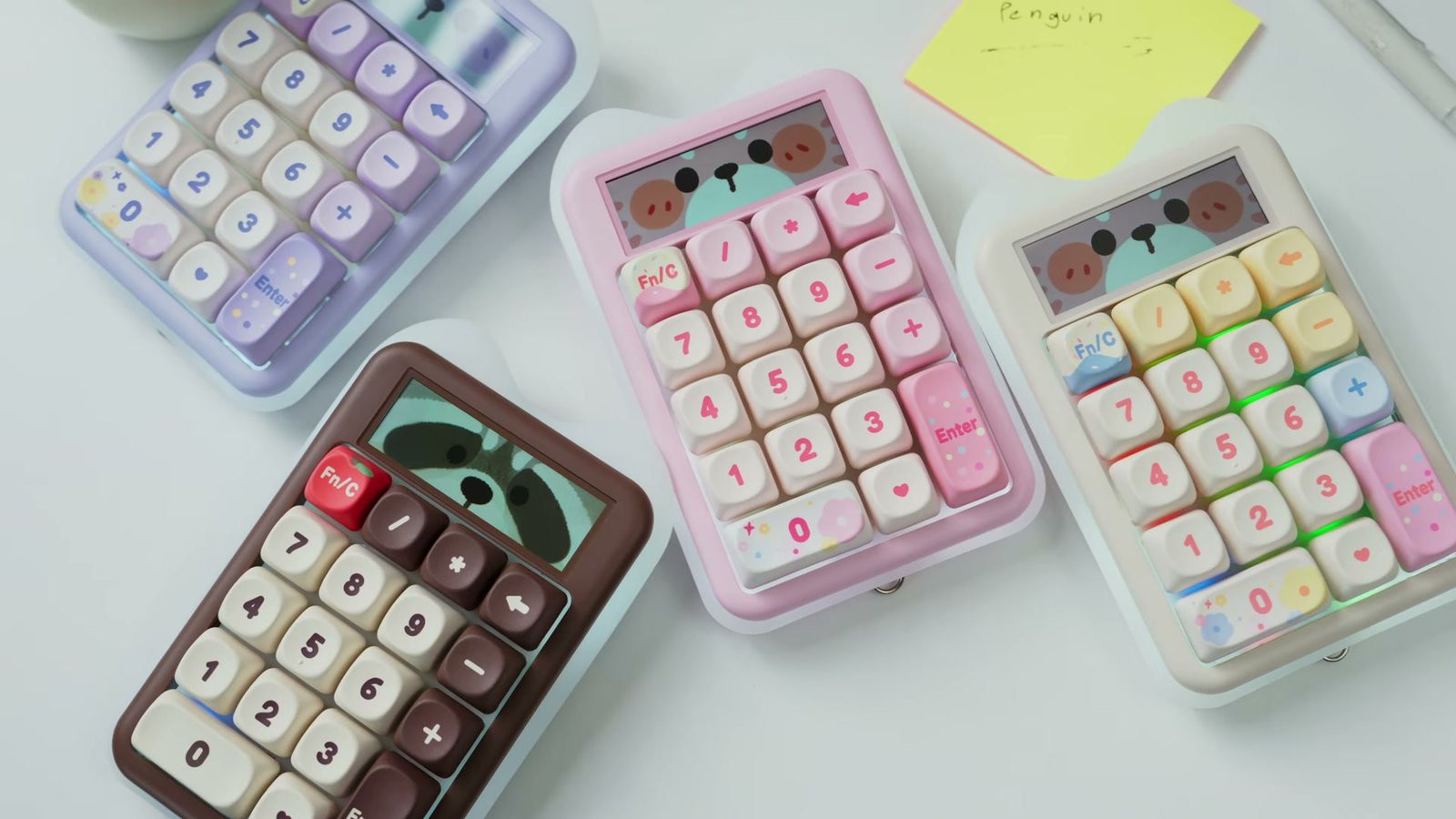
Compact 65% and 75% mechanical keyboards free up desk space for mouse sweeps, yet leaving out a number pad slows down spreadsheets and quick math. Listed at $69.99 MSRP (and often around $54.99–$70.83 on AliExpress and Amazon), the YUNZII C21 solves that gap as an 18-key wireless mechanical numpad that converts into a standalone calculator at the press of a button. It also packs a 428 × 142 color TFT display, gasket-mounted acoustics, and a 2,500mAh tri-mode battery.
I tested the YUNZII C21 across all four colorways, checking its standalone calculator toggle, hot-swappable linear switches, MOA PBT keycaps, and web configurator. I also evaluated its TFT screen animations, Snake mini-game, and desk pairing alongside 75% keyboards. Here is how this 2-in-1 mechanical keypad performs in daily use.
YUNZII C21
The Good (Pros)
- 2-in-1 wireless mechanical numpad and standalone calculator
- 428x142 color TFT screen with custom GIFs and Snake mini-game
- Gasket-mounted structure with pre-lubed linear switches and MOA PBT keycaps
- Tri-mode Bluetooth, 2.4GHz, and USB-C with 2500mAh battery
The Bad (Cons)
- Relies on YUNZII web software rather than native QMK/VIA
- Playful cat-ear styling and plush tail may not suit minimalist offices
Quick Navigation (Table of Contents)
Technical Specifications
| Specification | YUNZII C21 |
|---|---|
| Layout | 20% Mechanical Numpad (18 Keys + Standalone Calculator Mode) |
| Display | Color TFT Screen (428 × 142) + Custom GIFs & Snake Game |
| Mounting & Acoustics | Gasket-Mounted with Multi-Layer Foam & Silicone Padding |
| Switches & PCB | Full-Key Hot-Swappable (3/5-Pin), YUNZII Candy / Sage Linear |
| Keycaps | Dye-Sublimated PBT (MOA Rounded Profile) |
| Lighting | South-Facing RGB + Frosted Side Light Strip |
| Connectivity | Tri-Mode (2.4GHz Wireless, Bluetooth, Wired USB-C; up to 5 Devices) |
| Battery | 2,500mAh Rechargeable |
| Software | YUNZII Web-Based Configurator |
| Colorways & Price | Pink, Beige, Purple, Coffee / $69.99 MSRP (~$54.99–$70.83) |
Cat-Ear Design, MOA Keycaps & Standalone Calculator

Available in Pink, Beige, Purple, and Coffee, the YUNZII C21 pairs rounded cat-ear framing with durable dye-sublimated PBT keycaps in a comfortable MOA profile. A dedicated mode button switches instantly between PC numpad input and a standalone physical calculator, letting me crunch numbers locally even when my computer is asleep. Its elongated zero key and crisp legends make rapid spreadsheet entry intuitive from day one.
Tri-Mode Connectivity & 2,500mAh Battery

Flipping the keypad over reveals playful cat-paw feet alongside a physical tri-mode switch for 2.4GHz wireless, Bluetooth, and wired USB-C. It supports pairing across up to five devices, making transitions between a desktop PC, laptop, and tablet effortless. Inside sits a generous 2,500mAh battery that keeps both the display and wireless radio running for weeks between USB-C charges.
Gasket Mount, Hot-Swap Switches & RGB Glow

Unlike hollow plastic office calculators, the YUNZII C21 uses a true gasket-mounted plate layered with sound-dampening foam and silicone pads. Paired with factory-lubed YUNZII Candy or Sage linear switches, every keystroke delivers a soft, creamy acoustic profile without metallic ping. Full 3-pin and 5-pin hot-swap sockets let enthusiasts swap switches freely, while south-facing RGB and frosted side strips light up dim desk setups evenly.
428×142 TFT Screen, Custom GIFs & Web Software

Above the top row sits a sharp 428 × 142 color TFT screen that displays time, date, connection status, battery percentage, and live calculator math. Through YUNZII's browser-based web configurator, I uploaded custom GIFs, remapped keys, and tweaked RGB effects without installing bloated desktop drivers. It even includes a playable Snake mini-game right on the screen for quick desk breaks.
Desk Pairing & Everyday Workflow Fit

Pairing the YUNZII C21 alongside a 65% or 75% keyboard gives you the best of both worlds without sacrificing gaming mouse room. You can slide the numpad onto the left side during intense FPS matches or tuck it into a backpack when working from a cafe. Matching colorways like Purple, Pink, and Coffee align seamlessly with YUNZII's C75 boards for a cohesive setup.

Note that while power users might miss native open-source QMK or VIA support, the web-based software handles everyday macros and screen uploads smoothly. Adding the detachable plush tail turns a purely utilitarian accessory into a charming desk centerpiece. Build consistency across all four colorways feels solid and thoughtfully finished.
💡 Recommended Alternatives: Compare this keypad against screen-equipped boards in our Epomaker RT75 Review, check out our Top 5 Best Gaming Keyboards in 2026 guide for compact main boards, or explore our Keyboard Hub.

YUNZII C21 2-in-1 Mechanical Numpad & Calculator
- 2-in-1 Numpad & Calculator
- 428x142 Color TFT + Snake Game
- Gasket Mount + Hot-Swap PCB
- Tri-Mode Wireless (2500mAh)
Final Thoughts — Price & Value
At $69.99 MSRP (and frequently discounted near $54.99), the YUNZII C21 delivers far more personality and acoustic refinement than ordinary wireless numpads. Combining a gasket-mounted hot-swap PCB, PBT MOA keycaps, a 428 × 142 TFT screen, and a standalone calculator in one 2,500mAh package makes the value hard to beat. Few compact keypads offer this much mechanical quality under $70.
Buy it if you use a 65% or 75% keyboard and want a creamy-sounding wireless numpad that doubles as a standalone desk calculator. Skip it if you strictly require open-source QMK/VIA firmware or prefer plain black corporate hardware. Check current availability on Amazon or compare colorways on AliExpress.
Frequently Asked Questions
Does the YUNZII C21 work as a standalone calculator without a PC?
Yes, pressing the dedicated mode key switches the YUNZII C21 into a standalone physical calculator. All calculations run locally on the keypad and appear directly on the built-in 428 × 142 color TFT screen. You do not need an active Bluetooth or USB connection to use calculator mode.
Are the switches on the YUNZII C21 hot-swappable?
Yes, the YUNZII C21 features a full-key hot-swappable PCB compatible with both 3-pin and 5-pin mechanical switches. Out of the box, it comes with factory-lubed YUNZII Candy or Sage linear switches mounted on a gasket-cushioned plate. You can easily swap in tactile or silent switches anytime.
Does the YUNZII C21 support QMK or VIA?
No, the YUNZII C21 uses YUNZII's proprietary web-based configurator rather than native QMK or VIA firmware. Through the web driver, you can still remap keys, record macros, customize RGB lighting, and upload custom GIFs to the TFT display. Changes save cleanly without needing heavy background software.
