

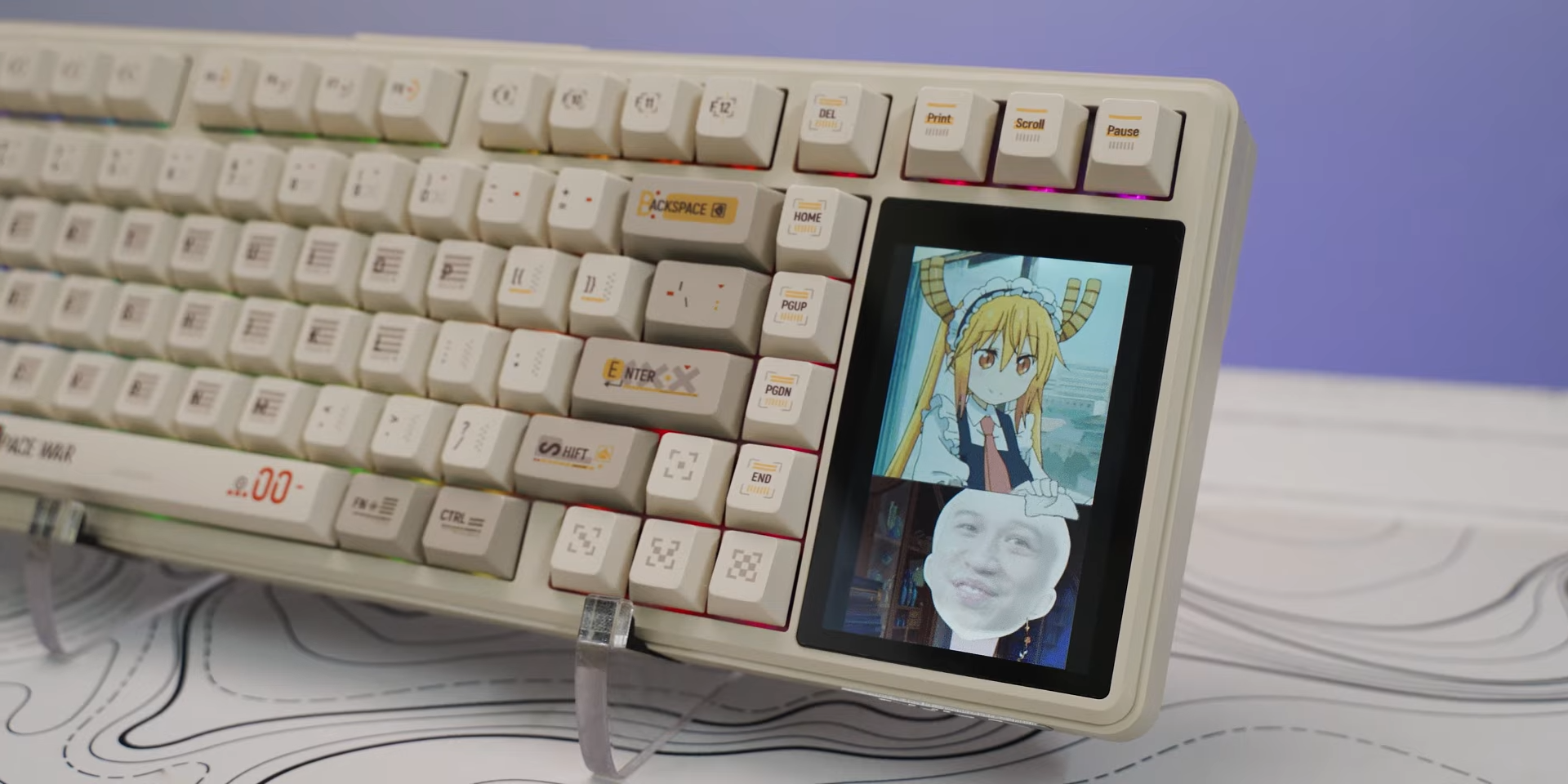
I have seen plenty of wild concepts in the mechanical keyboard space, but combining a smartphone-sized display with a custom keyboard is a bold move. The Aula L99 attempts to bridge this exact gap by replacing a traditional physical numpad with a massive four-inch color touchscreen display. This unique peripheral has caught the attention of enthusiasts looking for ultimate desktop customization and interactive hardware controls.
Priced at approximately $99.99, depending on the specific variant, this keyboard positions itself as an intriguing, mid-range experimental device. Consumers can purchase it through various import channels, though stock levels for certain limited colorways fluctuate. I spent considerable time testing this hardware to determine if this giant screen serves a practical purpose or remains a mere visual novelty.

The Massive 4-Inch Touchscreen
The centerpiece of this keyboard is undoubtedly the 3.98-inch IPS LCD panel, which I will round up to a clean four inches for simplicity. It boasts a resolution of 320 by 480 pixels, delivering vibrant colors and surprisingly wide viewing angles for a keyboard accessory. Users can interact with this display directly via single-touch inputs, enabling seamless navigation through various integrated system menus and on-screen applications.

Behind the scenes, this display functions as a system monitor capable of syncing with your computer to output real-time data. It displays essential diagnostics such as CPU temperature, GPU temperature, battery percentages, and system time directly on your desk. For personalization enthusiasts, the screen accommodates large custom GIF animations and family photos, turning the keyboard into a brilliant digital picture frame.
Utilizing this screen also reveals its alternative role as a virtual numeric keypad, which explains the “L99” naming convention despite the physical layout mimicking a tenkeyless form factor. I found that typing on a flat, non-tactile touch screen lacks the physical feedback necessary for rapid data entry. Utilizing the physical number row remains a far faster and more reliable method for standard numerical typing tasks.

Touchpad Mode and Media Controls
Aula designed this display to perform multiple interactive tasks beyond simple diagnostic monitoring. Swiping through the interface allows you to transform the screen into a fully functional laptop-style touchpad. It supports standard cursor movement alongside dedicated on-screen left and right mouse click zones, providing a backup navigation option directly from your typing position.

Media management becomes highly accessible through the touchscreen interface when paired with external devices. Users can play, pause, adjust volume levels, and skip audio tracks directly from the display while connected to a smartphone via Bluetooth. This layout allows for quick adjustments without needing to minimize active applications or reach for secondary media controllers.
System adjustments such as shifting connection profiles and tweaking the keyboard’s internal settings are handled directly on the panel. Swapping back and forth between different integrated RGB lighting styles, brightness settings, and Bluetooth pairing screens is executed with a few simple taps. This design bypasses the need to open complex computer software suites for basic cosmetic adjustments.

Firmware Struggles and Software Quirks
My testing process was not entirely smooth, as the touchscreen experienced unexpected system freezes during active use. The screen would occasionally lock up entirely, refusing to register touch inputs while the physical keyboard itself continued to function flawlessly. Resolving this issue required researching online solutions, as this is a domestic Chinese release with companion software written entirely in Chinese.

International buyers importing this keyboard face similar software hurdles due to the lack of localized documentation. I located a functioning solution on Reddit, where community members shared a recently released Chinese firmware update that stabilizes the display performance. Applying this update successfully restored stable screen operations, but the initial installation process remains somewhat tedious for non-Chinese speakers.
The official physical user manual provides very limited assistance, listing only four basic key combinations for hardware adjustments. Physical hotkeys are restricted to resetting the device, locking the Windows key, changing lighting effects, and shifting colors. Relying heavily on the screen for basic controls creates a major bottleneck when the display freezes, making the physical manual’s lack of key shortcut listings a notable drawback.

Technical Specs and Sound Profile
Stripping away the screen reveals a highly competent mechanical keyboard built on modern enthusiast-grade specifications. The keyboard features a 1.2mm printed circuit board paired with a flexible polycarbonate plate and full internal sound-dampening foam. It features a five-pin hot-swappable socket design, south-facing RGB light-emitting diodes, and robust double-shot PBT keycaps.

Buyers can choose between two main linear switch variations, specifically the Rain drop switches and the Caramel Latte options. The acoustic signature of the keyboard offers a satisfyingly crisp, poppy, and slightly deep typing sound characteristic of Aula’s recent releases. The factory-lubed stabilizers perform remarkably well out of the box, offering smooth key travel with minimal rattle or ticking on larger keys.
Physical ergonomics are supported by a dual-stage kickstand on the bottom case and four thick silicone feet to prevent desk slippage. A subtle metallic accent strip decorates the rear case, elevating the general visual presentation of the plastic chassis. The structural build quality is solid, showing zero creaking or unsightly plastic molding seams during intense typing sessions.

Battery Consumption and Design Oddities
Powering a massive four-inch color screen alongside a full array of RGB lights requires a substantial power source. Aula equipped this model with a generous 8000mAh battery, which is exceptionally large for modern mechanical keyboards. Running both the touchscreen and the per-key backlighting simultaneously drains this massive capacity in approximately one to two days of continuous use.

Deactivating the screen and backlighting dramatically extends the operational lifespan between charging cycles. Frequent users will need to plug the device in regularly, which brings me to a particularly head-scratching design choice on the top edge. A removable silicone protective cover sits over the USB Type-C port, the physical power switch, and the wireless receiver storage slot.
This silicone flap proved highly inconvenient during daily testing, requiring constant opening and closing to plug in the charging cable. The dangling piece of rubber feels out of place on an otherwise premium-feeling custom keyboard layout. Removing the cover permanently may be the best path forward for users who regularly cycle between wired and wireless modes.

Final Thoughts — Price & Value
The Aula L99 introduces a unique concept to the mechanical keyboard market at a price point of $99.99. It delivers a solid typing experience, delightful acoustic performance, and robust hardware specifications that easily match competitor options. The addition of a fully interactive color touchscreen provides an unmatched platform for displaying custom graphics, system diagnostics, and creative desktop layouts.
Potential buyers must weigh these innovative features against the power demands of the screen and the minor software bugs associated with domestic Chinese firmware. Desktop enthusiasts seeking a highly customizable, eye-catching centerpiece for their workspace will find great value in this quirky keyboard. It remains a fascinating, highly specialized tool that prioritizes visual flair and unique touch-based functionality over simple plug-and-play simplicity.
