

The custom gaming peripheral market has experienced explosive growth recently, drawing in users who previously had little interest in building their own input devices. Historically, acquiring a mechanical keyboard with customized dampening foam, lubricated switches, and specialized plates required purchasing individual components and assembling them by hand.
Emerging brands such as EPOMAKER have recognized this market demand and successfully bridged the gap by mass-producing keyboards that replicate the premium feel of custom builds at a fraction of the cost. The EPOMAKER x Aula F75 stands out as a prime example of this trend, aiming to deliver enthusiast-level quality in a convenient, pre-built package.
My daily workload involves writing extensive scripts, making a comfortable and reliable keyboard an absolute necessity for my setup. Having spent nearly three weeks thoroughly testing this compact, wireless keyboard, I can confidently analyze its performance in both demanding productivity tasks and intense gaming sessions. Priced at an incredibly accessible $69 on Amazon and AliExpress, this model offers a highly competitive entry point into the world of premium mechanical keyboards without requiring buyers to assemble components from scratch.

Form Factor and Connectivity Options
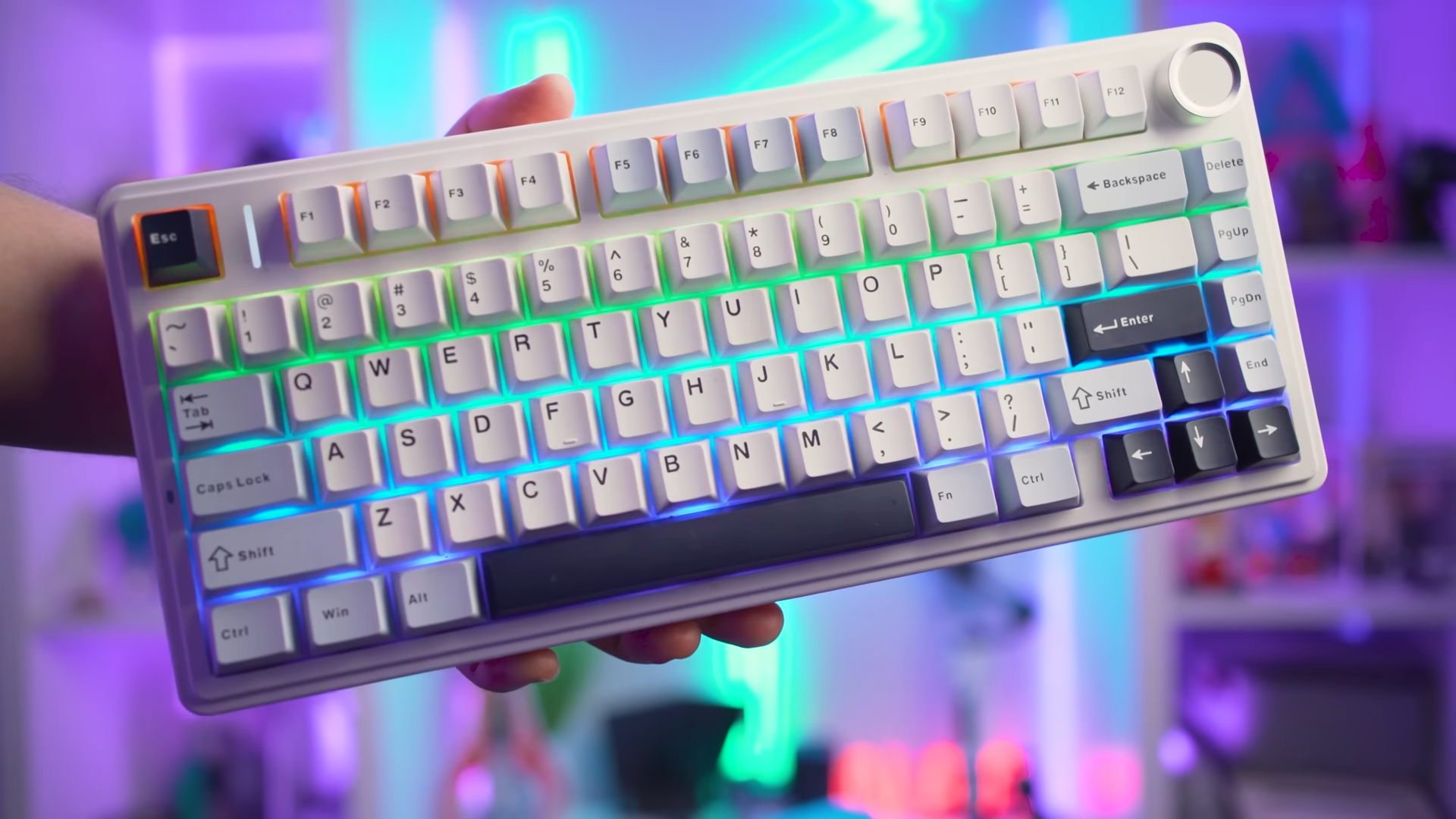
The EPOMAKER x Aula F75 utilizes a 75% form factor, which removes the dedicated numerical pad on the right side to establish a remarkably small and neat footprint. This compact layout frees up significant desk space for mouse movement, which is highly beneficial during fast-paced gaming sessions. The wireless design further enhances the clean aesthetic of the desk, eliminating cable clutter while maintaining a reliable connection to the computer.

Powering this wireless setup is a built-in 4,000 mAh battery, which works alongside an included 2.4 GHz wireless USB dongle and a high-quality charging cable. During my testing period, I found myself reaching for the USB-C charging cable a bit more frequently than I would prefer, suggesting that a slightly larger battery capacity would have been a welcome addition. This battery life is far from the worst I have encountered in wireless peripherals, making it entirely manageable for daily use.
Users can also connect the keyboard to their devices using Bluetooth, which is selected via a physical toggle switch on the rear housing. This toggle switch allows you to switch between different connection modes with a quick flick to the left or right, ensuring compatibility with laptops, tablets, and desktop PCs. Having multiple connectivity options ensures that the keyboard remains versatile across a variety of hardware configurations.

Color Schemes, Keycaps, and Premium Switches
EPOMAKER offers the Aula F75 in several distinct color schemes to suit different aesthetic preferences, with my specific review unit featuring the Light Blue styling. Although the name suggests a blue dominant design, the chassis and majority of the keycaps are actually white, with select light blue and black keys strategically placed across the board. The keycaps are manufactured using double-shot PBT plastic, giving them a smooth yet tactile texture that prevents fingers from slipping off during intense gaming actions.

The chosen colorway also dictates the specific mechanical switches that come installed on the board. My Light Blue model features pre-lubricated Leobog Reaper switches, though other color configurations utilize alternative options such as TTC Crescent, Leobog Ice Vein, or Leobog Greywood V3 switches. The factory lubrication on these Leobog Reaper switches is exceptionally well-applied, eliminating any scratchiness and ensuring a smooth linear travel from the very first keypress.
Beneath these switches lies a 1.2 mm single-key slotted printed circuit board (PCB) that acts as the hardware backbone. This specialized slotted design allows for precise flex and improved accuracy during rapid typing, ensuring that every single keystroke registers instantly without ghosting. My continuous use over nearly three weeks has proven this internal design to be incredibly solid, as the keyboard has not missed a single beat during long writing or gaming sessions.

Gasket Construction and Five-Layer Acoustic
The typing comfort of the Aula F75 is heavily enhanced by its internal gasket structure, which isolates the plate from direct contact with the plastic case. Although some marketing materials mistakenly refer to this as a leaf gasket design, the implementation here successfully minimizes harsh bottom-out forces. This cushioning effect results in a highly comfortable typing experience that reduces finger fatigue during extended work sessions.
Acoustic performance is where this keyboard truly excels, largely due to the inclusion of five separate layers of sound-dampening padding. The interior housing features two layers of premium poron foam, an IXPE switch pad, a PET sound enhancement pad, and a thick silicon pad resting at the bottom of the plastic case. This multi-layered combination effectively absorbs physical shocks and unwanted vibrations, producing a deeply satisfying and quiet sound profile that rivals custom-built keyboards costing hundreds of dollars.

Constructing the chassis primarily from plastic could raise concerns regarding durability, but the physical frame remains remarkably rigid. Even when adjusting the flip-out feet to the highest typing angle, the keyboard exhibits minimal flex under heavy pressure. Slamming through keys during hectic gaming sessions never causes the board to bend, creak, or feel fragile, demonstrating a high level of manufacturing quality.
The Dual-Function Control Knob and Lighting Modes
A highly practical feature of the Aula F75 is the dedicated rotary control knob positioned in the top right corner of the keyboard. This metallic knob acts as a quick-access controller for the two primary functional profiles, which are split into Office Mode and Gaming Mode. By default, the keyboard operates in Office Mode, illuminating the entire board with a clean, static white light while assigning the volume control function to the rotary knob.

Transitioning the keyboard into Gaming Mode requires holding the rotary knob down for approximately three seconds. Switching modes unlocks full RGB lighting effects, allowing the keyboard to cycle through vibrant patterns and colors across the key matrix. In this state, the rotary knob changes its behavior, no longer controlling the system volume but instead adjusting the brightness of the LEDs and cycling through different lighting animations.
My personal preference led me to utilize a simple configuration trick to get the most utility out of this control layout. I activated the dynamic RGB rainbow lighting effect in Gaming Mode, then immediately switched the keyboard back to Office Mode. This workaround keeps the rainbow aesthetic active while returning the volume control function to the physical knob, combining the best visual style with daily convenience.

Customization Potential and Case Limitations
The printed circuit board of the Aula F75 is fully hot-swappable, allowing users to pull out the stock switches and insert different options without any soldering. This feature makes it incredibly easy to experiment with different mechanical switches and keycaps to tailor the keyboard to your liking. The included keycap and switch puller tools make this swap process straightforward, presenting an accessible path for basic visual and tactile customization.
Attempting to modify the deeper internal components is a much more difficult task due to the design of the plastic outer shell. The keyboard is encased in a highly secure, rigid plastic housing that does not feature easily accessible screws or clips. Forcing the chassis open requires a substantial amount of brute force, carrying a high risk of permanently cracking or snapping the plastic frame during disassembly.

Videos within the keyboard community confirm that enthusiasts have indeed cracked their frames when attempting to open this specific model. I chose not to open my unit because the stock sound and feel are already incredibly well-optimized. The factory configuration of foam, dampening, and pre-lubricated switches works so well that further internal modifications are simply unnecessary for the average user.
Final Thoughts — Price & Value
Retailing for just $69 on Amazon and AliExpress, this keyboard offers a level of value that is difficult to overstate. Mass production has allowed EPOMAKER to slash the pricing of features that were once exclusive to expensive, custom-built mechanical keyboards. The inclusion of multi-layer dampening, pre-lubricated linear switches, and dual wireless connectivity makes this model an absolute steal for anyone seeking premium quality on a budget.

Those seeking a deeply customizable platform to tear apart and modify might want to look elsewhere or build a keyboard from scratch. This pre-built unit is designed to offer an exceptional experience right out of the box, eliminating the typical hassle, time, and expense associated with custom builds. This mechanical keyboard is an incredibly polished, satisfying, and high-value option that deserves a spot on any modern desk setup.
