

Epomaker and Aula have established a powerful reputation in the mechanical keyboard industry for delivering highly satisfying, high-performance peripherals that offer incredible value. The newly released Epomaker x Aula F75 Max continues this trend of collaborative engineering, building directly upon the massive market success of their previous collaborative F75 keyboard. Priced comfortably at $70 US, this gaming and productivity device aims to offer a premium aesthetic profile without demanding a premium price tag.
My extensive testing of this physical keyboard reveals a highly competitive execution of the popular exploded 75 percent layout that dominates modern setups.

Quick Navigation (Table of Contents)
Aesthetic Refinements and Side Light Strips
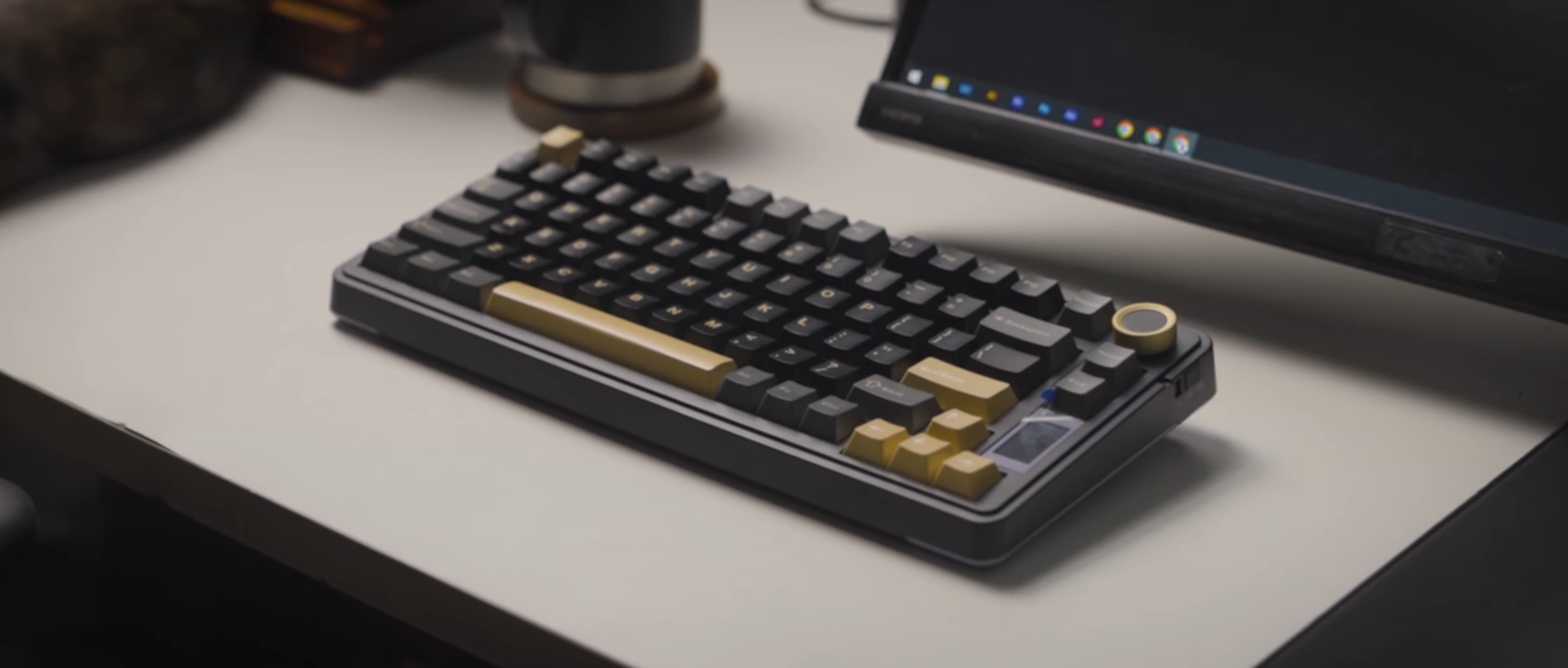
The physical appearance of the F75 Max showcases a sleek, highly modern chassis design that improves upon previous collaborative efforts. Comparing this new design to the F75 Max reveals a refined exterior housing that looks significantly sleeker and more contemporary. The dark gunmetal base coordinates beautifully with the black and gray keycaps, giving the keyboard a very mature look.

A standout design feature is the thin, incredibly vibrant RGB light bar integrated seamlessly into the side profiles of the case. Users can quickly cycle through different illumination effects and saturated colors by pressing the function key in combination with the Z key. The glow of this side lighting is remarkably bright, providing a clean neon accent that instantly elevates any desktop setup.
The manufacturer opted to launch this keyboard in a single black colorway with distinct pale yellow accents on the keycaps and knob. This specific aesthetic approach works beautifully for dark-themed workspace designs requiring a subtle pop of contrast. The physical integration of the pale yellow elements against the gunmetal base elevates the entire visual package beyond standard budget mechanical boards.

Exploded Layout and Physical Controls
The physical layout utilizes an exploded 75 percent form factor that remains a massive favorite for daily productivity and gaming rotations. On the top right corner sits a tactile volume knob that echoes the highly praised designs of the F75 series. This aluminum exterior knob features a plastic core, delivering satisfying tactile clicks when rotated and a loud, tactile click when pressed.

Positioned directly next to the knob is a functional TFT screen that offers immediate visual feedback during operation. This miniature display screen keeps you updated on critical system metrics including the current time, date, and battery percentage. Users can instantly verify their operating system mode alongside active wireless connectivity status without opening software.
The physical power and connectivity toggle switch is located conveniently on the top surface right beside the volume knob. Having this critical hardware switch on the top bezel makes it incredibly easy to toggle between devices with your right hand. Multi-device professionals will find this layout choice highly efficient when managing several workstations at the same time.

Illumination Customization and Software
Saturated, bright RGB backlighting shines through the keyboard to create a spectacular light show on your desktop surface. Both the side light bars and the main keys feature customizable underglow that can be configured directly from the board. Physical key combinations allow for quick hardware-level lighting adjustments without needing to open external programs.

Advanced customization is fully supported through official companion software developed for this specific collaborative model. This dedicated software utility is easily accessible for download directly from the official Epomaker website. The program enables deep customization of lighting profiles, custom key remapping, and macro assignments to suit specific workflows.
Users can easily adjust the vibrant colors to match their desk theme using these built-in hardware shortcuts. The backlighting remains vibrant even in well-lit studio rooms, highlighting the contrast of the keycap legends. This rich illumination system elevates the physical aesthetic of the desktop workspace without looking cheap.

Chassis Construction and Battery Life
Despite using a lightweight ABS plastic-based housing, the structural integrity of this keyboard remains absolutely superb. Holding the heavy device reveals a robust, premium chassis that does not suffer from flexing or cheap creaking. The solid construction choices ensure a sturdy typing platform that mimics much more expensive aluminum custom keyboards.

Flipping the keyboard over reveals a massive metal emblem centered beautifully on the bottom of the plastic casing. This metal plate proudly displays the product branding and technical specifications, adding a premium weight to the underside. Four silicone feet are placed on the outer corners to guarantee the keyboard remains securely anchored to your desk.
Typing comfort is further enhanced by a set of two-level flip stands that let you customize your incline angle. A magnetic dongle storage compartment is built directly into the rear frame near the USB-C port for safe keeping. This wired port allows for seamless charging of the massive 5,000 mAh internal battery while you continue working.

Double Shot Keycaps and Switch Specifications
The keycaps are made of high-grade double shot PBT plastic utilizing the highly comfortable Cherry profile. This material feels exceptionally nice to the touch, offering a subtle matte texture with a reliable amount of physical grip. The high-contrast legends combine yellow, white, black, and gray colorways across different keys to create a striking workspace appearance.

Buyers can choose from three distinct switch options manufactured by Leobog to customize their typing experience. These options include the well-regarded Reaper linear switches, the Silent Cotton Candy switches, and the Ice Vein switches. I can personally vouch for the Reaper switches because I have previously tested them on the F75, where they sounded incredibly nice.
My specific review unit came equipped with the Ice Vein prelubed linear five-pin switches. Looking at the specifications reveals a 51-gram bottom-out force with a quick 1.5 millimeters of pre-travel. These switches utilize a POM top housing, a POM stem, and a nylon bottom housing for optimal acoustic characteristics.

Gasket Mount and Acoustic Performance
The flexible polycarbonate plate uses a gasket-mounted design to provide a highly comfortable typing experience. This mounting style delivers deeper typing clacks and a soft, cushioned bottom-out with every single keypress. The chassis is packed with premium dampening materials to eliminate unwanted hollow sounds or metallic pinging.
Out-of-the-box acoustic performance is exceptionally clean due to finely lubed and tuned plate-mounted stabilizers. Users will notice an absolute absence of ticking or rattling on the larger modifier keys right from the start. This professional level of factory tuning completely removes the immediate need for tedious aftermarket modding.
To be brutally honest, I would have preferred this keyboard with the Leobog Reaper switches instead of the Ice Veins. While the Ice Veins sound completely fine, I noticed some prominent stem wobble that slightly detracts from the typing feel. The Reaper switches feel lighter to actuate and offer a much smoother keystroke in my experience.

Final Thoughts — Price & Value
The Epomaker x Aula F75 Max stands out as an exceptional value proposition at its eighty-dollar price point. You receive a fully-featured keyboard that delivers stable wireless connectivity, a functional TFT display, and superb internal acoustic dampening out of the box. The integration of high-quality double shot PBT keycaps and hot-swappable Leobog switches makes it a formidable competitor in the budget mechanical space.
Investing in this model provides a highly satisfying typing experience that rivals far more expensive custom builds. The seamless wireless switching combined with the vibrant side-light aesthetics ensures this keyboard fits perfectly into both gaming and professional environments. Anyone seeking a sleek, dark-toned mechanical keyboard with punchy color accents will find this collaborative effort to be a highly rewarding purchase.
💡 Recommended Alternatives: Compare this Max edition against the original Epomaker x Aula F75 Review, the full aluminum Epomaker Luma 84 Review, and the retro-screen Epomaker RT75 Review.
